Next.js starter
Every package in one Next.js app to start from, fetched without the monorepo - a useChat page talking to Claude Code, Codex or Pi in a sandbox, with sessions, approvals, the network, a repository and a marketplace of plugins.
Every package of AI SDK Harness in one Next.js app, to start from: a chat with coding agents in a sandbox, several conversations at once that outlive the server, an approval policy, a closed network, a repository and its changes as a patch, and a marketplace of plugins. Fetch it on its own, it installs from npm:
npx giget@latest gh:fpasquet/ai-sdk-harness/examples/starter-next my-app
cd my-app && npm install
cp .env.example .env.local   # set CLAUDE_CODE_OAUTH_TOKEN, or the credential of another agent
npm run dev                  # http://localhost:3000
Keep what you need: each sandbox is a branch of lib/sandbox.ts, each coding agent an entry of lib/harnesses.ts, and the marketplace the JSON files of marketplace/.
A chat with the coding agents of the AI SDK harnesses: Claude Code and Codex, which run in the sandbox behind a bridge, and Pi, which runs in the Next.js server with its tools in the sandbox. They run in a local Docker Sandbox through ai-sdk-sandbox-sbx, in a local microsandbox through ai-sdk-sandbox-microsandbox, in a Cloud Run sandbox through ai-sdk-sandbox-cloud-run, in a Compute Engine virtual machine through ai-sdk-sandbox-gce, or on your machine behind Anthropic Sandbox Runtime through ai-sdk-sandbox-runtime. The app is a Next.js page using useChat, and one route handler streaming a HarnessAgent turn back to it. Each conversation is a session of ai-sdk-harness-sessions: several run at once in the one sandbox, each is suspended when idle and resumed on its next message, and they outlive the dev server.
The interface is built with Tailwind CSS, shadcn/ui and AI Elements, the shadcn registry of AI components: the conversation, the prompt input, the agent's reasoning, and every tool it ran in the sandbox with its input and output. Answers are rendered as Markdown while they stream in, by Streamdown.
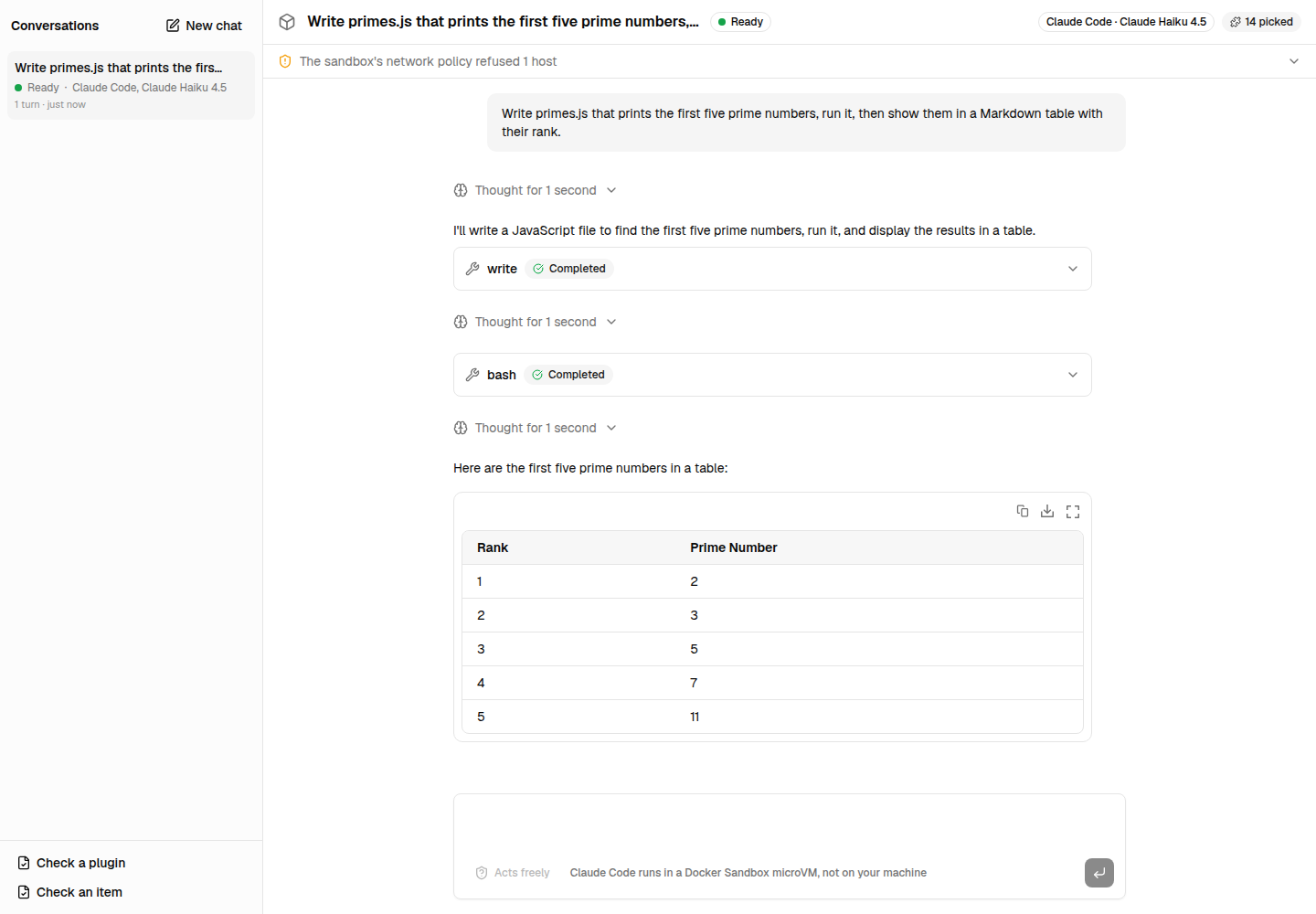
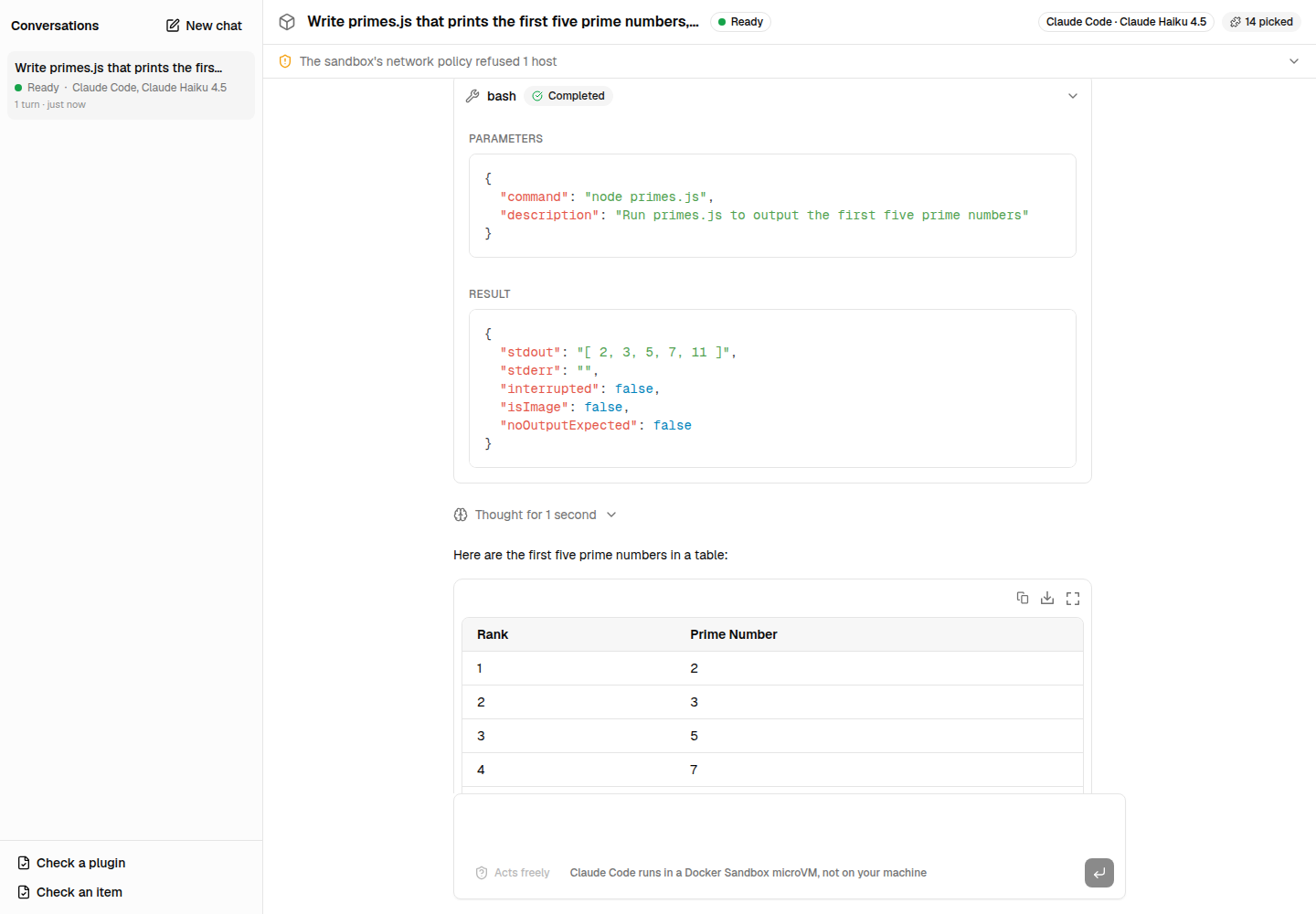
Open a tool call to see what the agent ran in the microVM, and what came back:
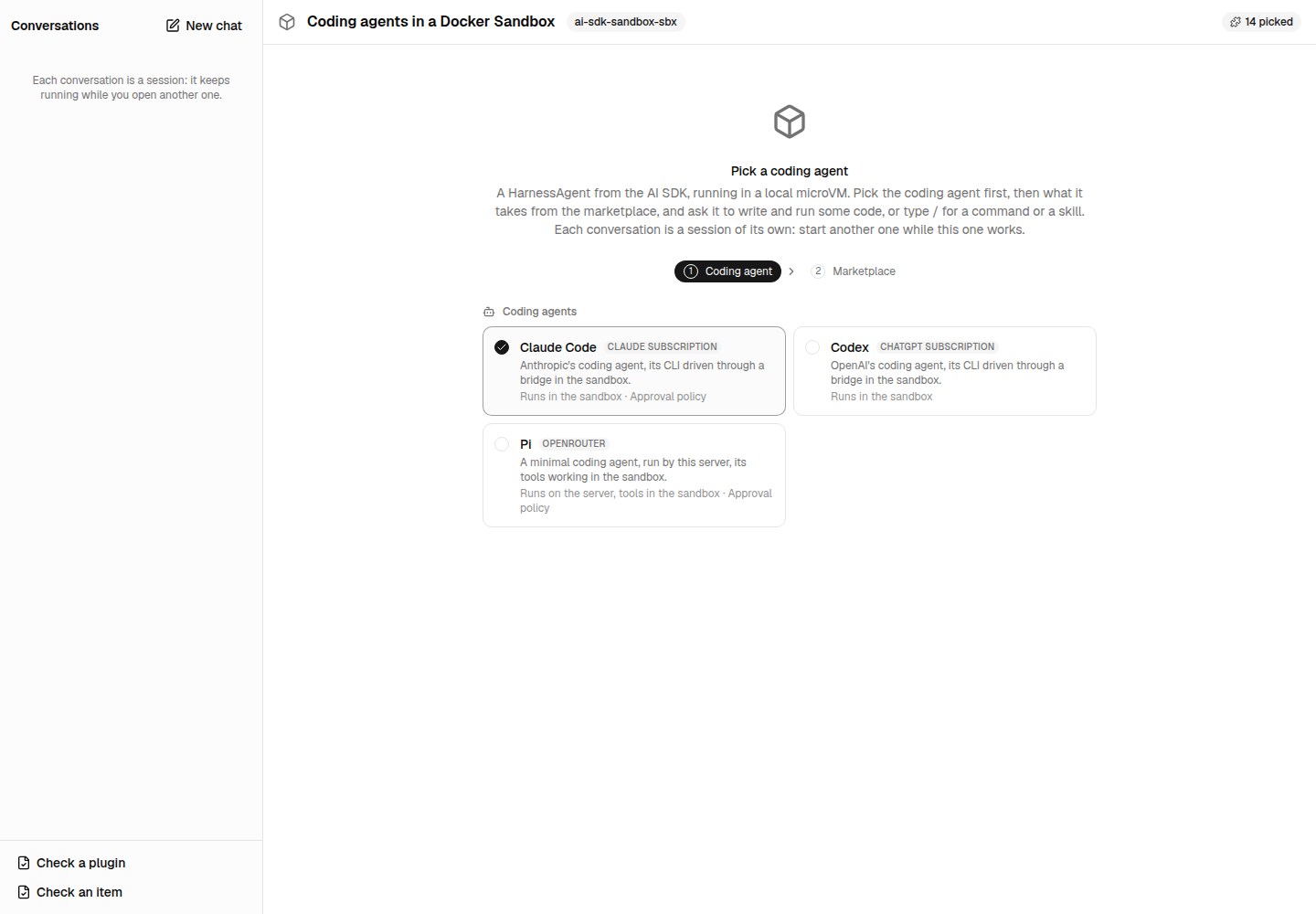
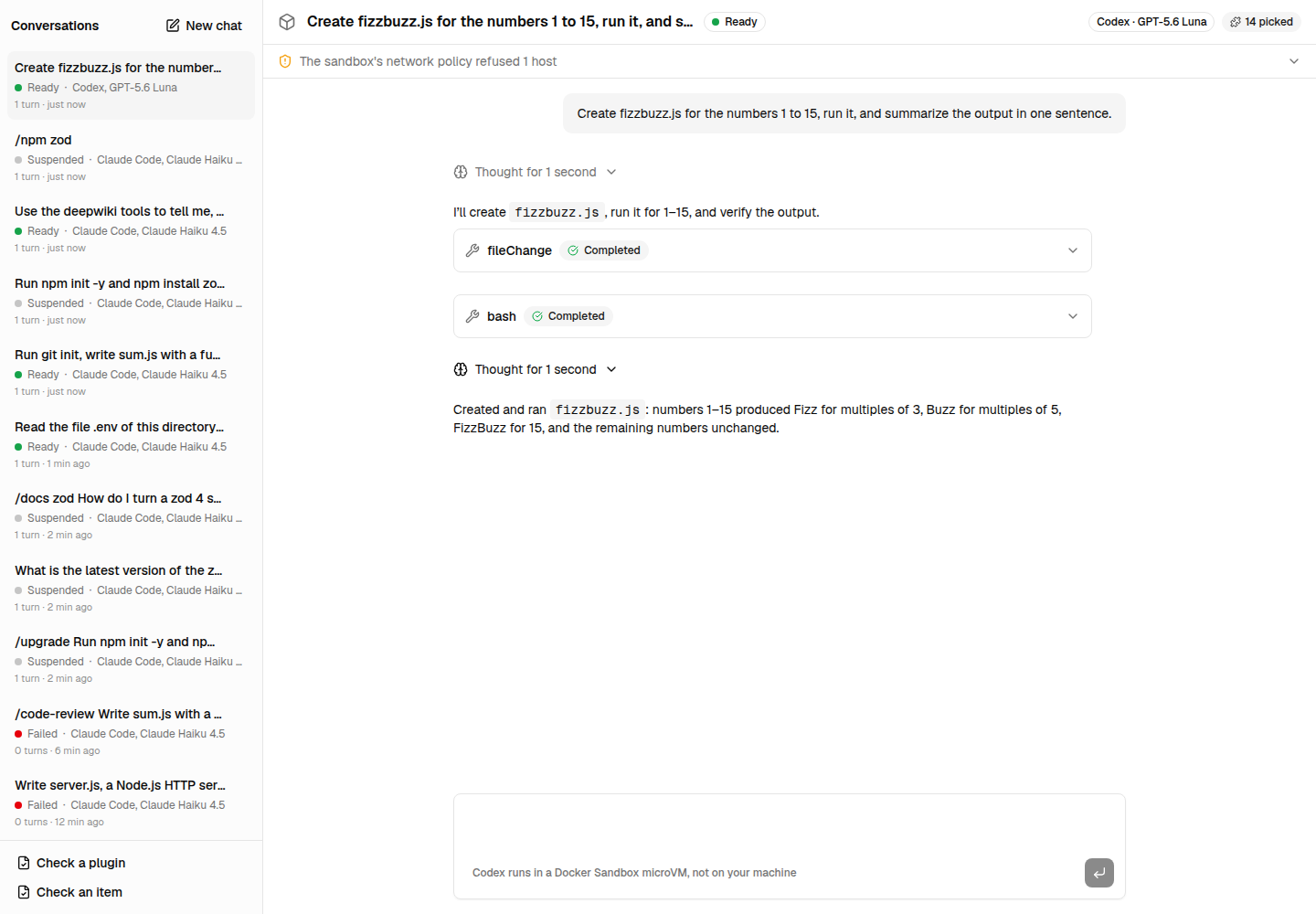
A new conversation is set up in two steps before its first message. First its coding agent, picked in a gallery where each harness has a card: those whose credential the server does not have are greyed out, with the variables to set. Then, with the agent and its model shown on top, what it takes from the marketplace, and the prompt:
| Coding agent | Runs on | Suggested models | Where it runs |
|---|---|---|---|
| Claude Code | a Claude subscription | Claude Haiku 4.5, Sonnet 5.5, Opus 5.5 | its CLI, behind a bridge in the sandbox |
| Codex | a ChatGPT subscription | GPT-5.6 Luna, GPT-5.6 Terra, GPT-6 Luna | its CLI, behind a bridge in the sandbox |
| Pi | OpenRouter | DeepSeek V4 Flash, Kimi K3, GLM 5.3 | the Next.js server, its tools in the sandbox |
The other official adapters, OpenCode, Deep Agents, Grok Build, fx, GitHub Copilot or Cursor, plug in the same way: an entry in lib/harnesses.ts and its factory in lib/harness-adapters.ts.
The model picker of the second step lists the suggested models first. For Pi, which goes through OpenRouter, it also offers, searchable, every model of OpenRouter's catalog that can call tools, read by the server once an hour (lib/models.ts): Pi runs those of its own catalog, generated from OpenRouter's.
They all share the one sandbox, and the conversations of different agents run side by side. What sets them apart shows on their cards: the approval policy is offered to the agents that can ask before their own commands and edits (Claude Code, Pi).
Run it
You need Node.js 24 or later and Docker Sandboxes (sbx) signed in. Fetched on its own, as above, it runs with npm run dev. In a clone of the monorepo, it runs against the packages of your branch rather than npm's:
pnpm install
cp examples/starter-next/.env.example examples/starter-next/.env.local   # then set the credentials
pnpm example:dev                                                         # http://localhost:3000
Every credential is an environment variable, read by the server (lib/harness-adapters.ts); none is typed in the page:
- Claude Code takes
CLAUDE_CODE_OAUTH_TOKEN, the long-lived tokenclaude setup-tokenprints for a Claude subscription, orANTHROPIC_API_KEY; without them, the login of theclaudeCLI on your machine. - Codex takes the login of the
codexCLI on your machine, a ChatGPT subscription (codex login, in~/.codexorCODEX_HOME); orOPENAI_API_KEY. With a ChatGPT login, Codex asks for aChatGPT-Account-IDheader a local sandbox proxy cannot add: it is left out with a warning, and Codex works without it. - Pi takes
OPENROUTER_API_KEY: its models are OpenRouter's, through Pi's own OpenRouter provider, never through AI Gateway. Pi runs in the Next.js server: the key never reaches the sandbox.
The very first message takes a few minutes: the sandbox is created, Claude Code and Codex are installed in it, then it is saved as a template image. Every later start reuses both and answers in seconds. Pi runs in the Next.js server, and uses the sandbox for its files and commands only.
Run it in a microsandbox
The same chat runs its agents in microsandbox microVMs instead, booted from the node:24 image on your machine, with no daemon and no account. It needs KVM on Linux (read-write access to /dev/kvm) or a Mac on Apple Silicon. In .env.local:
EXAMPLE_SANDBOX=microsandboxEach conversation gets a microVM of its own, ai-sdk-harness-example-<conversation id>, rather than a view of a shared one: a new credential restarts a microsandbox, which would end the turns of the other conversations. The first message installs Docker, Claude Code and Codex in a throwaway microVM and saves its disk as a template; every later microVM is restored from it in about a second. Four conversations may be live at once. The agents can use docker and docker compose; EXAMPLE_MICROSANDBOX_DOCKER=false leaves Docker out, and the microVMs then run under microsandbox's restricted profile.
Run it on Cloud Run
The same chat runs its agents in a Cloud Run sandbox instead, once the sandbox service of ai-sdk-sandbox-cloud-run is deployed in your Google Cloud project and your gcloud account is granted roles/run.invoker on it. Docker Sandboxes are then not needed. Read the service's URL from Cloud Run:
gcloud run services describe <service> --region=<region> --format='value(status.url)'Then, in .env.local:
EXAMPLE_SANDBOX=cloud-run
CLOUD_RUN_SANDBOX_URL=<the URL printed above>
CLOUD_RUN_SANDBOX_SERVICE_TOKEN=<the service's token: gcloud secrets versions access latest --secret=<service>-token>
# CLOUD_RUN_SANDBOX_AUTH=gcloud   # or `metadata` on Google Cloud, `none` for a service run locally
The header says which sandbox the agents run in. The first message saves a template with Claude Code and Codex to the service's bucket, a few minutes; every later start reuses it. The sandbox reaches the model APIs, the npm registry and the host of a repository, nothing else.
After 5 minutes without a message (EXAMPLE_SUSPEND_AFTER_MS), the example suspends a conversation: its harness session is stopped with its state. Once no conversation holds the sandbox, the sandbox is saved to a snapshot: nothing runs, and only the snapshot's storage is billed. The next message brings the sandbox back, and the agent picks the conversation up where it was:
To delete the sandbox:
curl -X DELETE -H "Authorization: Bearer $(gcloud auth print-identity-token)" \
  -H "x-ai-sdk-sandbox-token: $CLOUD_RUN_SANDBOX_SERVICE_TOKEN" \
  "$CLOUD_RUN_SANDBOX_URL/v1/sandboxes/ai-sdk-harness-example"
Run it on Compute Engine
The chat runs its agents in a Compute Engine virtual machine of their own, Docker and Docker Compose included, once the sandbox service of ai-sdk-sandbox-gce is deployed in your Google Cloud project and your gcloud account is granted roles/run.invoker on it. In .env.local:
EXAMPLE_SANDBOX=gce
GCE_SANDBOX_URL=<the URL of the service>
# GCE_SANDBOX_AUTH=gcloud   # or `metadata` on Google Cloud, `none` for a service run locally
GCE_SANDBOX_SERVICE_TOKEN=<the service's token: gcloud secrets versions access latest --secret=sandbox-service-token>
Make the template with Claude Code and Codex once, when you deploy, rather than in the first conversation: some 5 minutes, during which Compute Engine saves it as an image. Run it again after a deploy that changes the harnesses or the sandbox image:
npm run templateEvery machine then boots from it in some 40 s; without it, the first message makes it. As on Cloud Run, a conversation is suspended after 5 minutes without a message (EXAMPLE_SUSPEND_AFTER_MS), and the machine is stopped once no conversation holds it: only its disk is billed. The next message starts it again, in some 30 s, on the same disk. A conversation kept live costs some 10 cents an hour: under 2 for an e2-medium Spot machine, and some 8 for the service's Cloud Run instance, which its bridge keeps busy, past Cloud Run's free 50 hours a month. A longer delay keeps the machine warm longer, for those cents.
A turn goes on when the page is closed: start one in the evening, read its answer in the morning. It stops after an hour at the latest (EXAMPLE_TURN_TIMEOUT_MS), and the stop button interrupts it on the server. On the service, SANDBOX_MAX_RUN_HOURS has Compute Engine stop a machine after so long whatever happens, and SANDBOX_MAX_RUNNING caps the machines running at once. The machine reaches the model APIs, the npm registry, Docker Hub and the host of a repository through the service's egress proxy, nothing else.
To delete the machine:
curl -X DELETE -H "Authorization: Bearer $(gcloud auth print-identity-token)" \
  -H "x-ai-sdk-sandbox-token: $GCE_SANDBOX_SERVICE_TOKEN" \
  "$GCE_SANDBOX_URL/v1/sandboxes/ai-sdk-harness-example"
Run it behind srt
On Linux or macOS, the chat can run its agents on your machine itself, behind srt, with neither Docker Sandboxes nor a cloud account. On Linux, install what srt needs first (see the requirements):
sudo apt install bubblewrap socat ripgrepThen, in .env.local:
EXAMPLE_SANDBOX=srt
# SRT_ALLOW_ALL_UNIX_SOCKETS=1   # where Ubuntu refuses srt's seccomp filter: the error says so
The sandbox lives in ~/.ai-sdk-sandbox-runtime/ai-sdk-harness-example/: the agents write there and nowhere else, read the rest of the machine but your home, and reach the model APIs, the npm registry and the host of a repository only. The first message installs Claude Code and Codex in it, in about a minute; every later start reuses them.
Conversations
Every conversation is a session of ai-sdk-harness-sessions (lib/sessions.ts), listed on the left with its status as the server changes it.
Several at once
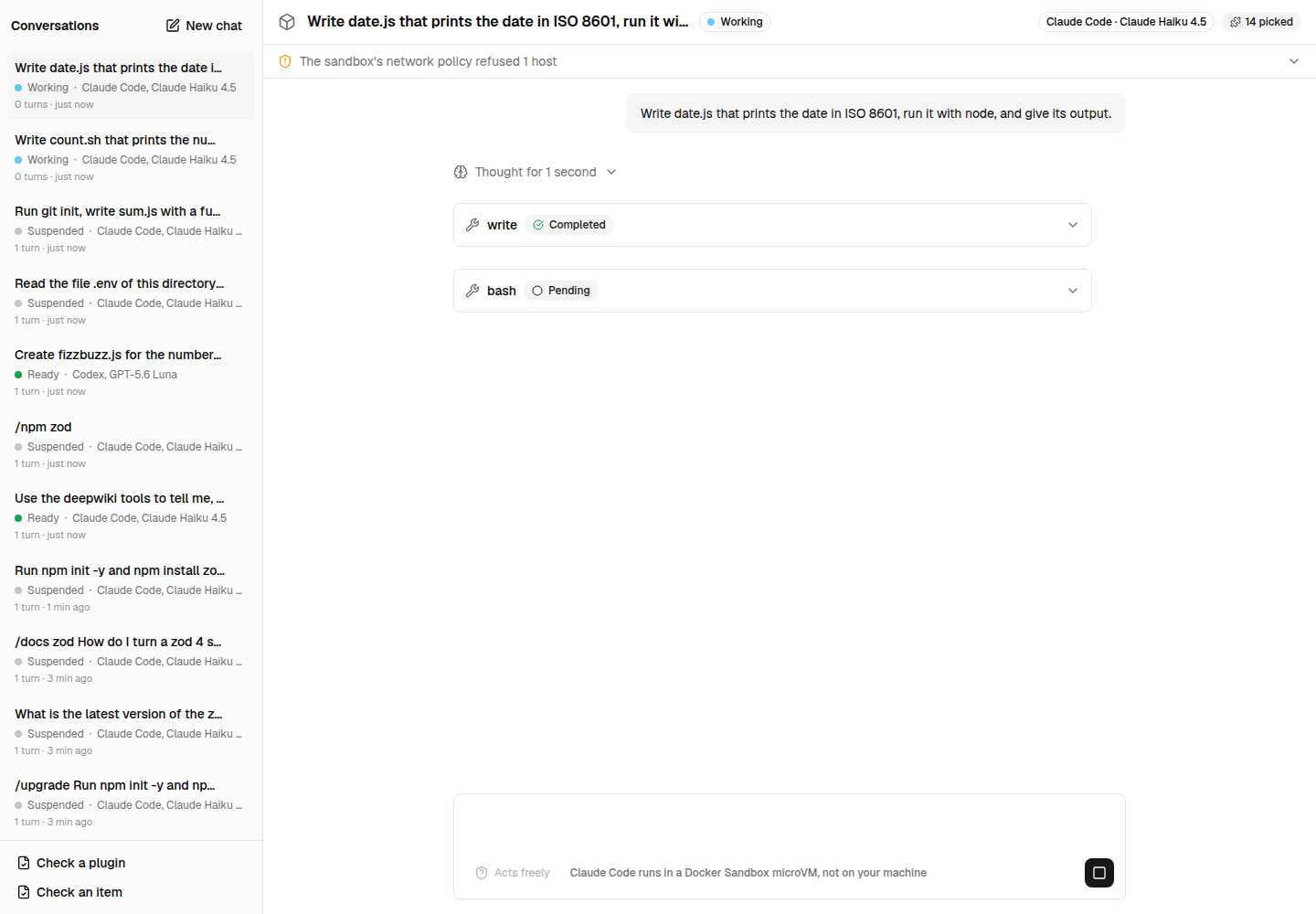
What it shows: two conversations work at the same time, each a Claude Code session of its own in the one sandbox. A conversation keeps streaming while another one is shown: every conversation opened in the tab stays mounted. The list says what each session is doing — preparing, working, ready, waiting for you, suspended —, how many turns it had, and when it last changed.
What the package does: sharedSandbox() gives each session a view of the sandbox (fork()), with a port of its own for its bridge: four sessions are live at once (SESSION_PORTS), and a fifth suspends the one idle the longest. subscribe() sends every change of every session; app/api/sessions/events/route.ts passes them on to the page as server-sent events.
An approval policy
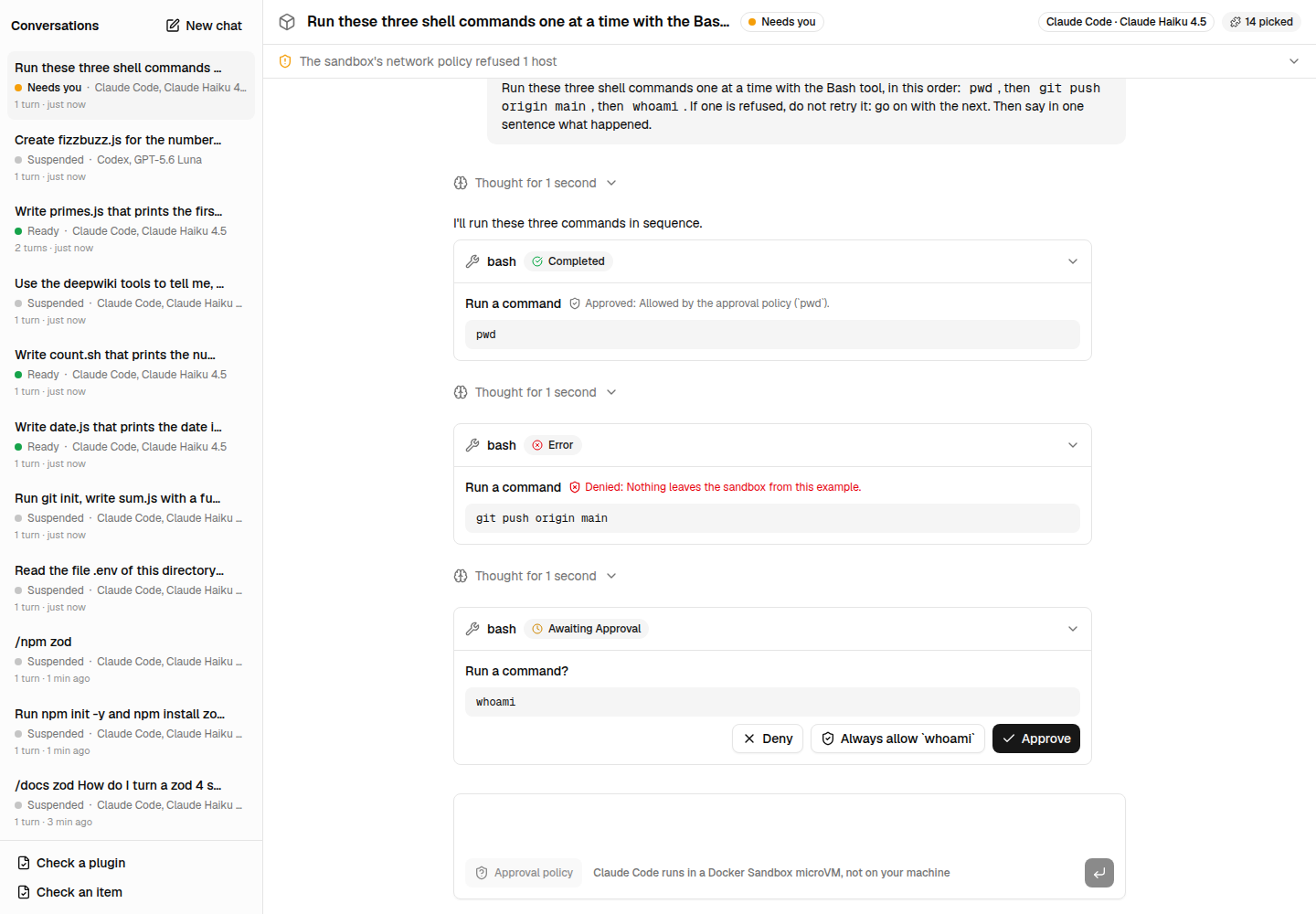
What it shows: with "Approval policy" picked before the first message, the conversation follows the policy of ai-sdk-harness-approval (lib/approval.ts). Asked for three commands, Claude Code ran pwd at once, allowed by the policy; git push was refused, and the agent told why; whoami waits for you, with "Always allow whoami" next to Approve and Deny. The conversation is marked "Needs you" meanwhile. Hover the toggle to read the policy.
What the packages do: APPROVAL_POLICY.agentSettings() runs the agent with permissionMode: 'allow-reads': Claude Code asks before each edit and command. The session manager's approve option, APPROVAL_POLICY.approver(), answers what the policy decides at once, within the turn and in the same stream, and leaves the rest to you: the session waits, awaiting-input. "Always allow" keeps a grant with the conversation (app/api/sessions/[id]/grants/route.ts, sessions.update()), which the policy reads at the next approval; approving sends the conversation back, and the route calls continue(), which reads the answer from it and resumes the turn, even after a suspension. components/harness/tool-approval.tsx shows each request and its verdict: it is the ToolApproval of the docs' registry.
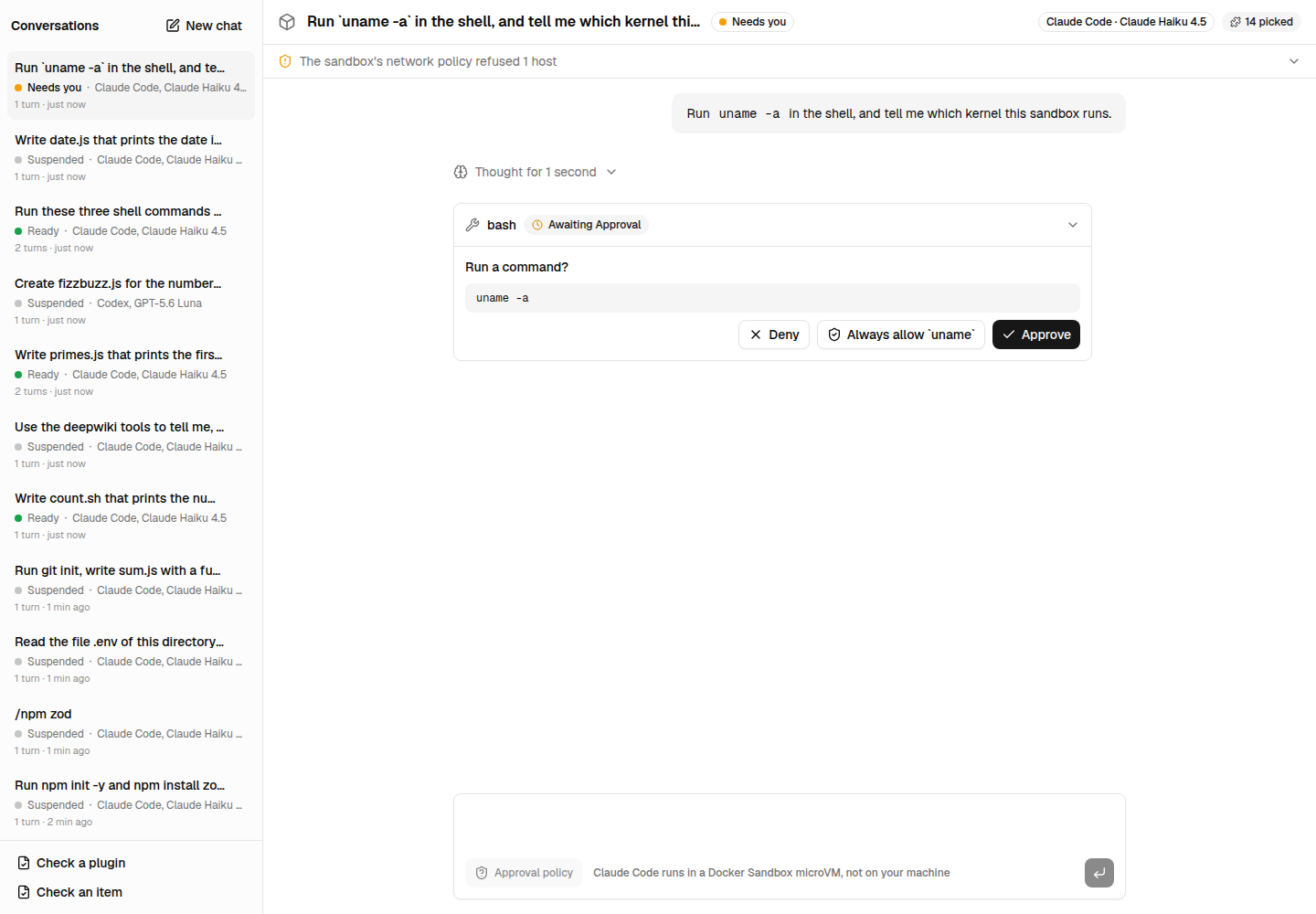
The policy is offered to the agents whose adapter can ask before their own commands and edits: Claude Code and Pi. The Codex harness adapter runs Codex with approvals turned off (vercel/ai#22550). And a Claude Code conversation that was suspended, or that outlived a restart of the server, does not take the answers to its approvals once resumed (vercel/ai#22549): the policy answers what it can, and an approval asked again is left to you.
The agent's questions
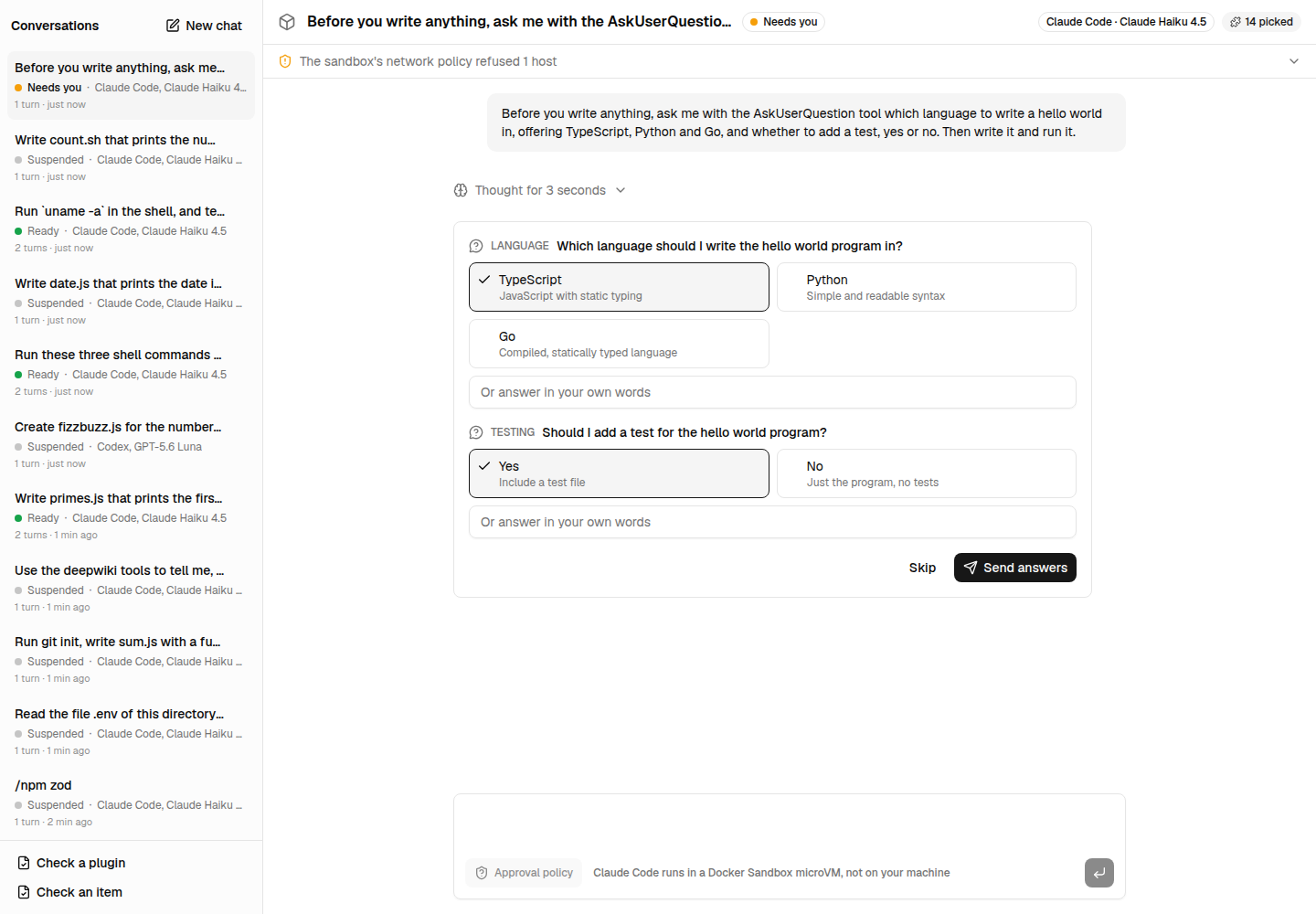
What it shows: Claude Code asks its questions with AskUserQuestion, whatever the toggle: the conversation needs you, and a form gives the answers. Once sent, the agent goes on with them.
What the packages do: the question reaches the page as a call of askUserQuestions, which the turn waits for. components/harness/questions-form.tsx, the registry's QuestionsForm, builds its output with answersOf(), and addToolOutput() sends the conversation back; continue() hands the output to the paused turn.
Suspended, then resumed
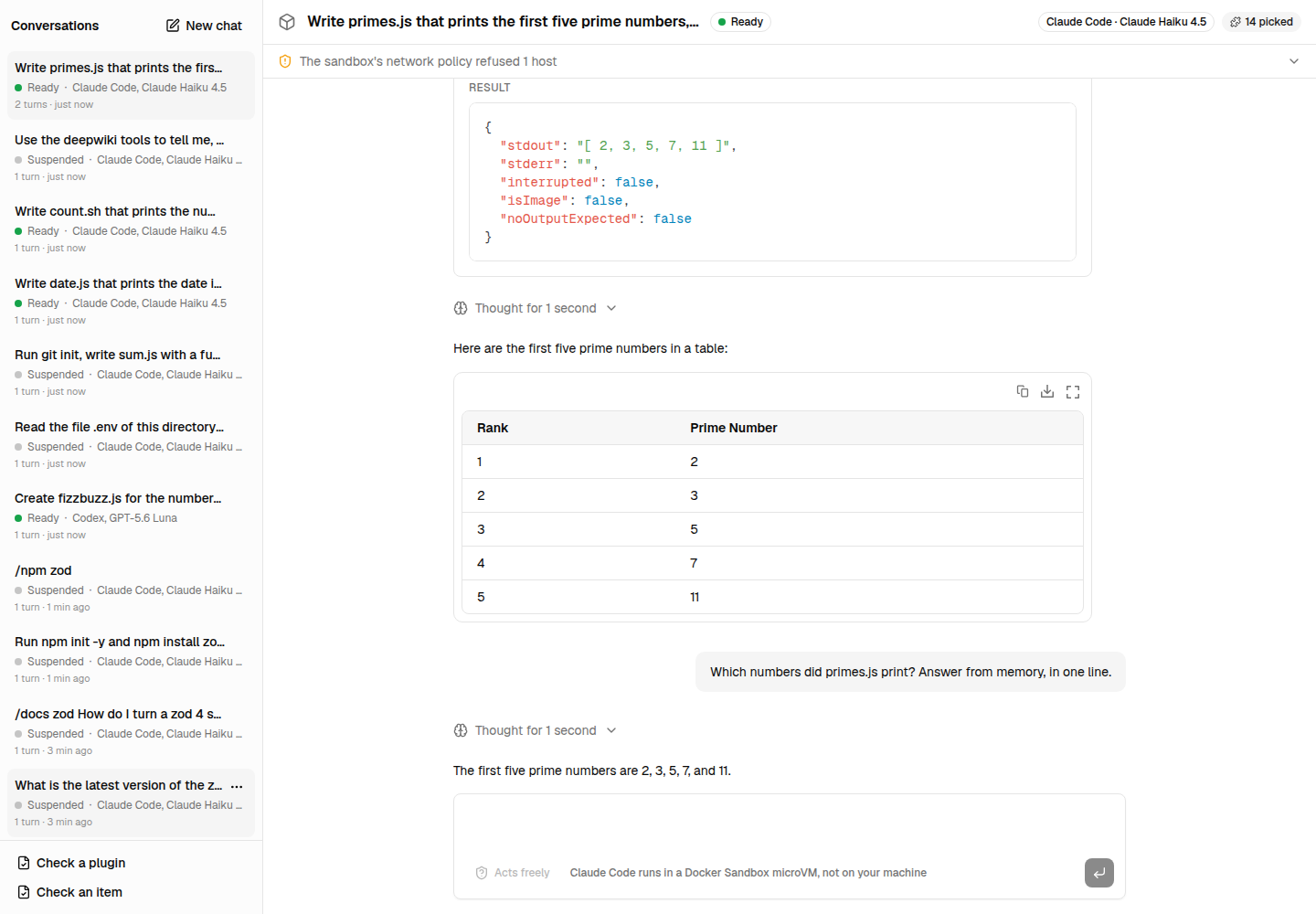
What it shows: the conversation was suspended ("Suspend now" in its menu, or 15 minutes without a message, 5 on Cloud Run and Compute Engine), its port handed back. Its next message resumed it, and Claude Code answered from the conversation it had before.
What the package does: suspend() stops the harness session, keeps its resume state in the store, and releases the sandbox view. The next send() takes a view again and resumes the harness session from that state. On Cloud Run, the sandbox itself is suspended once no conversation holds it (stopWhenUnused). The sessions are kept in .data/sessions, as JSON files (createFileSessionStore() of ai-sdk-harness-sessions/file): stopping the dev server suspends them (shutdown()), and they resume after it starts again.
A repository
With EXAMPLE_REPOSITORY, the conversations work on a repository through ai-sdk-harness-workspace (lib/workspace.ts): an https: URL, fetched in the sandbox, or the absolute path of a repository on this machine, sent to the sandbox as Git bundles. Set it before the first conversation: a conversation started without it has no checkout to resume.
EXAMPLE_REPOSITORY=/home/me/code/widgets npm run dev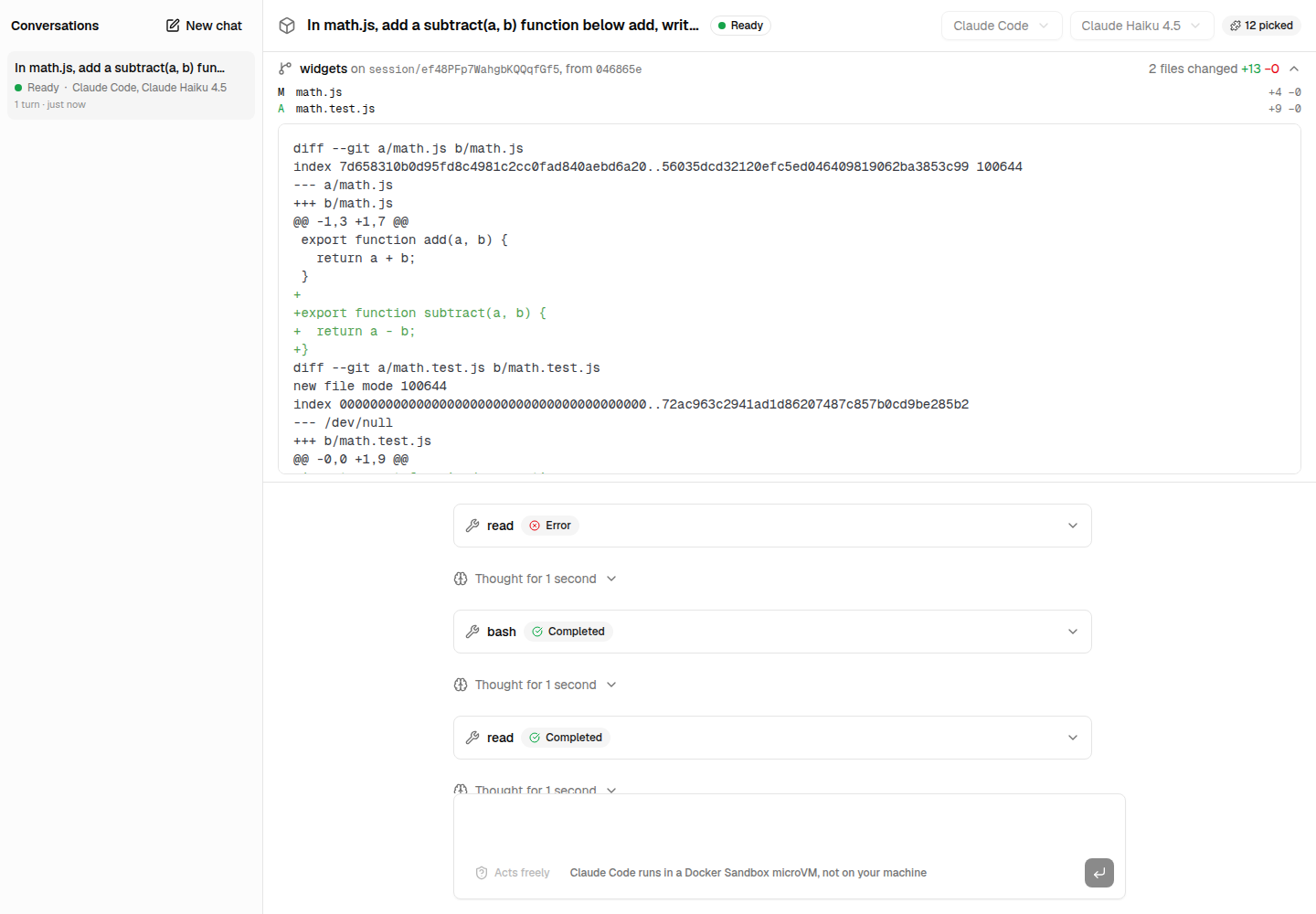
What it shows: the agent added a function and a test file in its checkout of widgets, on the branch session/<id>. The bar above the conversation lists what it changed since the checkout started, and opens on the patch.
What the package does: workspace.sandboxes() gives each conversation a checkout in its sandbox — a worktree of a copy of the repository the conversations of the sandbox share —, kept when the conversation is suspended and removed when it is deleted; withWorkspace() makes the checkout in the conversation's working directory before the agent starts, the plugins' files written after it and kept out of its changes. app/api/sessions/[id]/changes/ reads changedFiles() and changes() after each turn. EXAMPLE_REPOSITORY_REF picks a branch, EXAMPLE_REPOSITORY_TOKEN is the token of a private repository, brokered by the sandbox rather than handed to it, and EXAMPLE_REPOSITORY_SETUP a command run in each new checkout, pnpm install for instance. A Cloud Run or an srt sandbox reaches the hosts it lists and nothing else: lib/sandbox.ts lists workspace.hosts() with them, the host of an https: repository (github.com), so that its checkouts can be fetched; a repository on this machine needs none.
A marketplace
The agent runs with what the conversation picked before its first message, in a marketplace built with ai-sdk-harness-plugins (lib/plugins.ts). Plugins and items are configuration: written in code, read from a Claude Code plugin directory, or from JSON files under marketplace/:
| In the marketplace | Kept as | What it shows |
|---|---|---|
safety-guard | a plugin in code | A PreToolUse hook and the script it runs, shipped to the sandbox: a global npm install, or a command that would wipe the sandbox or force-push, is blocked |
code-tour | a plugin in code | Slash commands, /explain <path> and /tour, expanded on the server, and the skill they rely on |
sandbox-inspector | a plugin in code | A tool that runs on the server and reaches into the sandbox, inspectSandbox, and a test-writer subagent |
commit-helper | a Claude Code plugin, read as it is | A /commit-message command and a skill (plugins/commit-helper) |
library-docs | a whole plugin as data | The Context7 MCP server, connected by the server, and a /docs command that requires it (marketplace/plugins/library-docs.json) |
upgrades | a plugin as data, that requires | An /upgrade skill, and the tool:npm-latest it requires, delivered as the item it is rather than copied; the npm registry its skill installs from, in network.hosts (marketplace/plugins/upgrades.json) |
tool:npm-latest | an item on its own, as data | An http tool: a request the server makes to the npm registry, with no code (marketplace/items/npm-latest.json) |
tool:http-check | an item on its own, as data | A sandbox-command tool: a curl run in the sandbox, its input as INPUT_PORT and INPUT_PATH (marketplace/items/http-check.json) |
command:npm | an item on its own, as data | /npm <package>, which requires tool:npm-latest |
skill:code-review | an item on its own, as data | A skill on how to review a change |
subagent:reviewer | an item on its own, as data | A subagent that reviews the working directory, which requires skill:code-review |
rule:dependency-versions | an item on its own, as data | A rule for **/package.json only: whenever the agent reads one, it checks that the dependencies are pinned |
hook:protect-env | an item on its own, as data | A PreToolUse hook and its script: the agent may not read .env files |
mcp-server:deepwiki | an item on its own, as data | The DeepWiki MCP server, connected by the server, two of its tools kept |
The cards say what each runtime loses, and the server's log warns. It warns too of what lintPlugin() and lintItem() find as the marketplace is read — a property of a tool's input its command never reads, an argument a command's hint does not announce —: edit a JSON file of marketplace/ and restart to see it. library-docs and deepwiki need the server to reach Context7 and DeepWiki: unpick them otherwise.
Picking from the marketplace
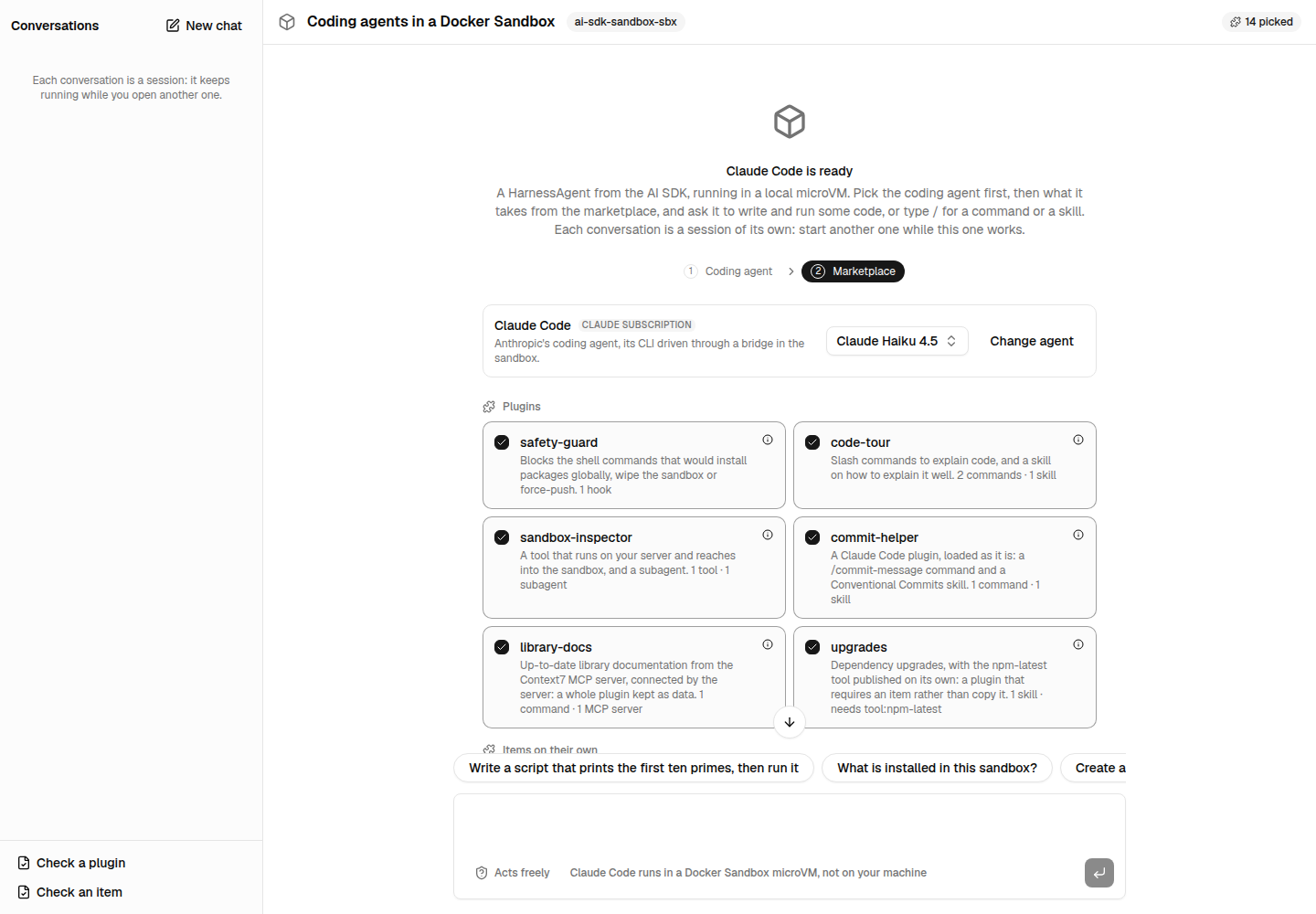
What it shows: what the marketplace offers, as catalog.describe() gives it to the page: the plugins, with what they bring and what they need besides it ("needs tool:npm-latest"), and the items on their own, with their kind and what they need ("Needs tool:npm-latest"). Nothing of their code, prompts or secrets. A card is on for what the pick comes to, and locked while something requires it, with what does: tool:npm-latest reads "Required by upgrades, /npm" until both are unpicked. The conversation picks before its first message, and keeps its pick.
What the package does: the cards read explain() and deselect() of ai-sdk-harness-plugins/selection, the catalog's rules from its description alone, in the browser: no request at each click, and no rule of the page's own. The page sends the ids picked (plugin:safety-guard, command:npm…). The route resolves them with catalog.resolve(): a plugin brings its items and what it requires, an item what it requires, a stored tool or MCP server is built or connected. It builds the agent with withPlugins() once per coding agent, model and catalog.fingerprint() of the pick, so editing a plugin or an item builds a new one.
What a plugin holds
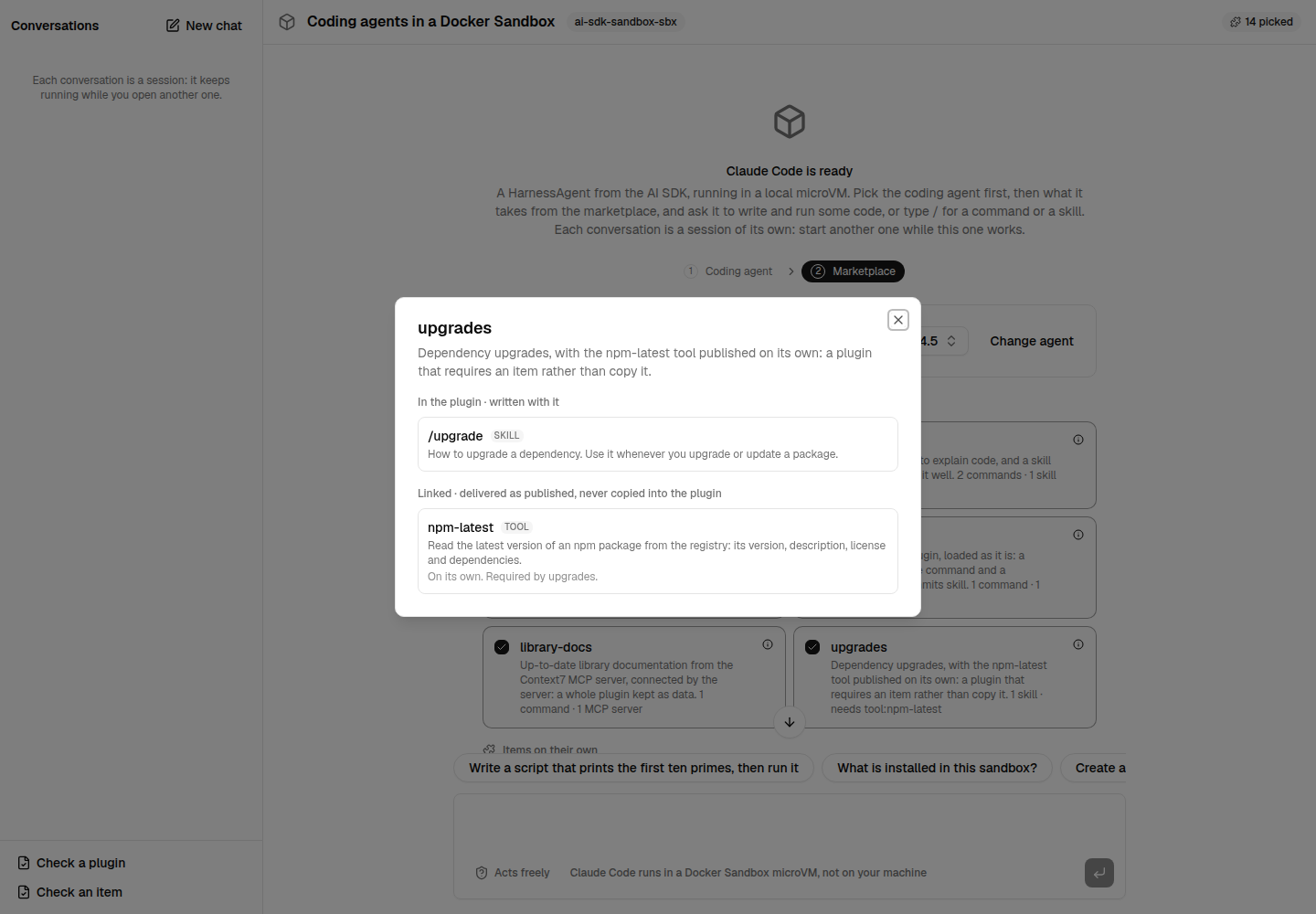
What it shows: the ⓘ of a plugin's card opens what picking it brings: the items written with it, then the items it is linked to — what it requires, and what that requires in turn —, each with where it comes from (on its own, or from another plugin) and what brings it. upgrades holds an /upgrade skill and is linked to tool:npm-latest, published on its own.
What the package does: the dialog reads the marketplace's description alone: a plugin's own items are the items whose plugin is its name, and explain() of ai-sdk-harness-plugins/selection gives what picking the plugin comes to, and what brings each, as catalog.explain() does on the server; a linked item is delivered as the item it is, never copied into the plugin.
Commands and skills after /
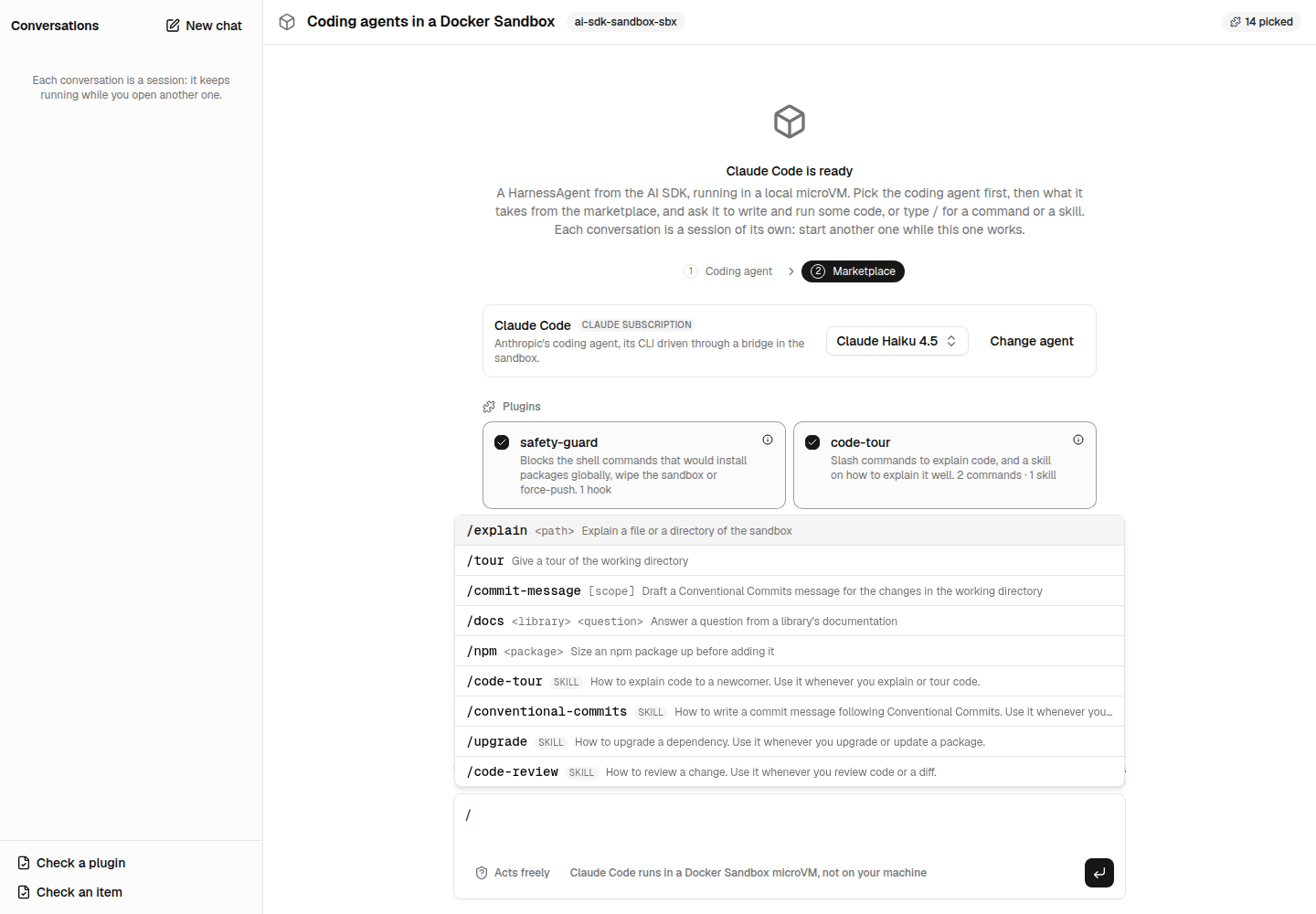
What it shows: typing / at the start of a message lists the commands and the skills the conversation picked, those of the Claude Code plugin commit-helper, of the stored plugins library-docs and upgrades and of the stored items (/npm, /code-review) included. A skill is marked as such.
What the package does: the list comes from the marketplace's description, with the names expandCommand() understands. When the message reaches the route, expandCommand() replaces a command with its prompt (/explain src becomes "Explain src to a developer who has never seen it…"), and a skill with a request to use it; the conversation keeps the message as typed.
Checking a plugin, or an item
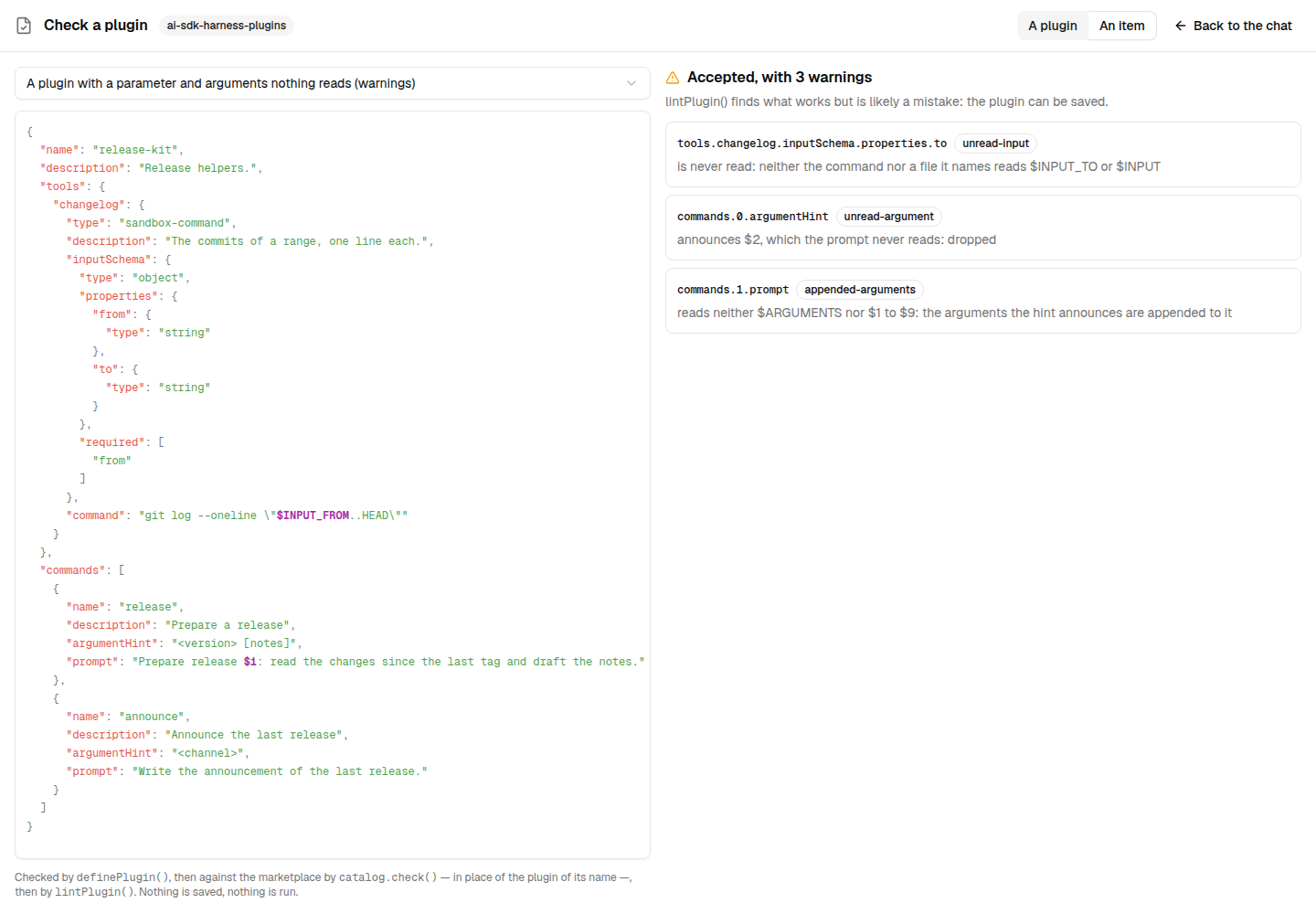
What it shows: /plugin-check and /item-check, linked under the conversations, are what a back office that edits the marketplace would show next to its form. Pick a plugin — or an item — of the marketplace, or one written with mistakes, and edit its JSON, coloured as you type, the variables and arguments a command or a prompt reads standing out: it is checked as you type, each finding at its field. What is accepted can still be likely a mistake: a property of the input the command never reads, an argument the hint announces that the prompt never reads, a prompt that reads none of the arguments its hint announces, or more than it announces. It can be saved; the warnings say where to look.
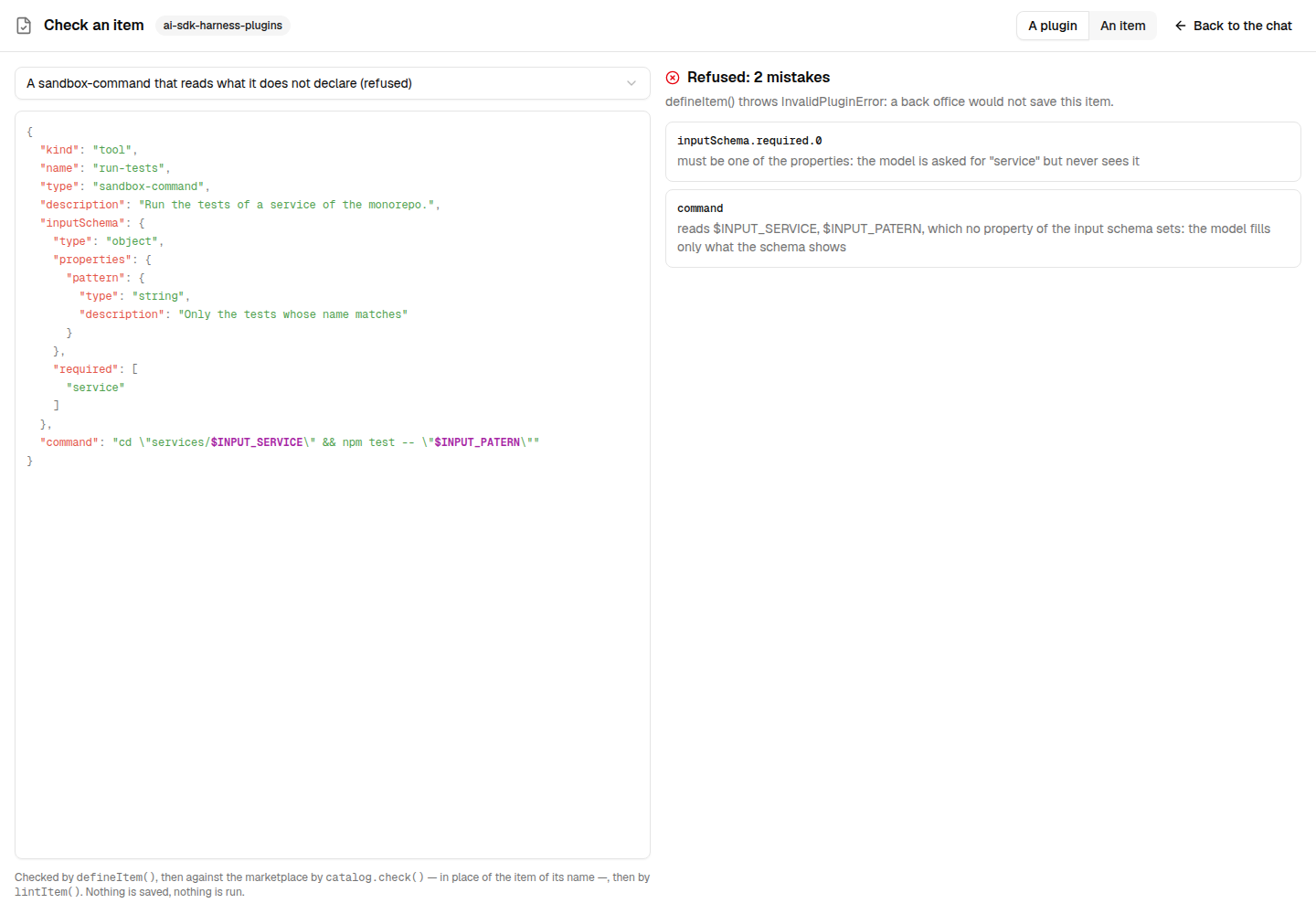
A sandbox-command that reads $INPUT_SERVICE without a service property, or an input schema that requires a property it does not declare, is refused. So is a plugin or an item whose requires names what the marketplace does not have — tool:npm-audit, mcp-server:snyk —, each at its requires: saved, it would stop the marketplace from being read at all.
What the package does: app/api/check/ checks the JSON on the server (lib/plugin-check.ts): definePlugin() on the plugin page, defineItem() on the item page, whose InvalidPluginError lists the mistakes by field; then catalog.check(), with the plugin or the item in place of the one of its name in the marketplace, for what it requires that the marketplace does not have; then, for what they accept, lintPlugin() or lintItem(), whose warnings carry a field, a code and a message. Nothing is saved, nothing is run.
The network of the sandbox
A Docker Sandbox, a Cloud Run sandbox and an srt sandbox let only the hosts they list through. The example builds the list with ai-sdk-harness-network: the trusted hosts of the forges, package registries, toolchains, container registries and Linux archives, where the agents clone and install, the hosts each coding agent installs from and calls (harnessHosts(), OpenRouter's in place of their own provider for those that go through it), the repository's host (workspace.hosts()), and the hosts the marketplace reaches from the sandbox, which catalog.hosts() reads from the definitions, without resolving anything, before the sandbox is opened (exampleHosts() and openSandbox() in lib/sandbox.ts, marketplaceSandboxHosts() in lib/plugins.ts).
const { sandbox } = catalog.hosts(catalog.entries().map(({ id }) => id)); // ['registry.npmjs.org']
await createSbxNetworkSandboxSession({
  networkPolicy: networkPolicy(
    trustedHosts(),
    harnessHosts('claude-code'),
    harnessHosts('codex'),
    await workspace.hosts(),
    sandbox,
  ),
});
The conversations share the sandbox whatever each one picks, so it lets through the hosts of the whole marketplace; a sandbox per conversation would take catalog.hosts(selection).sandbox of its own pick. The upgrades plugin declares the npm registry in network.hosts, since its skill installs packages; catalog.hosts() reads the npm registry of tool:npm-latest too, in server: the server makes that request, not the sandbox. The Docker Sandbox found again on a start gets the policy again (setNetworkPolicy()), so an edit of the marketplace reaches it. A microsandbox keeps the network policy its package gives it.
Try it
Each plugin and item of the marketplace, a prompt that puts it to work, and what to expect. The package's documentation shows the JSON of each, and a screenshot of that turn.
| Picked | Type | What happens | |
|---|---|---|---|
plugin:library-docs | /docs zod How do I turn a zod 4 schema into a JSON Schema? | The agent calls the Context7 tools the server connects to | JSON and screenshot |
plugin:upgrades | /upgrade Run npm init -y and npm install [email protected], then upgrade zod. | The plugin brings the tool it requires, which the skill calls | JSON and screenshot |
tool:npm-latest | What is the latest version of zod? Use the npm-latest tool. | The server requests the npm registry for the agent | JSON and screenshot |
tool:http-check | Start a server on port 8080, then check it with the http-check tool. | The command runs in the sandbox, the input as environment variables | JSON and screenshot |
skill:code-review | /code-review Write sum.js with an off-by-one bug, then review it. | The agent loads the skill and reviews as it says | JSON and screenshot |
rule:dependency-versions | Run npm init -y and npm install zod, then read package.json. | Reading package.json loads the rule: the answer ends with a dependency check | JSON and screenshot |
command:npm | /npm zod | The command brings the tool it requires | JSON and screenshot |
hook:protect-env | Read the file .env of this directory. | The hook blocks the read | JSON and screenshot |
subagent:reviewer | Write sum.js with a bug, then have the reviewer subagent review it. | Claude Code delegates the review | JSON and screenshot |
mcp-server:deepwiki | Use the deepwiki tools: what is the vercel/ai repository? | The agent asks DeepWiki, with the tools the server connects to | JSON and screenshot |
How it works
| File | What it does |
|---|---|
lib/sessions.ts | The conversations, sessions of ai-sdk-harness-sessions: one HarnessAgent per harness, model, approval policy and plugins (withPlugins), one shared sandbox, a store of JSON files, suspension when idle |
lib/workspace.ts, app/api/sessions/[id]/changes/, components/changes-panel.tsx | With EXAMPLE_REPOSITORY, the workspace of ai-sdk-harness-workspace: a checkout for each conversation, and what its agent changed |
app/api/sandbox/blocked/, components/blocked-hosts-panel.tsx | With a Docker Sandbox, the hosts its network policy refused since the example opened it (blockedRequests() of ai-sdk-sandbox-sbx), above the conversation, and the sbx policy allow command that allows one for this sandbox |
lib/approval.ts, app/api/sessions/[id]/grants/ | The approval policy of ai-sdk-harness-approval, and the grants of "Always allow", kept with each conversation |
app/api/sessions/, components/session-list.tsx | The list of conversations: their statuses as server-sent events, "Suspend now" and "Delete" |
lib/sandbox.ts | Opens the sandbox EXAMPLE_SANDBOX names: a Docker Sandbox with ai-sdk-sandbox-sbx, a Cloud Run sandbox with ai-sdk-sandbox-cloud-run or an srt sandbox with ai-sdk-sandbox-runtime, shared by the conversations; or a microsandbox per conversation with ai-sdk-sandbox-microsandbox |
app/api/chat/route.ts | Opens the session with the first message, expands a slash command (expandCommand), sends the message or the approvals to the session, and streams the turn back |
lib/plugins.ts, plugins/, marketplace/ | The marketplace: three plugins written in code, a Claude Code plugin loaded from its directory, and two plugins and items written in JSON; one catalog, which the page describes and the route resolves |
app/plugin-check/, app/item-check/, app/api/check/, lib/plugin-check.ts, components/json-editor.tsx | A plugin or an item edited as JSON, coloured and checked as you type: what definePlugin() and defineItem() refuse, what catalog.check() finds the marketplace could not meet, and what lintPlugin() and lintItem() find in what they accept |
lib/harnesses.ts | The coding agents and the models each one offers, shared by the page and the route |
components/chat.tsx | The conversations open in the tab, each with its useChat, the suggestions, the prompt input and the agent, model, plugin and approval pickers |
components/marketplace-picker.tsx, components/prompt-editor.tsx | The marketplace cards of a new conversation and what each plugin holds, from its public description, locked while required (ai-sdk-harness-plugins/selection), and the prompt (a Tiptap editor) that completes the commands and skills picked after / |
components/message-part.tsx | One part of a message: Markdown, reasoning, the agent's questions, or a tool call with its approval |
components/harness/ | ToolApproval and QuestionsForm, which the docs' shadcn registry serves |
components/ai-elements/, components/ui/ | Vendored from the AI Elements and shadcn/ui registries with shadcn add, and left as upstream ships them |
The coding agent keeps the conversation in its own session, so the route only sends the new message. Each bridge listens on a port of its own, in a view of the sandbox: the conversations run side by side, and the sandbox stays when a conversation is deleted.
next.config.ts keeps the harness packages out of the server bundle (serverExternalPackages): the harnesses read their sandbox bridge from files next to their own module.
Clean up
The sandbox outlives the dev server, so the next start finds it again. To stop or remove a Docker Sandbox:
sbx stop ai-sdk-harness-example   # stops the microVM, keeps its files
sbx rm ai-sdk-harness-example     # removes it
sbx template ls                   # the template images, removable with `sbx template rm`
The microsandboxes, one per conversation, are removed with their conversation; msb ls lists them, and msb snapshot ls the template snapshots, removable with msb snapshot rm.
The conversations are kept in .data/sessions: remove the directory to forget them.