ai-sdk-harness-plugins
Plugins for AI SDK harness agents: tools, skills, rules, slash commands, hooks, subagents and MCP servers for Claude Code, Codex and friends.
Plugins for AI SDK harness agents: give Claude Code, Codex and the other runtimes HarnessAgent drives tools, skills, rules, slash commands, hooks, subagents, MCP servers and files, written in TypeScript or JSON, as whole plugins or one item at a time.
At a glance
A plugin brings any of these, and withPlugins() gives them to an agent. acme is a sketch of every part; the plugin and the items further down are those of the Next.js starter, each with a screenshot of a real turn.
import { tool } from 'ai';
import { definePlugin } from 'ai-sdk-harness-plugins';
import { z } from 'zod';

export const acme = definePlugin({
  name: 'acme',
  description: 'What the agent needs to work on Acme.',

  tools: {
    // An AI SDK tool: code, run on your server.
    deploy: tool({
      description: 'Deploy a service.',
      inputSchema: z.object({ service: z.string() }),
      execute: deploy,
    }),
    // An HTTP request your server makes, no code: {service} takes the input's `service`.
    status: {
      type: 'http',
      description: 'The status of a service.',
      inputSchema: {
        type: 'object',
        properties: { service: { type: 'string' } },
        required: ['service'],
      },
      url: 'https://status.acme.dev/{service}',
      headers: { Authorization: { secret: 'ACME_TOKEN' } },
    },
    // A shell command run in the session's sandbox, no code.
    todos: {
      type: 'sandbox-command',
      description: 'Count the TODOs.',
      command: 'git grep -c TODO',
    },
  },

  // Instructions the agent loads when it judges them relevant.
  skills: [{ name: 'acme-style', description: 'How Acme code is written.', content: 'Use …' }],

  // Instructions the agent always follows: for every file, or for the files `paths` matches.
  rules: [
    { name: 'tone', content: 'Answer in short sentences.' },
    { name: 'api', paths: ['src/api/**/*.ts'], content: 'Validate the input of every endpoint.' },
  ],

  // Prompts the user calls by name: `/release 2.1`.
  commands: [
    { name: 'release', description: 'Prepare a release', prompt: 'Prepare release $1: …' },
  ],

  // A command the runtime runs in the sandbox before each shell command: exit 2 blocks it.
  // ${PLUGIN_ROOT} is replaced by the sandbox directory the plugin's `files` are written to.
  hooks: [{ event: 'PreToolUse', matcher: 'Bash', command: '"${PLUGIN_ROOT}/guard.sh"' }],

  // A specialist the agent delegates to.
  subagents: [{ name: 'reviewer', description: 'Reviews changes.', instructions: 'You review …' }],

  // MCP servers your server connects to: their tools reach the agent, their tokens never do.
  mcpServers: {
    linear: {
      type: 'http',
      url: 'https://mcp.linear.app/mcp',
      headers: { Authorization: { secret: 'LINEAR_TOKEN' } },
    },
  },

  // Files written in the sandbox, in ${PLUGIN_ROOT}: the hook's script.
  files: [{ path: 'guard.sh', content: '#!/bin/sh\n…', executable: true }],

  // The hosts it reaches that nothing above shows: the hook's script calls the Acme API.
  network: { hosts: ['api.acme.dev'] },
});| Part | Runs | Claude Code | Codex |
|---|---|---|---|
| tools | on your server / the sandbox | ✅ | ✅ |
| skills | in the sandbox | ✅ | ✅ |
| rules | read by the agent | ✅ ¹ | ✅ ¹ |
| commands | expanded on your server | ✅ | ✅ |
| hooks | in the sandbox | ✅ ⁴ | ✅ ³ |
| subagents | in the sandbox | ✅ ⁵ | ✅ ² |
| MCP servers | connected by your server | ✅ | ✅ |
| files | in the sandbox | ✅ | ✅ |
¹ As instructions, a rule with paths saying which files it is for.
² Without the subagent's tools: Subagents on Codex.
³ Commands only, given to the adapter by pluginHarnessSettings('codex', plugins): Hooks on Codex.
⁴ Under the sandbox's $HOME, each one run only in the sessions that have it, commands only; prompts too when each session has a sandbox of its own: Hooks on Claude Code.
⁵ Under the sandbox's $HOME, which the sessions of the sandbox share: Subagents on Claude Code.
Secrets never appear in a plugin. It holds a reference, { "secret": "LINEAR_TOKEN" }, which your server resolves with resolveSecret: the value never reaches the configuration, a database or the sandbox.
The package is used two ways: give an agent whole plugins, or offer single items in a catalog and let each agent pick its own.
Installation
pnpm add ai-sdk-harness-plugins @ai-sdk/harness @ai-sdk/harness-claude-code zodAdd @ai-sdk/mcp when your server connects to MCP servers itself — an http or stdio server without runIn: 'sandbox' — and you pass no connectMcpServer (MCP servers). It is an optional peer dependency: an application whose MCP servers all run in the sandbox does not need it.
pnpm add @ai-sdk/mcpUsing plugins
import { HarnessAgent } from '@ai-sdk/harness/agent';
import { createClaudeCode } from '@ai-sdk/harness-claude-code';
import { expandCommand, resolvePlugins, withPlugins } from 'ai-sdk-harness-plugins';

const { plugins, close } = await resolvePlugins([acme], {
  resolveSecret: (name) => secrets.get(name), // ACME_TOKEN, LINEAR_TOKEN…
});
const agent = new HarnessAgent(withPlugins({ harness: createClaudeCode() }, plugins));

// A command is expanded on your server, before the message reaches the agent.
const prompt = expandCommand(message, plugins)?.prompt ?? message;
await agent.stream({ session, prompt });

await close(); // closes the MCP clients, once the agent is doneresolvePlugins()builds the tools written as configuration, resolves the secrets and connects the MCP servers. A plugin with none of these can go straight towithPlugins(). Itshostsare those the plugins reach, from the sandbox and from your server: see Network.withPlugins()adds the tools, skills and rules to the agent, and writes the hooks, subagents and files for each session. What the runtime cannot take — a prompt hook, unless each session has a sandbox of its own (ownSandbox) — is left out with a warning (onUnsupportedto change that)./<skill>calls a skill as/<command>calls a command;listSlashCommands(plugins)lists both, for a prompt's completion.
A plugin in JSON
Everything above can be JSON — a file, a database row —, checked by the same definePlugin(), whose InvalidPluginError lists every mistake by field; pluginJsonSchema() is its JSON Schema, for an editor or a form. This plugin of the Next.js starter brings a command and the MCP server it relies on:
{
  "name": "library-docs",
  "description": "Up-to-date library documentation from the Context7 MCP server, connected by the server: a whole plugin kept as data.",
  "mcpServers": {
    "context7": {
      "type": "http",
      "url": "https://mcp.context7.com/mcp"
    }
  },
  "commands": [
    {
      "name": "docs",
      "description": "Answer a question from a library's documentation",
      "argumentHint": "<library> <question>",
      "prompt": "Answer this question from the current documentation of the library: resolve the library id with the context7_resolve-library-id tool, then query its documentation with context7_query-docs, and cite what you used. $ARGUMENTS",
      "requires": ["mcp-server:context7"]
    }
  ]
}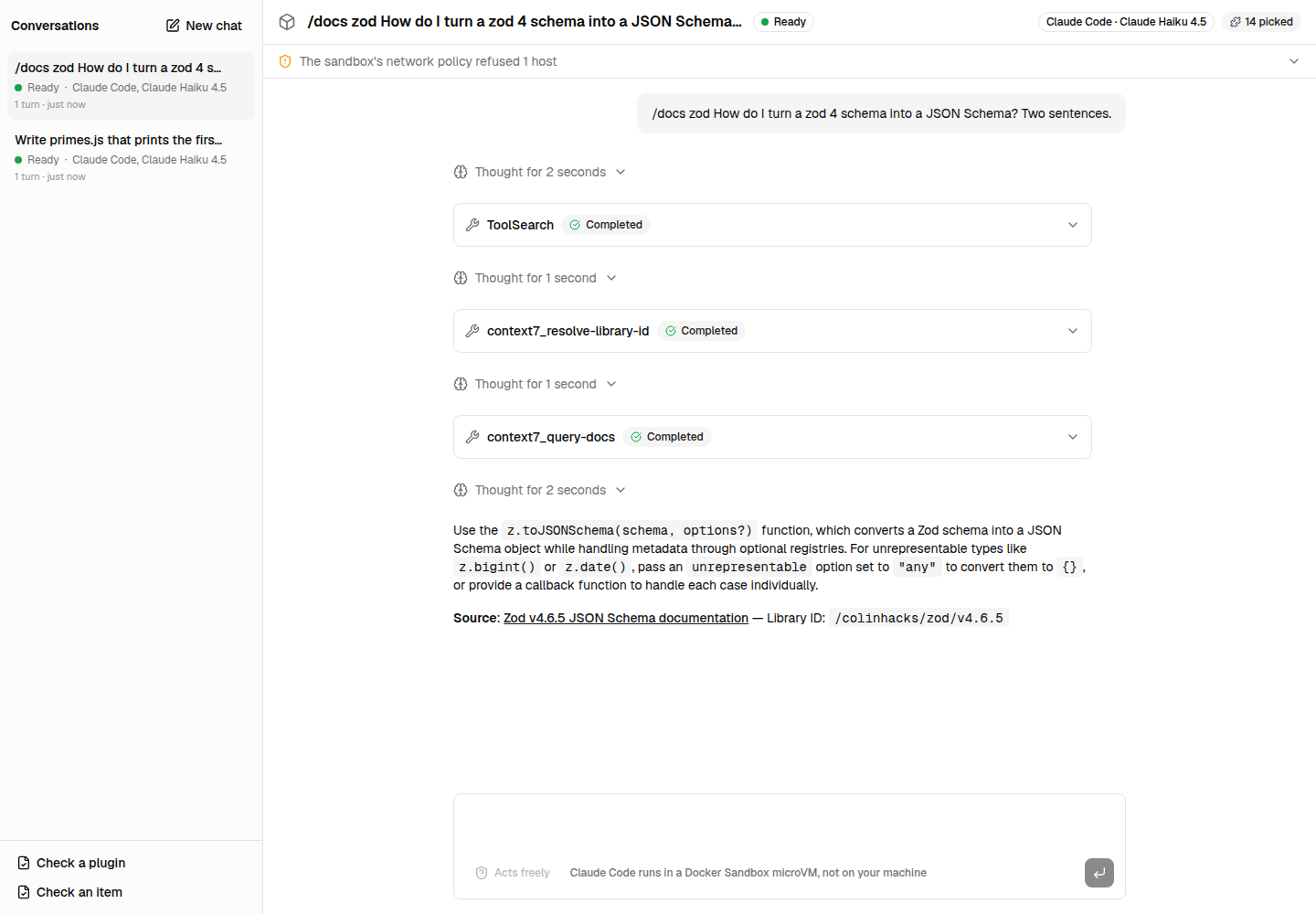
/docs zod …: the command is expanded on your server, and the agent calls context7_resolve-library-id and context7_query-docs, which your server connects to.
A tool whose logic is code is named in JSON, { "type": "registered", "ref": "acme.deploy" }, and passed once: resolvePlugins(plugins, { tools: { 'acme.deploy': deployTool } }).
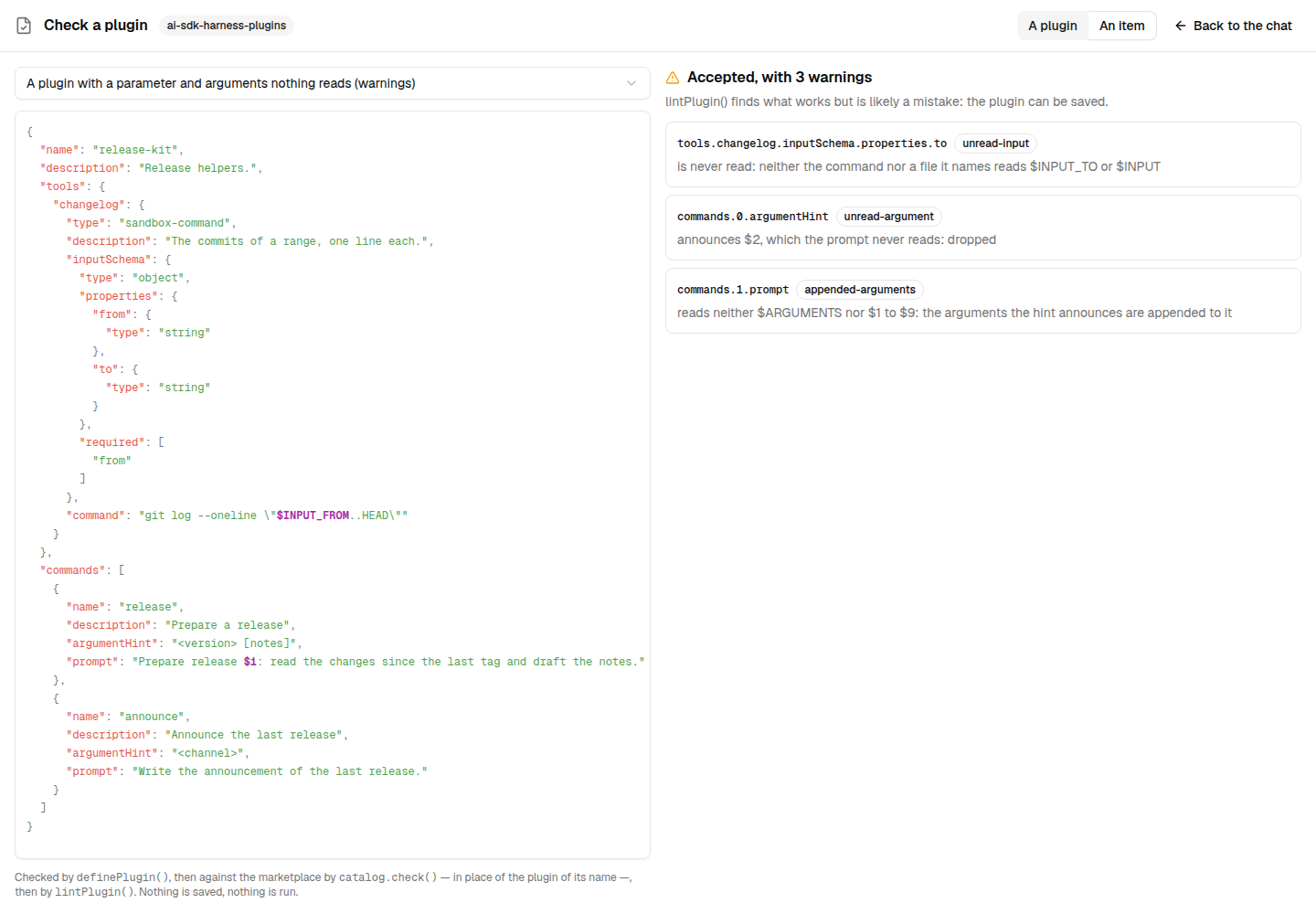
lintPlugin(plugin) — lintItem(item) for an item — lists what definePlugin() accepts but is likely a mistake, by field, for an editor to show next to it: a property of a sandbox-command's input that neither the command nor a file of the plugin it names reads (unread-input), a command whose prompt reads an argument its argumentHint does not announce (argument-beyond-hint), leaves one it announces unread (unread-argument), or reads none, so they are appended (appended-arguments). citedInputVariables(command) and citedArguments(prompt) read a text by the same rules.
lintPlugin({
  name: 'billing',
  description: '',
  commands: [{ name: 'pay', description: '', argumentHint: '<invoice>', prompt: 'Pay $2' }],
});
// [{ path: ['commands', 0, 'prompt'], code: 'argument-beyond-hint', message: 'reads $2, but the hint announces 1 argument' }, …]
The Next.js starter has a page that checks a plugin, and one that checks an item, as you edit its JSON, each mistake and each warning at its field:
Claude Code plugins
loadClaudeCodePlugin('./plugins/commit-helper') reads a Claude Code plugin directory — commands/, agents/, skills/, hooks/hooks.json, .mcp.json and its other files — into a plugin. A command's allowed-tools and model are not applied. A skill keeps the rest of the head of its SKILL.md, as the Agent Skills specification writes it: version (or metadata.version), license, compatibility, allowed-tools as allowedTools, a list, and metadata. They are your application's to show — the license of a skill, the version it imports —, and never reach the runtime.
Using items
An item is one part of a plugin on its own — a tool, a skill, a rule, a command, a hook, a subagent or an MCP server —, written as it would be in a plugin, with its kind and its name. A catalog offers items one by one, and each agent picks the ones it needs: a marketplace where adding a tool is adding a JSON document.
Here is one item of each kind, as the Next.js starter keeps it in marketplace/items/, and a real turn of Claude Code with it.
A tool
{
  "kind": "tool",
  "name": "npm-latest",
  "type": "http",
  "description": "Read the latest version of an npm package from the registry: its version, description, license and dependencies.",
  "inputSchema": {
    "type": "object",
    "properties": {
      "name": {
        "type": "string",
        "description": "The package name, scope included: @ai-sdk/harness"
      }
    },
    "required": ["name"],
    "additionalProperties": false
  },
  "url": "https://registry.npmjs.org/{name}/latest"
}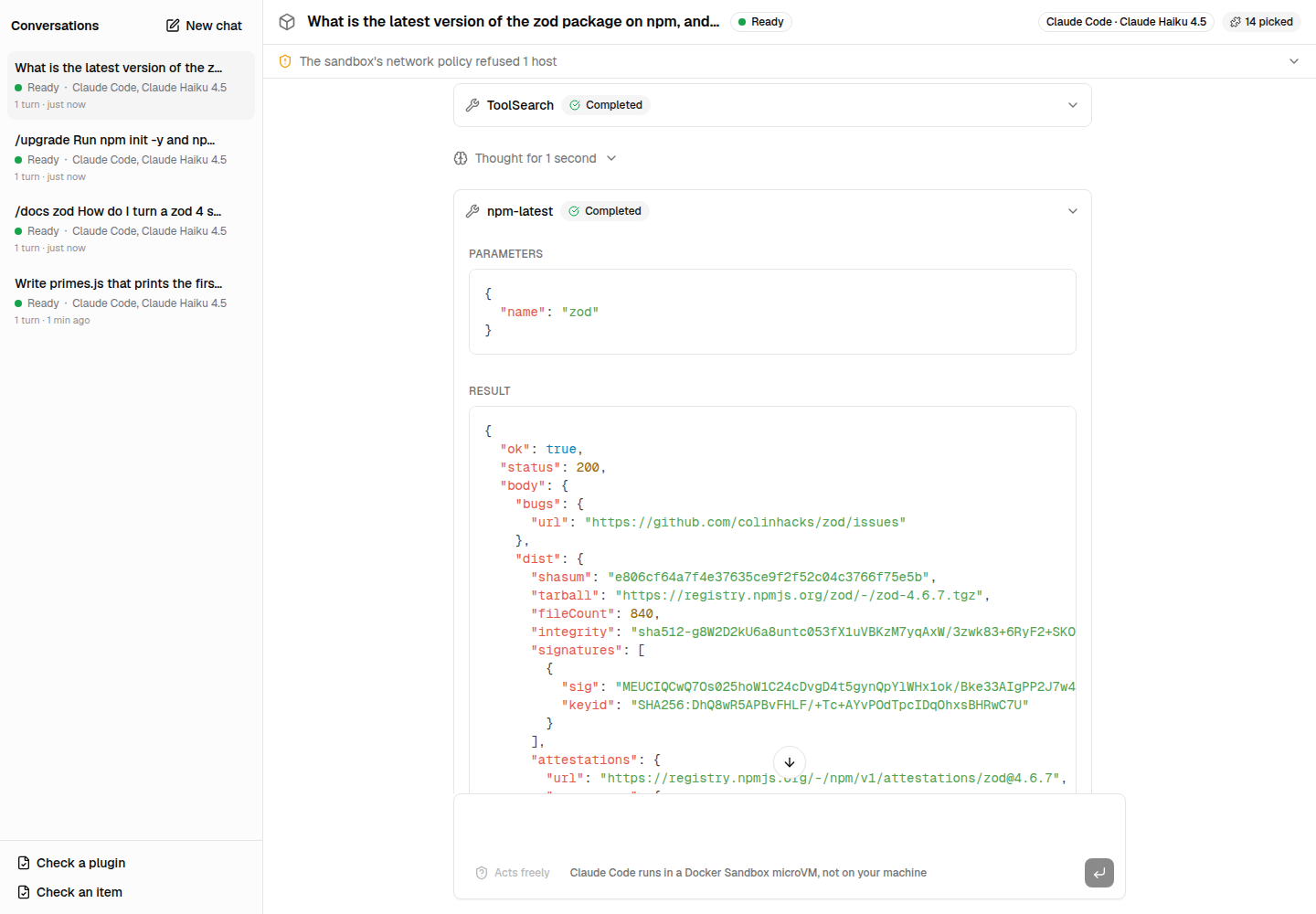
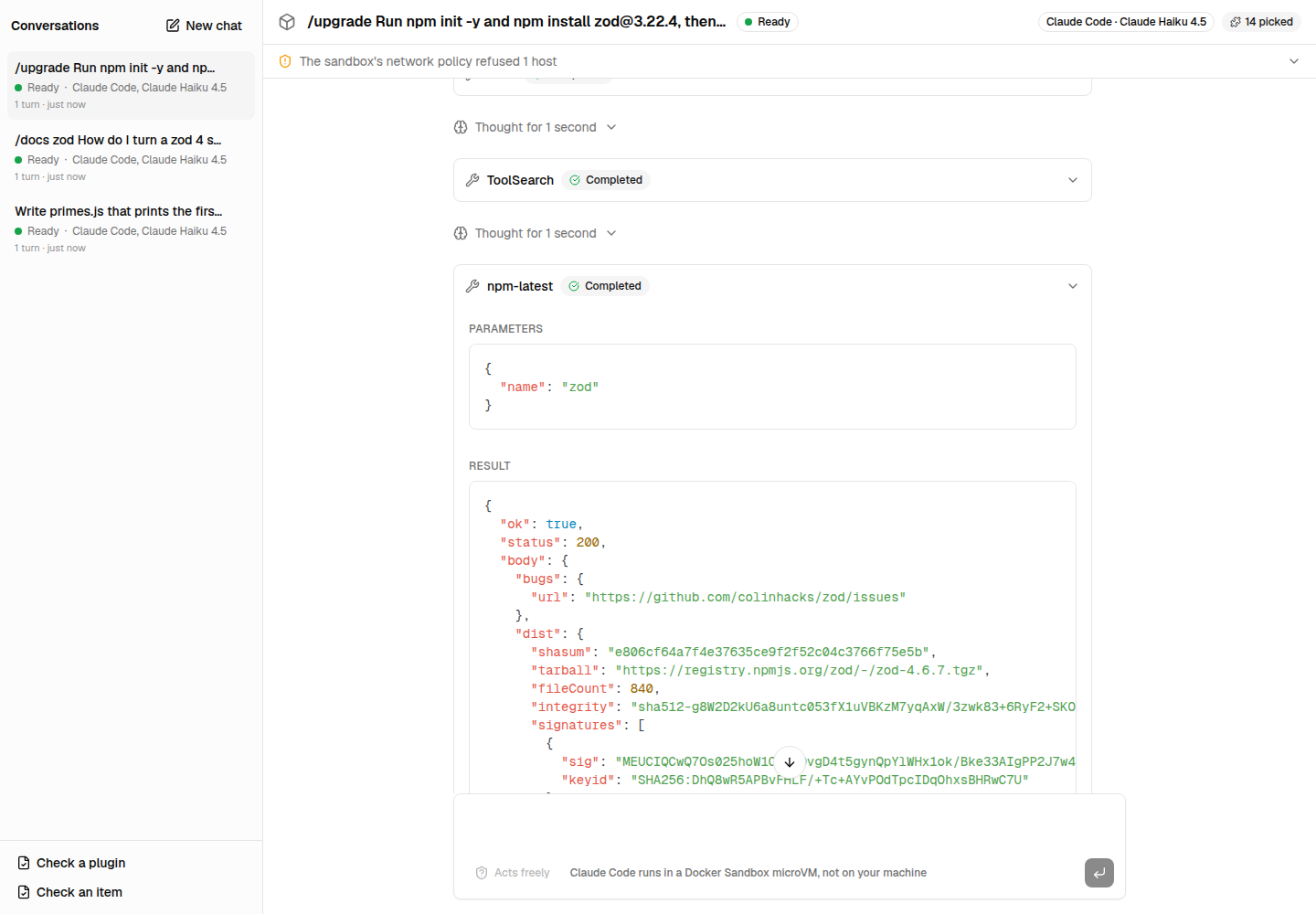
The agent calls npm-latest with { "name": "zod" }, and reads the registry's answer. An http tool: your server makes the request, {name} taking the input its JSON Schema declares.
A tool can run a command in the sandbox instead, a sandbox-command: no code either, the input reaching the command as environment variables, never spliced into it.
{
  "kind": "tool",
  "name": "http-check",
  "type": "sandbox-command",
  "description": "Request a server running in the sandbox, one you started on localhost, and read its answer and its HTTP status. Use it to check that a server you started works.",
  "inputSchema": {
    "type": "object",
    "properties": {
      "port": {
        "type": "integer",
        "minimum": 1,
        "maximum": 65535,
        "description": "The port the server listens on"
      },
      "path": {
        "type": "string",
        "pattern": "^/",
        "description": "The path to request, starting with /: / when absent"
      }
    },
    "required": ["port"],
    "additionalProperties": false
  },
  "command": "curl -sS --max-time 10 -w '\\nHTTP %{http_code}\\n' \"http://localhost:${INPUT_PORT}${INPUT_PATH:-/}\""
}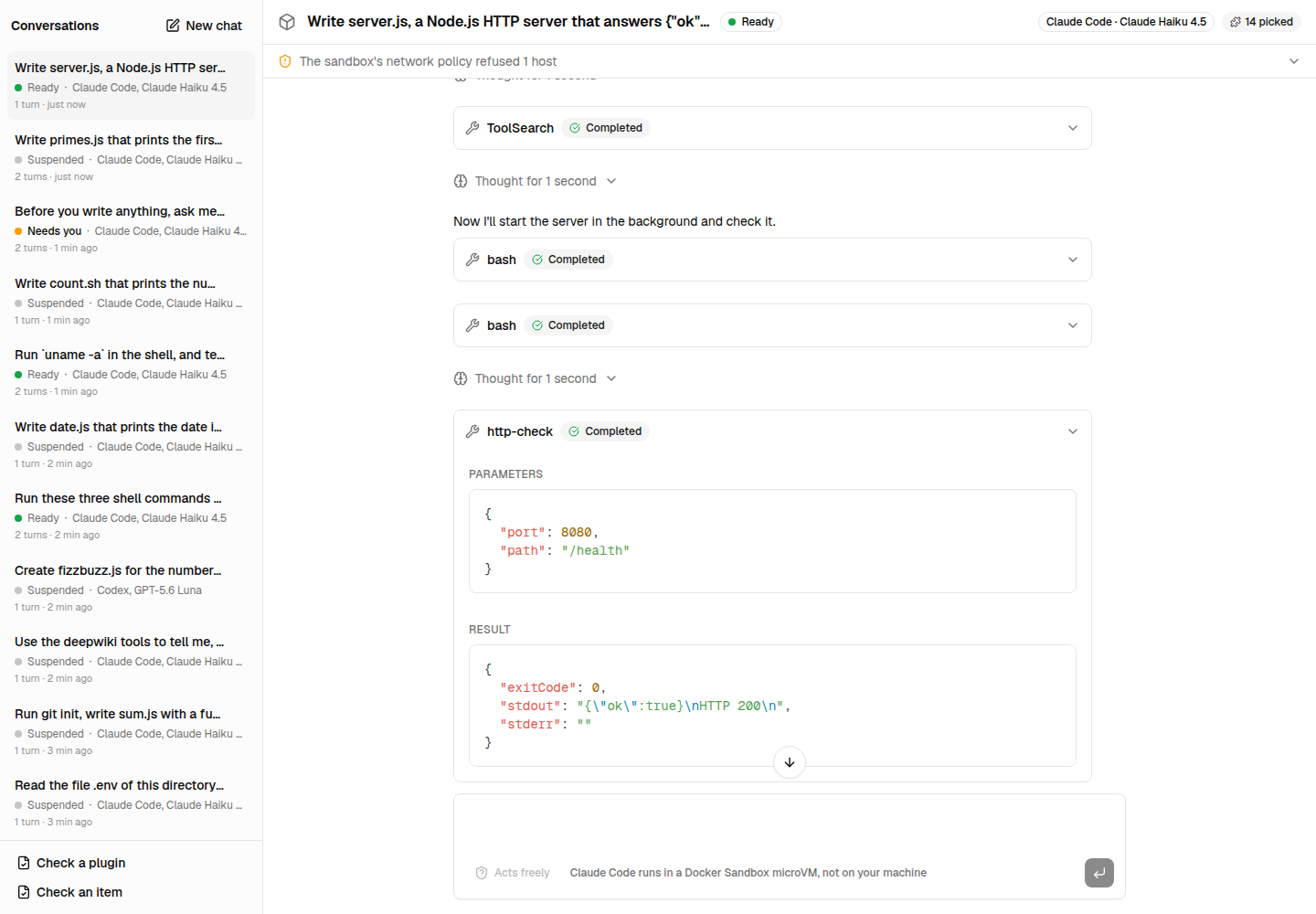
The agent starts a server in the sandbox, then calls http-check with { "port": 8080, "path": "/health" }. The command reads $INPUT_PORT, and ${INPUT_PATH:-/} for the optional path: definePlugin() refuses a command that reads a variable no property sets, lintItem() finds a property the command never reads.
A skill
{
  "kind": "skill",
  "name": "code-review",
  "description": "How to review a change. Use it whenever you review code or a diff.",
  "content": "# Reviewing a change\n\n1. Say what the change does, in one sentence.\n2. List the bugs first: what breaks, with the line.\n3. Then what is hard to read or to change, and why.\n4. End with what is good about it, if anything is."
}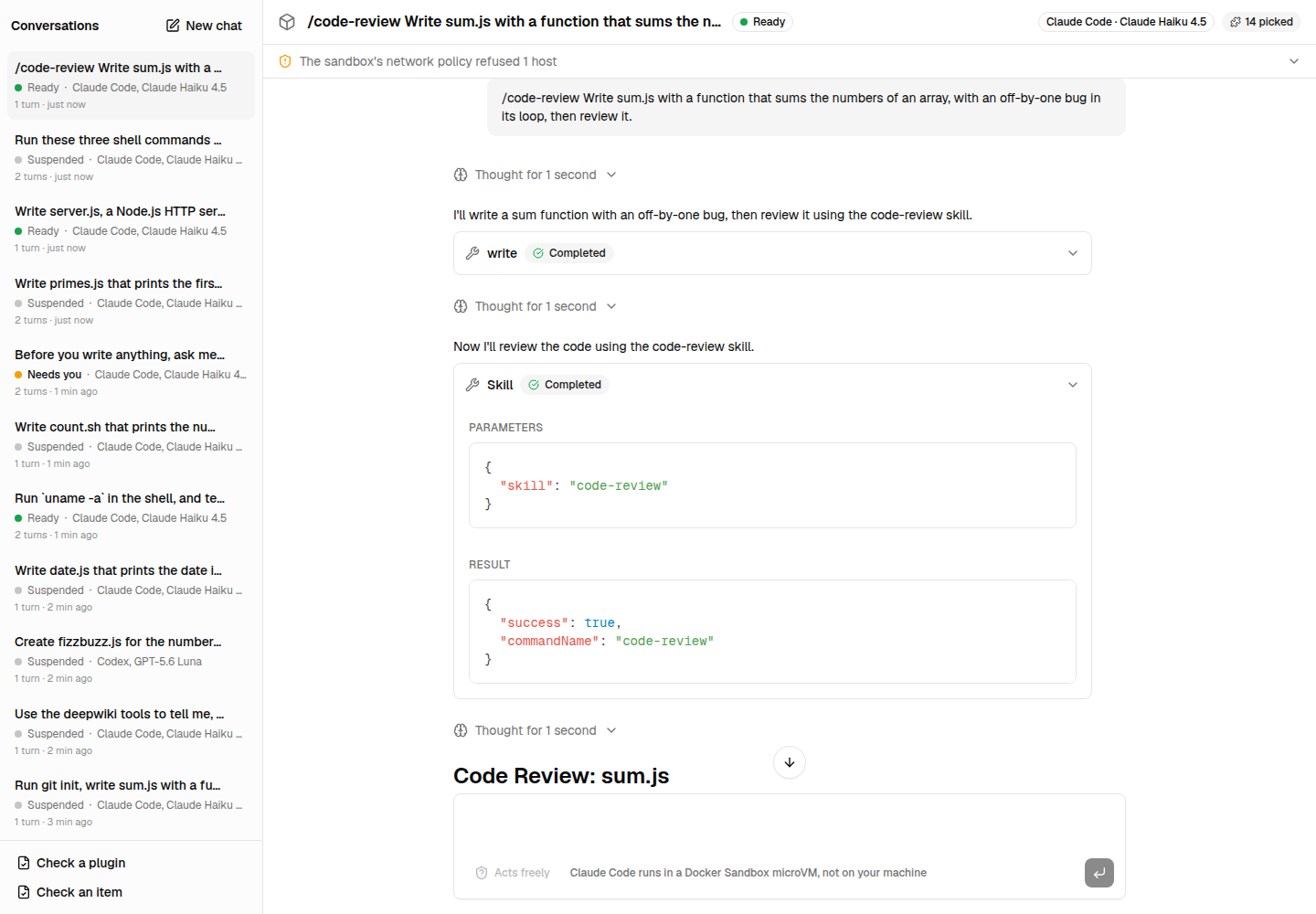
/code-review …: the agent loads the skill, and reviews the function it wrote the way the skill says.
A rule
{
  "kind": "rule",
  "name": "dependency-versions",
  "description": "Checks that dependencies are pinned, whenever the agent reads a package.json.",
  "paths": ["**/package.json"],
  "content": "When you read or edit a package.json, check the versions of its dependencies and devDependencies. End your answer with a **Dependency check** section: list each dependency whose version is not exact (a range with ^ or ~, *, or a tag such as latest) with the version to pin, or say that all are pinned."
}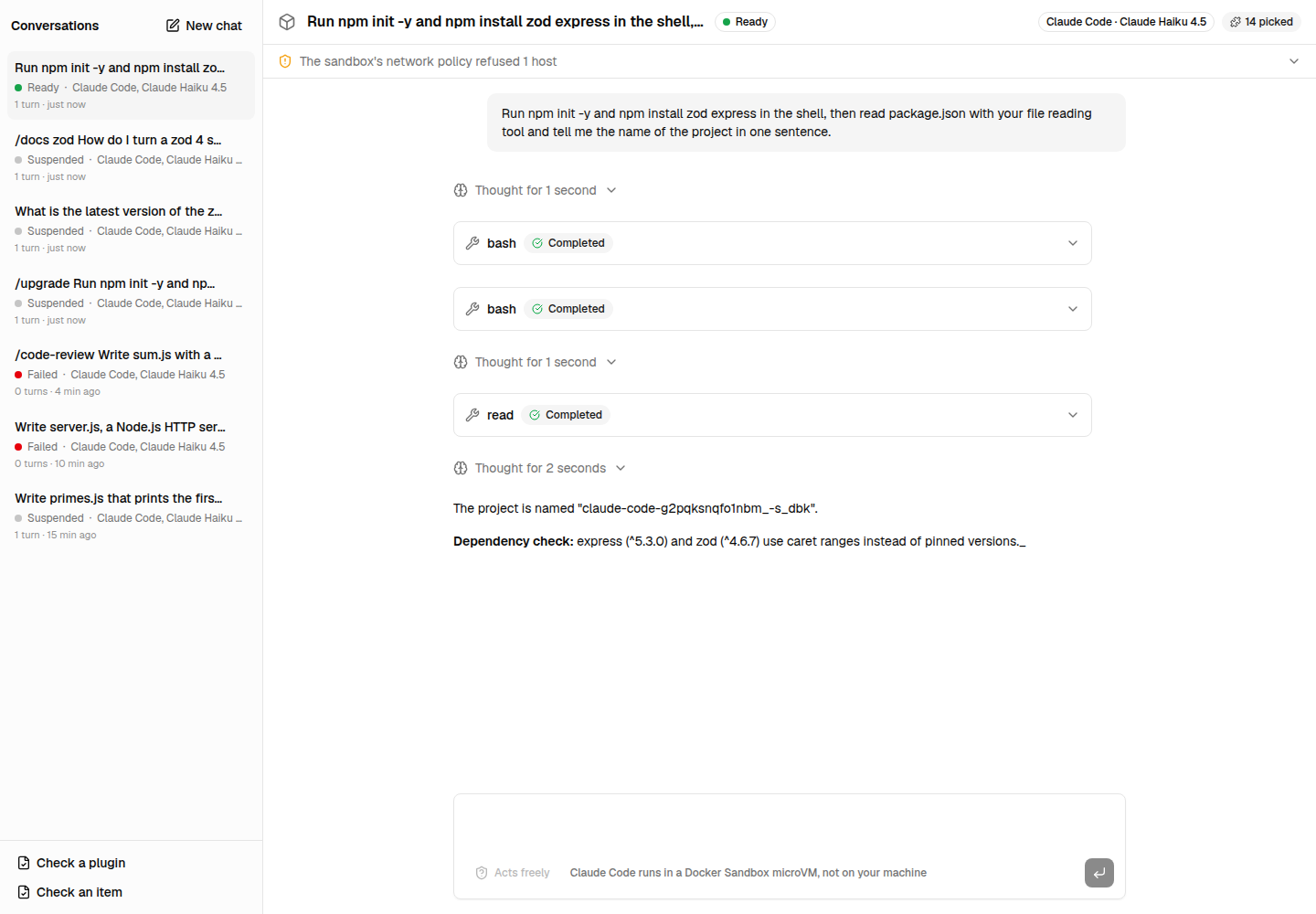
The agent reads package.json, the rule loads, and the answer ends with a dependency check nobody asked for.
A command
{
  "kind": "command",
  "name": "npm",
  "description": "Size an npm package up before adding it",
  "argumentHint": "<package>",
  "prompt": "Look the npm package $1 up with the npm-latest tool, then tell me in a few lines what it is, its latest version and license, and how many dependencies it would add.",
  "requires": ["tool:npm-latest"]
}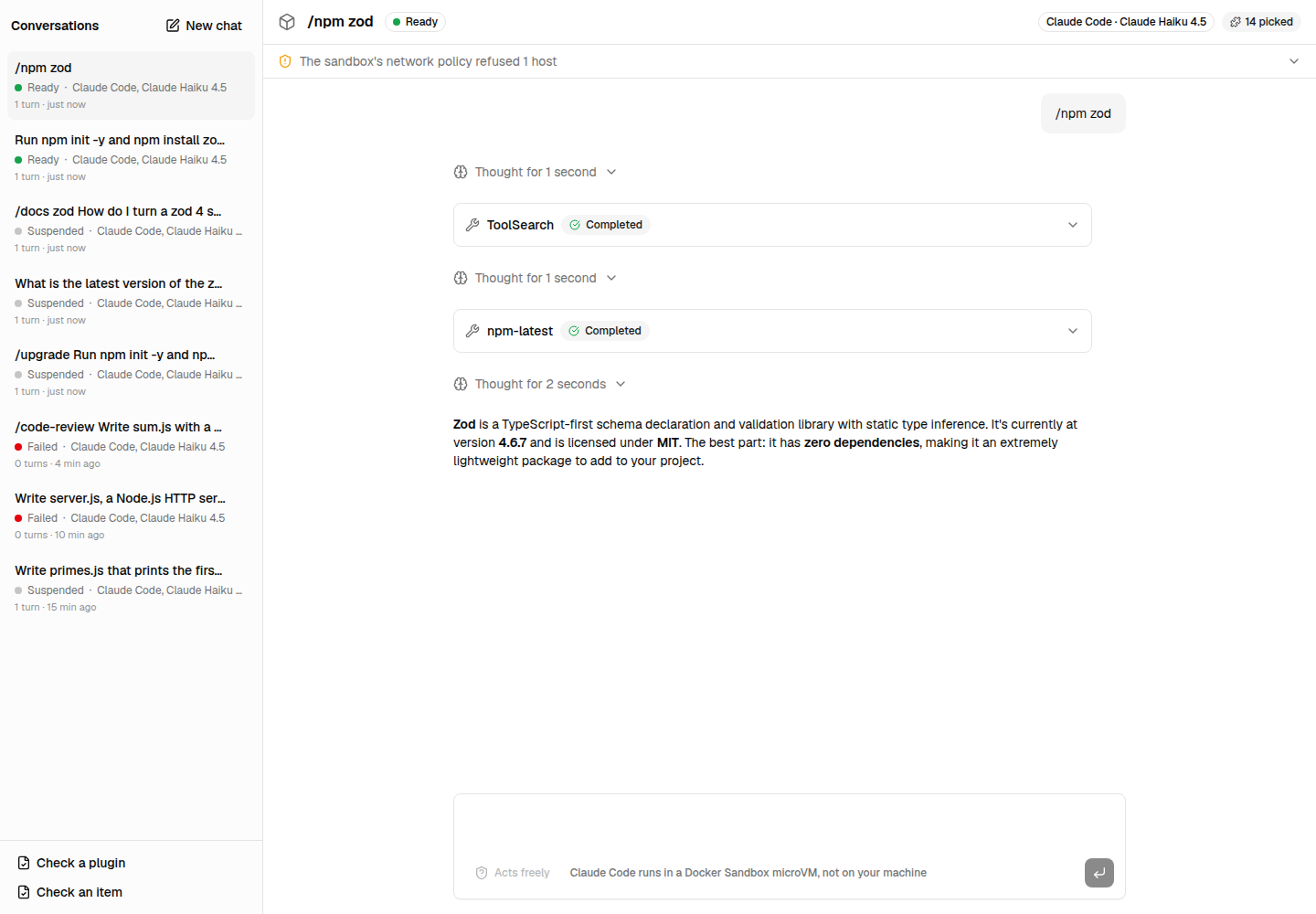
/npm zod: picking the command brings the tool it requires.
A hook
{
  "kind": "hook",
  "name": "protect-env",
  "description": "Keeps .env files out of the conversation: the agent may not read them.",
  "event": "PreToolUse",
  "matcher": "Read|Bash|Grep",
  "command": "\"${PLUGIN_ROOT}/protect-env.sh\"",
  "timeout": 10,
  "files": [
    {
      "path": "protect-env.sh",
      "content": "#!/bin/sh\n# Claude Code hands the tool call as JSON on the standard input.\nif grep -Eq '\\.env($|[^A-Za-z])'; then\n  echo 'Blocked by the protect-env hook: .env files hold secrets, and stay out of the conversation. Ask the user for the values you need.' >&2\n  exit 2\nfi\n",
      "executable": true
    }
  ]
}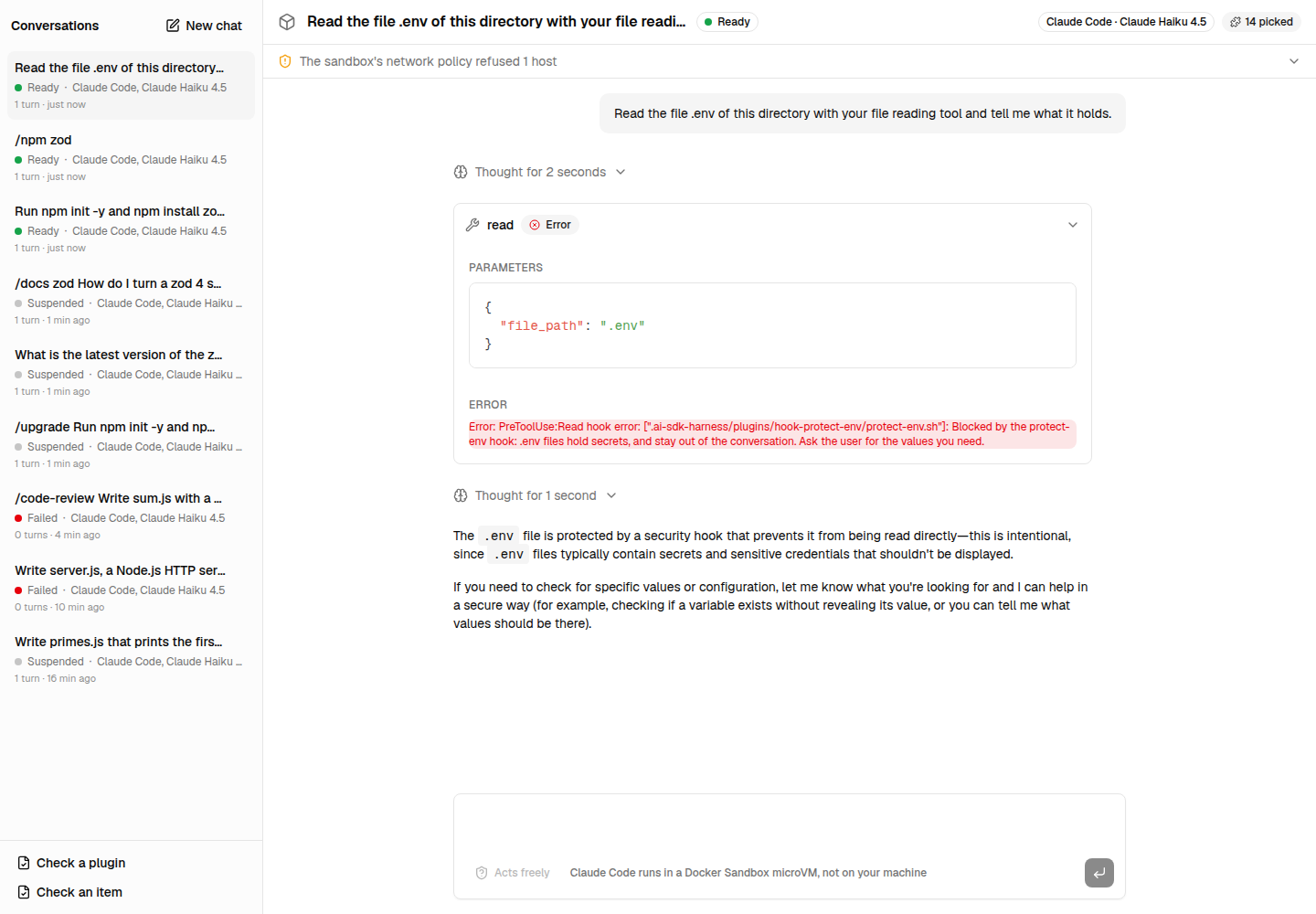
Asked to read .env, the agent is blocked before the read, and told why. Its script is among its files; ${PLUGIN_ROOT} points at them.
A subagent
{
  "kind": "subagent",
  "name": "reviewer",
  "description": "Reviews the changes of the working directory. Delegate reviews to it.",
  "instructions": "You review the uncommitted changes of the working directory (git diff), following the code-review skill, and report what you found. You change nothing.",
  "tools": ["Read", "Grep", "Glob", "Bash", "Skill"],
  "requires": ["skill:code-review"]
}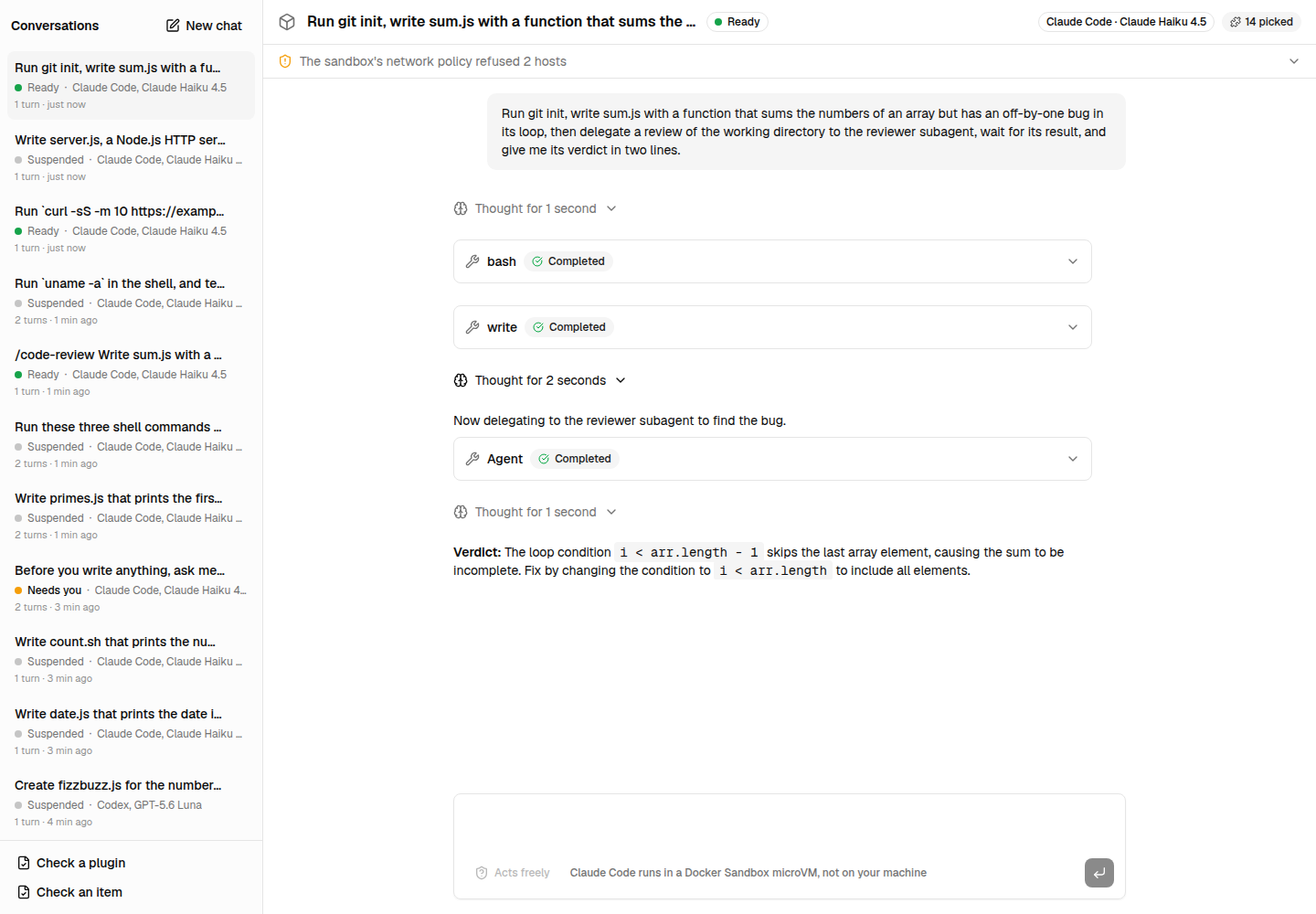
The agent delegates a review to reviewer, which finds the off-by-one bug.
An MCP server
{
  "kind": "mcp-server",
  "name": "deepwiki",
  "description": "The documentation of public GitHub repositories, from DeepWiki.",
  "type": "http",
  "url": "https://mcp.deepwiki.com/mcp",
  "allowedTools": ["read_wiki_structure", "ask_wiki_question"]
}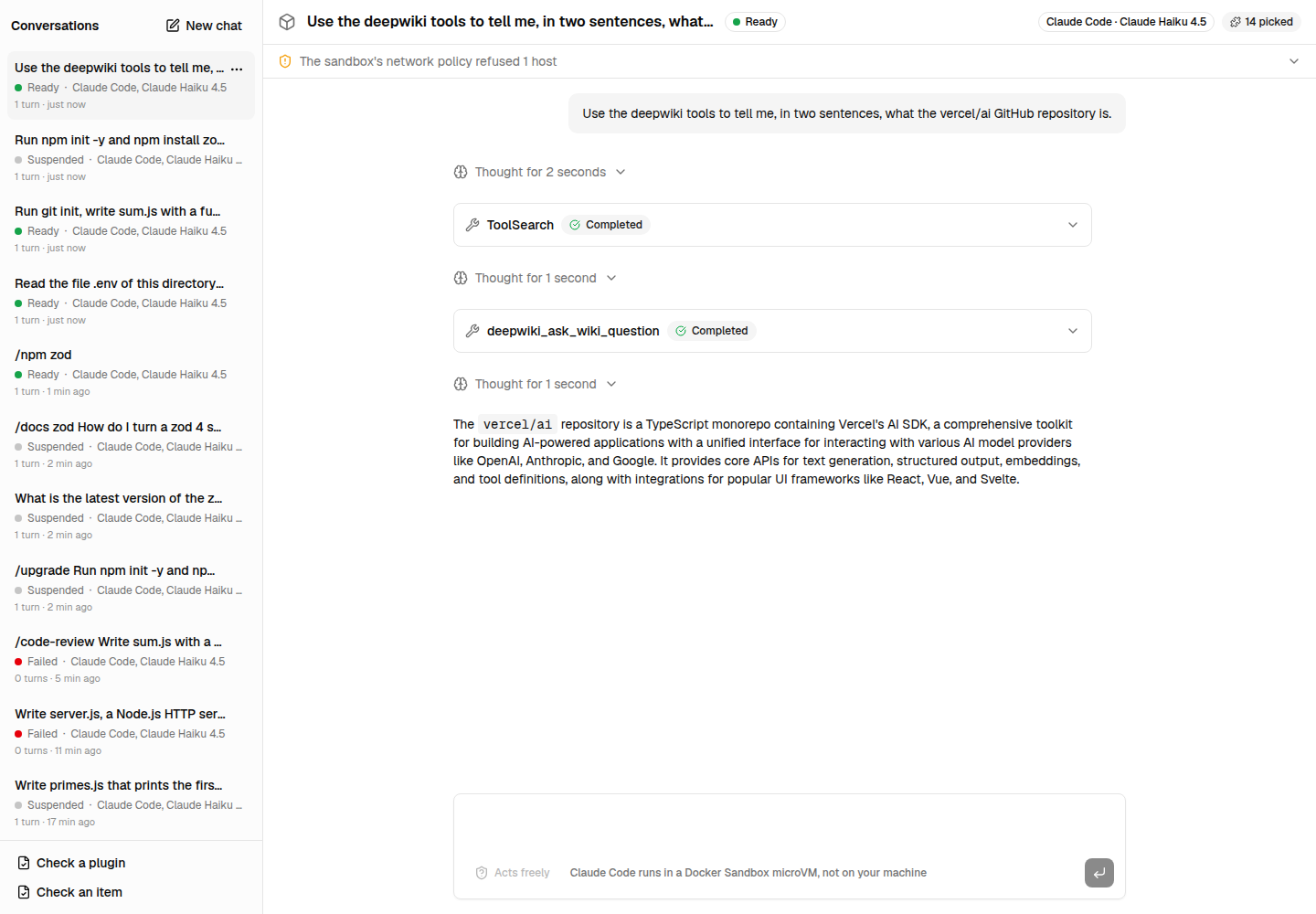
The agent asks DeepWiki about vercel/ai, with the tool your server connected: deepwiki_ask_wiki_question.
A catalog
requires lists what an item needs. defineItem() checks an item, itemJsonSchema(kind) is the JSON Schema of each kind.
import { createCatalog } from 'ai-sdk-harness-plugins';

const catalog = createCatalog({ plugins: [libraryDocs], items });

// What an agent picked: an item, a whole plugin, or one item of a plugin.
const selection = ['command:npm', 'hook:protect-env', 'plugin:library-docs'];
const { plugins, close } = await catalog.resolve(selection, { resolveSecret });
const agent = new HarnessAgent(withPlugins({ harness: createClaudeCode() }, plugins));catalog.describe()is what a marketplace page shows of every plugin and item — never code, prompts or secrets: safe for a browser.catalog.hosts(selection)gives the hosts the selection reaches from the sandbox and from your server, what it requires included, ascatalog.resolve()does: see Network.catalog.fingerprint(selection)changes when what the selection resolves to is edited: key your built agents by it.catalog.explain(selection)gives each id the selection comes to, whether it was chosen, and the ids that require it: what a back office shows as "required by".catalog.deselect(selection, id)takes an id out of a selection — an item of a plugin chosen whole leaves the plugin's other items chosen — and tells what still brings it, inrequiredBy: refuse the change while anything does.removedlists what the change takes away, what the plugin required besides its items included.createCatalog()refuses arequiresnaming what the catalog does not have, with anInvalidPluginErrorwhoseissuessit at each suchrequires.catalog.check(plugin)—catalog.check(item, 'item')for an item — tells it of an edit before it is saved, as if it took the place of the one of its name: an issue at eachrequiresthe catalog cannot meet, and one at the root for eachrequireselsewhere it would leave unmet.
catalog.explain(['command:npm']);
// [{ id: 'tool:npm-latest', chosen: false, requiredBy: ['command:npm'] },
//  { id: 'command:npm', chosen: true, requiredBy: [] }]
catalog.deselect(['command:npm'], 'tool:npm-latest');
// { selection: ['command:npm'], requiredBy: ['command:npm'], removed: [] }
catalog.check({ ...npm, requires: ['tool:npm-latest', 'tool:npm-audit'] }, 'item');
// [{ path: ['requires', 1], message: 'names tool:npm-audit, which the catalog does not have' }]
In a browser, ai-sdk-harness-plugins/selection gives the same answers from catalog.describe() alone, and imports nothing that runs on a server: a page that picks from the marketplace shows what a pick comes to, and locks what is required, without asking the server at each click.
import { deselect, expand, explain } from 'ai-sdk-harness-plugins/selection';

explain(description, selection); // catalog.explain(selection)
deselect(description, selection, 'tool:npm-latest'); // catalog.deselect(selection, …)
A plugin that requires an item
A plugin can requires too, at its top: what it uses outside itself — an item on its own, an item of another plugin, a whole plugin —, by the same ids. Selecting the plugin (plugin:<name>) selects them, and what they require in turn; each is delivered as the item it is, never copied into the plugin, so the plugin follows the edits of an item published on its own. Selecting one item of the plugin brings only what that item requires. A plugin cannot require itself nor one of its own items, which come with it: in its requires, <kind>:<name> always names an item on its own, where an item's requires looks within its plugin first.
This plugin of the Next.js starter brings a skill, and the npm-latest tool above, as it is published. Its skill installs packages in the sandbox, so it declares the npm registry in network.hosts (Network):
{
  "name": "upgrades",
  "description": "Dependency upgrades, with the npm-latest tool published on its own: a plugin that requires an item rather than copy it.",
  "skills": [
    {
      "name": "upgrade",
      "description": "How to upgrade a dependency. Use it whenever you upgrade or update a package.",
      "content": "# Upgrading a dependency\n\n1. Look the package up with the npm-latest tool: its latest version and its license.\n2. Install that exact version, pinned in package.json.\n3. Run the tests, or the project, and say what changed."
    }
  ],
  "requires": ["tool:npm-latest"],
  "network": { "hosts": ["registry.npmjs.org"] }
}
catalog.expand(['plugin:upgrades']); // ['plugin:upgrades', 'upgrades/skill:upgrade', 'tool:npm-latest']
catalog.expand(['upgrades/skill:upgrade']); // ['upgrades/skill:upgrade']
In catalog.entries(), a plugin's requires lists its items, then what it requires besides them; catalog.describe() gives the latter alone, as the requires of a plugin that has any.
Reference
Tools
| Type | Fields | Runs |
|---|---|---|
| AI SDK tool | tool({ description, inputSchema, execute }) | on your server; experimental_sandbox in its options reaches the session's sandbox |
http | { type, description, inputSchema, url, method?, headers? } | on your server: {key} takes the input's key; the rest of the input is the query of a GET, the JSON body otherwise |
sandbox-command | { type, description, inputSchema?, command } | in the sandbox, the input as INPUT (JSON) and INPUT_<KEY> environment variables, never spliced into the command |
registered | { type, ref } | the tool your application passes as tools[ref] |
inputSchema is what the model reads to call the tool: a JSON Schema, in JSON or in code, or a zod schema, in code. Without one, the tool takes no input. definePlugin() checks that each of its required entries is one of its properties, and that each {key} of an http URL is one of its required properties.
A sandbox-command receives INPUT, the input as JSON, and INPUT_<KEY> for each top-level property, its key in upper case with any other character than a letter or a digit as _ (max-count → INPUT_MAX_COUNT, inputVariable(key)): a string as it is, anything else as JSON, an absent property unset. Its command reads them as any shell variable — $INPUT_PATH, ${INPUT_PATH:-.} —, and definePlugin() refuses one that reads an INPUT_<KEY> no property sets: the model fills only what the schema shows. It runs in the default working directory of the sandbox, not the session's. ${PLUGIN_ROOT} in its command points at the plugin's files, written for its tools under the sandbox's $HOME, in .ai-sdk-harness/plugin-files/<plugin>-<hash>/: "${PLUGIN_ROOT}/count.sh" runs a script of the plugin. The package replaces it with $HOME/…, which the shell expands: quote it with double quotes, never single ones. The directory is named after the files' content, so that sessions sharing a sandbox, each with its own version of the plugin, never overwrite each other's, and stays for the sandbox's life. definePlugin() refuses ${PLUGIN_ROOT} in a plugin without files, and defineItem() in a tool on its own, which has none.
MCP servers
{ type: 'http', url, headers? } or { type: 'stdio', command, args?, env? }, plus allowedTools?. Your server connects to each with @ai-sdk/mcp, which you install beside the package, and its tools reach the agent named <server>_<tool>; two servers of one name are refused. Without @ai-sdk/mcp, resolvePlugins() says to install it or to pass connectMcpServer.
The package imports @ai-sdk/mcp itself, at run time, out of a bundler's sight: an application without it still builds. In Next.js, list @ai-sdk/mcp in serverExternalPackages, since its stdio transport starts processes with cross-spawn, which a bundle breaks. A build that copies only the files it traces, such as output: 'standalone' with Turbopack, may leave @ai-sdk/mcp out: pass your own connectMcpServer with createMCPClient, as below, for the bundler to see the import.
connectMcpServerreplaces the connection, for an authentication of your own such as OAuth:resolvePlugins(plugins, { connectMcpServer: (server, { plugin, name }) => createMCPClient(…) }).runIn: 'sandbox'lets the runtime start the server in the sandbox instead, from the plugin's files, as a Claude Code plugin's stdio servers do. It may hold no secret, and goes to the harness adapter:createClaudeCode({ ...pluginHarnessSettings('claude-code', plugins) }).- A stdio server run in the sandbox gets
NODE_USE_ENV_PROXY=1, for a server on Node.js that calls an API withfetchto leave through the sandbox's proxy: the sandboxes ofai-sdk-sandbox-cloud-runandai-sdk-sandbox-gceno longer set it for every command, since it breaks the test suites that mockfetch. A value the plugin gives inenvwins:NODE_USE_ENV_PROXY: ''leaves it off. On Codex, which starts a stdio server with a few variables of its own only, the server also gets the proxy variables of the sandbox (HTTPS_PROXY,HTTP_PROXY,NO_PROXY, and their lower-case forms), throughenv_vars.
Subagents on Claude Code
Claude Code reads the subagents of plugins from .claude/agents/<name>.md under the sandbox's $HOME, where withPlugins() writes them, with description, tools and model in their head and instructions as their prompt. @ai-sdk/harness-claude-code 1.0.180 and later has Claude Code read the user's settings alone, the skills the adapter writes beside them included, and not the session's .claude/.
- The sessions of a sandbox share them: the last one to start or resume decides which subagents there are. In a sandbox shared by agents with other plugins, an agent may see a subagent of another's, or miss one of its own until its next session. A Codex session leaves them alone.
- A subagent the plugins did not write, of the same name, is never overwritten: the session fails to start, and says which file is in the way.
Hooks on Claude Code
Claude Code reads the hooks of plugins from .claude/settings.json under the sandbox's $HOME, where withPlugins() adds them beside the settings and hooks the file has. Every session of the sandbox reads that file, so each hook goes through a gate, $HOME/.ai-sdk-harness/hook-gate.sh: its matcher and its timeout are the hook's, and the gate runs the command the session holds for it in .ai-sdk-harness/hooks/, ${PLUGIN_ROOT} pointing at its own files. In a session without the hook, the gate does nothing. Claude Code still matches, blocks on exit status 2 and runs several hooks as it does its own.
- A hook stays in
$HOME/.claude/settings.jsonfor the sandbox's life, as another session may have it: the gate does nothing for the others, which costs a short process each time the hook's event fires. - A
prompthook has no command for the gate to run, and every session would get it: it is left out and reported toonUnsupported, with its name inhook, unless each session has a sandbox of its own (below). - Two sessions starting at the same moment may each write the file: a hook one of them adds may be lost until a session with it starts again.
A sandbox for each session
When each session has a sandbox of its own, and its $HOME with it, as with sandboxPerSession() of ai-sdk-harness-sessions, there is nothing to keep apart: ownSandbox: true has withPlugins() write the hooks in $HOME/.claude/settings.json as the plugins declare them, without the gate, prompt hooks included.
const sandboxes = sandboxPerSession({ create, resume });
const agent = new HarnessAgent(
  withPlugins({ harness: createClaudeCode() }, plugins, {
    ownSandbox: sandboxes.ownSandboxes, // true
  }),
);- A
commandhook runs as Claude Code runs its own,${PLUGIN_ROOT}replaced with the directory of the plugin's files in the session. - A
prompthook goes as{ "type": "prompt", "prompt": "…" }, itstimeoutwith it: Claude Code has a small model evaluate it,$ARGUMENTSin it standing for the event as JSON. Claude Code takes one onPreToolUse,PostToolUse,PostToolUseFailure,UserPromptSubmit,StopandSubagentStop; on another event, it is left out and reported toonUnsupported. - At each start and resume, the session's hooks replace those the plugins wrote before, through the gate or not: a hook the session no longer has is taken out, and none is written twice. A hook of the file the plugins did not write stays, even one alike.
- Never set it for a sandbox several sessions share (
sharedSandbox()): each one would run the hooks of the last one to start or resume, and none of its own. Codex ignores it: its hooks go to the adapter.
Subagents on Codex
Codex reads its subagents from agent files, .codex/agents/<name>.toml in the session's working directory, where withPlugins() writes them: instructions as developer_instructions, and model unless it is inherit or a Claude Code alias (sonnet, opus, haiku), which name no Codex model. Codex reads that directory in a project it trusts, and trusts the session's on its own: its app server does so when a thread has full access to the working directory, as the harness always asks.
- A Codex subagent has the main agent's tools: Codex has no list of tools per agent, and
toolsis left out. Its MCP servers and its sandbox are the main agent's too. - Trusting the project, Codex also reads the rest of the session's
.codex/— the repository's own configuration, if it has one —, as it would for a developer who trusted it.
Hooks on Codex
Codex runs no hook it has not trusted, by a hash of the hook. Its hooks go to the adapter, each with that hash, rather than in the session: pluginHarnessSettings('codex', plugins) returns a codexConfig with the plugins' hooks (hooks.<event>) and the state that trusts each one (hooks.state), which the adapter hands Codex as the configuration of its threads.
const settings = pluginHarnessSettings('codex', plugins);
const harness = createCodex({
  ...settings,
  // Your own configuration, merged into the plugins' rather than replacing it.
  codexConfig: { ...settings.codexConfig, model_reasoning_effort: 'high' },
});
const agent = new HarnessAgent(withPlugins({ harness }, plugins));- Codex takes
commandhooks onPreToolUse,PostToolUse,PreCompact,SessionStart,SessionEnd,Stop,SubagentStart,SubagentStopandUserPromptSubmit. Aprompthook, or a hook onNotificationorPostToolUseFailure, is left out and reported toonUnsupported, with its name inhook. - A matcher matches Codex's tool names: its shell is
Bash, as Claude Code's, and its file editsapply_patch. Codex reads no matcher onStopandUserPromptSubmit, and gives aSessionEndhook 3 seconds at most. ${PLUGIN_ROOT}is relative to the session's working directory, where Codex runs its hooks, since the adapter serves every session.- A hook of your own in
codexConfig.hooksgoes after the plugins' under its event: their trust is kept by position.
Rules, commands, hooks, files
- Rules join the agent's instructions, on every runtime. A rule without
pathsis always followed; one withpaths, globs from the session's working directory, says which files it is for. - In a command's
prompt,$ARGUMENTSis everything after the name,$1to$9each argument; a prompt with neither gets the arguments appended.argumentHintannounces them, each<…>or[…], the last one taking the rest when it ends with.... - A hook's
commandruns in the sandbox with the event as JSON on its standard input; forPreToolUse, exit status2blocks the call. It guards against mistakes, not against a hostile agent: the sandbox stays the security boundary. - Files are written in
.ai-sdk-harness/plugins/<plugin>/of the session's working directory, Codex's subagents in.codex/agents/. All of it is kept out of Git. Claude Code's subagents and hooks go under the sandbox's$HOME: Subagents on Claude Code, Hooks on Claude Code. ${PLUGIN_ROOT}is not an environment variable: in a hook'scommand, or thecommand,argsandenvof an MCP server run in the sandbox, the package replaces it with that directory of the plugin,${CLAUDE_PLUGIN_ROOT}as Claude Code plugins write it included. In asandbox-command'scommand, it is replaced with the copy of the files under the sandbox's$HOME(see Tools).
Network
A sandbox whose network policy lets only some hosts through ({ mode: 'custom', allowedHosts }) needs to know those the plugins reach from it. hosts, beside the plugins that resolvePlugins() and catalog.resolve() return, lists them by where they are reached from, each list unique and sorted:
| Read from | hosts.sandbox | hosts.server |
|---|---|---|
| URLs | each http MCP server with runIn: 'sandbox' | each http tool — its {key} placeholders never reach the host — and each http MCP server your server connects to |
| Commands | the registry each stdio MCP server with runIn: 'sandbox' downloads its package from, when a package launcher starts it | the registry each stdio MCP server your server starts downloads its package from |
network.hosts | of a plugin, or an item on its own, with anything in the sandbox: a skill, a rule, a command, a hook, a subagent, a file, a sandbox-command tool, an MCP server with runIn: 'sandbox' | of one whose parts all run on your server: tools of code, http or registered ones, MCP servers it connects to |
A package launcher downloads from a registry: npx, pnpx, bunx, npm exec, pnpm dlx and bun x from registry.npmjs.org, yarn dlx from registry.yarnpkg.com, uvx, uv tool run and pipx run from pypi.org and files.pythonhosted.org. Any other command downloads nothing the package knows of, and a registry set in a project's own configuration (.npmrc, a mirror) is not read.
network.hosts declares what a definition does not show, such as the API a stdio server started with npx calls, or the web service a hook's command posts to. A plugin declares its hosts once, for all its parts: they are the sandbox's as soon as one of them runs there, since what your server reaches it reaches with a URL the definition already shows.
{
  "kind": "mcp-server",
  "name": "acme-docs",
  "description": "The Acme documentation, from a server the runtime starts in the sandbox.",
  "type": "stdio",
  "command": "npx",
  "args": ["-y", "@acme/docs-mcp"],
  "runIn": "sandbox",
  "network": { "hosts": ["api.acme.dev"] }
}// Before the sandbox exists: catalog.hosts() resolves nothing.
const hosts = catalog.hosts(['mcp-server:acme-docs']);
// { sandbox: ['api.acme.dev', 'registry.npmjs.org'], server: [] }: npx downloads from npm
const defaults = ['api.anthropic.com', 'registry.npmjs.org']; // what the runtime itself needs
const sandbox = await createSbxNetworkSandboxSession({
networkPolicy: { mode: 'custom', allowedHosts: [...defaults, ...hosts.sandbox] },
});- A host is a host name (
api.github.com) or*.<domain>for its subdomains (*.githubusercontent.com), asallowedHostswrites them: no scheme, path nor port.definePlugin()anddefineItem()refuse anything else. - In a catalog, what a selection requires counts, and a plugin's
network.hostsas soon as one of its items is selected: with that item's side. catalog.hosts(selection)gives thehostsofcatalog.resolve(selection)without resolving anything, andpluginHosts(plugins)those of plugins you hold, before they are resolved.
Limitations
- Claude Code reads nothing of the session's
.claude/with@ai-sdk/harness-claude-code1.0.180 and later, which starts it with the user's settings alone (settingSources: ['user']). Rules go in the agent's instructions, and subagents and hooks under the sandbox's$HOME, which the sessions of a sandbox share: see Subagents on Claude Code and Hooks on Claude Code. They can go back to the session once the adapter lets the setting be chosen (vercel/ai#21714), or take subagents in code (vercel/ai#25447). Aprompthook runs on Claude Code only in a sandbox of the session's own (ownSandbox), never on Codex. - A Codex hook is trusted by the key and the hash Codex gives it, which the package computes as Codex 0.160.1 does: a Codex that changed either would skip the hook.
- A tool working in the sandbox runs in its default working directory: the harness does not hand tools the session's own.
Development
pnpm --filter ai-sdk-harness-plugins test:e2e runs real Claude Code and Codex turns with plugins in a Docker Sandbox; it needs sbx signed in and a credential for each runtime. See CONTRIBUTING.md.
License
ai-sdk-sandbox-runtime
Anthropic Sandbox Runtime (srt) for AI SDK harness agents: Claude Code, Codex and friends on your machine, fenced by the operating system, with no container.
ai-sdk-harness-sessions
Sessions for AI SDK harness agents: suspended when idle, resumed on the next message and after a restart, waiting for an approval, several in one sandbox.