ai-sdk-sandbox-sbx
Docker Sandboxes for AI SDK harness agents: Claude Code, Codex and friends in a local microVM.
Run AI SDK harness agents (Claude Code, Codex, OpenCode…) in a Docker Sandbox: a microVM on your machine, or in Docker Sandboxes Cloud, driven through the sbx CLI.
The package gives HarnessAgent.createSession({ sandboxSession }) what it expects, a HarnessV1NetworkSandboxSession, the same way @ai-sdk/sandbox-vercel does for Vercel Sandbox:
- Isolation: every command and file operation is an
sbx execinto the microVM. Nothing runs on the host, and nothing of the host is mounted unless you ask for it. - Credentials stay on the host: the harness hands the sandbox a placeholder; the Docker Sandboxes proxy swaps the real value in on the way out.
- The harness is installed once: pass
agent.getSandboxTemplate()and the first sandbox is saved as a template image; every later one starts from it in seconds. - Local or cloud: the same API runs the sandbox on your machine, its ports on the loopback only, or in Docker Sandboxes Cloud with
cloud: true.
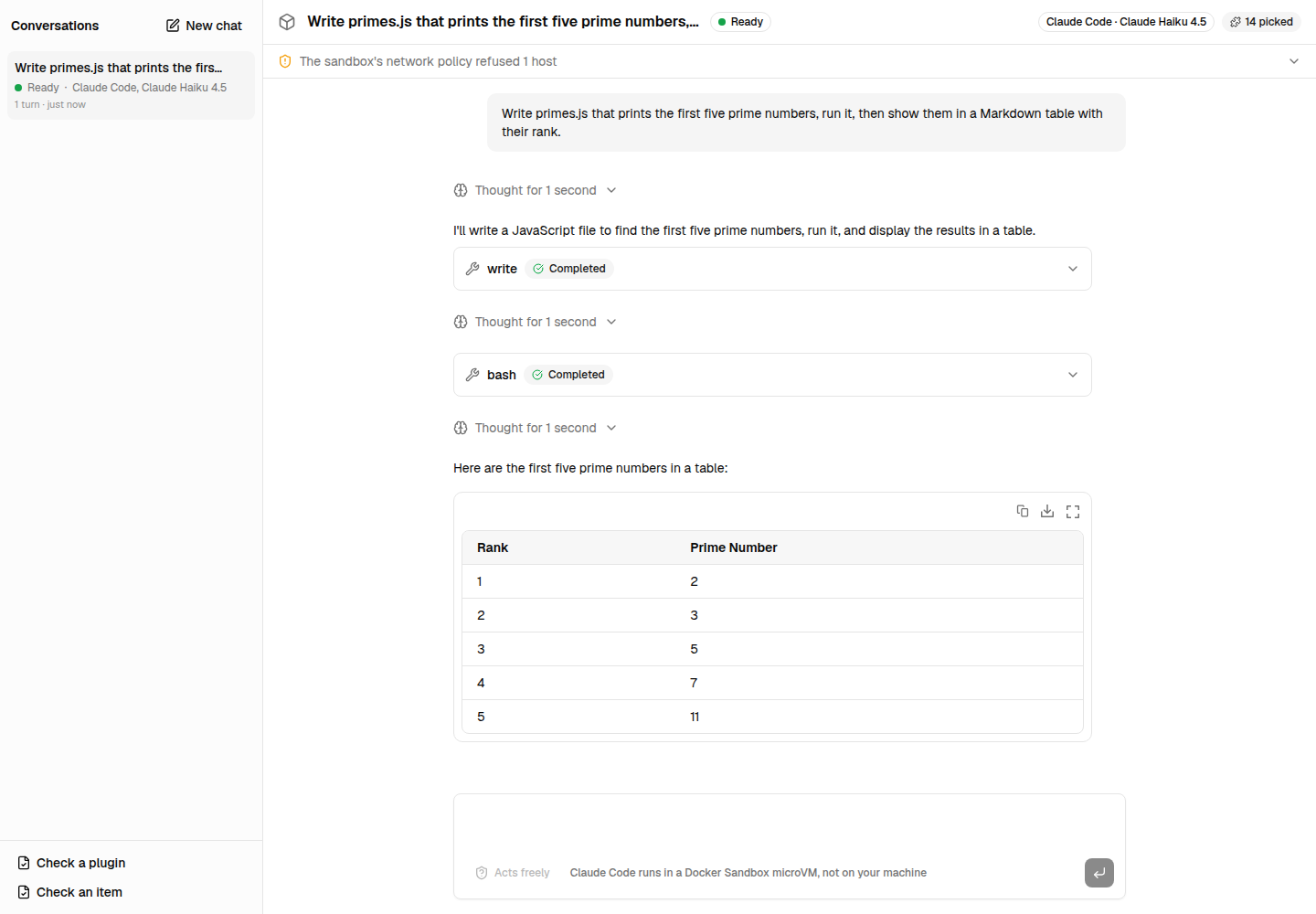
How it works
Every command and file operation is an sbx exec into the microVM, and every request the sandbox makes leaves through the Docker Sandboxes proxy, which applies the network policy and puts the credentials in.
Requirements
- Node.js 24 or later.
- Docker Sandboxes installed, with
sbxon thePATH(or pointed at by thebinaryoption), and signed in (sbx login). On a machine that runs sandboxes unattended, a server or a long development session, sign in with a personal access token (sbx login --username <user> --password-stdin) rather than in the browser, whose sign-in has to be refreshed. @ai-sdk/harnessand a harness adapter, such as@ai-sdk/harness-claude-code.
Installation
pnpm add ai-sdk-sandbox-sbx @ai-sdk/harness @ai-sdk/harness-claude-codeUsage
import { HarnessAgent } from '@ai-sdk/harness/agent';
import { createClaudeCode } from '@ai-sdk/harness-claude-code';
import { createSbxNetworkSandboxSession } from 'ai-sdk-sandbox-sbx';

// Authenticated from CLAUDE_CODE_OAUTH_TOKEN or ANTHROPIC_API_KEY.
const agent = new HarnessAgent({ id: 'coder', harness: createClaudeCode() });

const sandboxSession = await createSbxNetworkSandboxSession({
  // The Claude Code bridge listens on the first port; the harness reaches it on the loopback.
  ports: [4000],
  // The bridge installs its dependencies with pnpm, which the `shell` kit does not ship.
  setup: ['npm install --global --silent pnpm@10'],
  // Bakes Claude Code into a local image the first time, reused afterwards.
  template: await agent.getSandboxTemplate(),
});
const session = await agent.createSession({ sandboxSession });

try {
  const result = await agent.generate({
    session,
    prompt: 'Write a script that prints the first ten primes, then run it.',
  });
  console.log(result.text);
} finally {
  await session.destroy();
  await sandboxSession.destroy();
}
The caller owns the sandbox: ending the harness session leaves it running. stop() stops its microVM and keeps its files; destroy() removes it.
agent.stream() works the same way, and its result's toUIMessageStreamResponse() feeds useChat straight away. The Next.js starter is a complete chat on top of it.
Templates
A harness bootstraps itself in the sandbox before its first turn: Claude Code installs @anthropic-ai/claude-agent-sdk and the claude CLI, which takes a minute or two. Pass the agent's template and it happens once:
const sandboxSession = await createSbxNetworkSandboxSession({
  ports: [4000],
  setup: ['npm install --global --silent pnpm@10'],
  template: await agent.getSandboxTemplate(),
});
The first call creates a throwaway sandbox, under the network of the sandbox it is for (networkPolicy, denyNetwork, allowNetwork), runs setup in it, lets the harness prepare it, saves it with sbx template save and removes it. What the sandbox could not reach, its template does not reach either: allow what setup and the harness's install need, its registry for one (harnessHosts() of ai-sdk-harness-network lists them). A build that fails names the hosts the network refused to it. The image is named ai-sdk-harness-template:<digest>, the digest covering the harness recipe, the agent kit, the image and the setup commands, so a new harness version gets an image of its own. Every later sandbox starts from it with sbx create --template … --pull never.
The images stay in the sandbox runtime's store: list them with sbx template ls, remove an outdated one with sbx template rm.
Resuming a sandbox
Creation never resumes: a sandbox already named sandboxId is a conflict. Name the sandbox, keep its id, and reattach to it, from the same process or another one:
import {
  createSbxNetworkSandboxSession,
  resumeSbxNetworkSandboxSession,
  SbxSandboxNotFoundError,
} from 'ai-sdk-sandbox-sbx';

async function openSandbox() {
  try {
    const sandbox = await resumeSbxNetworkSandboxSession({ sandboxId: 'my-agent', ports: [4000] });
    // A previous run may have left a bridge behind, holding the port.
    await sandbox.killAllProcesses();
    return sandbox;
  } catch (error) {
    if (!(error instanceof SbxSandboxNotFoundError)) throw error;
    return createSbxNetworkSandboxSession({ sandboxId: 'my-agent', ports: [4000] });
  }
}
A stopped sandbox starts again on the first command. sbx does not remember which ports a harness uses until they are published, so pass the same ports again.
Working on your files
By default the sandbox mounts nothing of the host: the agent works on the microVM's own filesystem. Mount a directory to let it work on yours:
// Read-write: the agent edits the directory itself.
await createSbxNetworkSandboxSession({ workspace: '/path/to/project', ports: [4000] });

// A private clone of a Git repository instead: the host repository is mounted read-only, and
// the agent's commits come back through the `sandbox-<name>` git remote on the host.
await createSbxNetworkSandboxSession({ workspace: '/path/to/repo', clone: true, ports: [4000] });

// More directories, read-only.
await createSbxNetworkSandboxSession({ readOnlyWorkspaces: ['/path/to/docs'], ports: [4000] });
The sandbox's working directory (defaultWorkingDirectory, under which the harness creates each session's own directory) is read from the live sandbox: the workspace when one is mounted, /home/agent/workspace otherwise.
What the agent writes in a read-write workspace, your machine may run later: Git hooks, an .envrc, the scripts of a package.json. Review its changes before running anything from the directory, or prefer clone: true, which only hands its commits back through a Git remote.
Images and toolchains
A sandbox runs any image (image): python:3.12, golang:1.23, your project's own. The commands go through bash, or sh where there is none, and the files through cat: nothing of the package needs a language of its own.
The harness does: whatever the project's language, Node.js must be in the sandbox for its bridge (Claude Code installs its SDK there with pnpm), and git for the repositories. The kits of Docker Sandboxes have both; an image of yours needs them beside its toolchain, in the image or installed by setup. Once setup ran, the package checks them and fails the creation with SbxSandboxImageError, naming what is missing, rather than leaving the harness to fail in the middle of its bootstrap. requiredCommands changes the list; [] turns the check off, for a sandbox no harness runs in.
Docker and docker compose
Every Docker Sandbox runs a Docker daemon of its own, inside its microVM: the agent can docker run and docker compose up like on a developer's machine, so it can test a project for real against the services it needs. Clone the project in, then let the agent, or your setup, start its services and run its tests:
const sandboxSession = await createSbxNetworkSandboxSession({
  workspace: '/path/to/repo',
  clone: true,
  ports: [4000],
});

await sandboxSession.run({ command: 'npm ci && docker compose up -d --wait && npm test' });
The images are pulled through the Docker Sandboxes proxy, so the network policy must allow the registries they come from (Docker Hub by default).
Docker is not available in Cloud Run sandboxes: use this package for projects that need containers.
Docker Sandboxes Cloud
With cloud: true, the sandbox runs in Docker Sandboxes Cloud rather than on your machine: every sbx command goes out as sbx --cloud …. It needs a Docker Agentic Platform subscription and sbx login (personal access tokens carry no cloud access).
const sandboxSession = await createSbxNetworkSandboxSession({
  cloud: true,
  ports: [4000],
  setup: ['npm install --global --silent pnpm@10'],
  template: await agent.getSandboxTemplate(),
  ttl: '2h',
  onTimeout: 'stop',
});
What changes from a local sandbox:
- Nothing of your machine is mounted:
workspace,cloneandreadOnlyWorkspacesare refused. Copy what the agent needs in withwriteFile(), or clone it from inside the sandbox. - Ports get a public URL assigned by the control plane, instead of a loopback port. The harness bridges authenticate their connections with a token of their own.
- Credentials are set by the proxy: the cloud proxy puts the whole header on the requests to the host, under a secret named after the sandbox, the host and the header. Cloud secrets belong to the account, so
destroy()removes them too. - Templates live in the cloud registry, named
ai-sdk-harness-template-<digest>. Saving one snapshots the running sandbox and takes several minutes; list them withsbx --cloud template ls. - A cloud sandbox has a time-to-live, 24 hours at most: set it with
ttlandonTimeout, extend it withextendTtl('1h').stop()suspends it with its memory. - Sizing comes in billable shapes:
cpusandmemorytogether, 2 /4gby default.allowNetworkandplatformare cloud-only settings.
Cloud support is experimental: it follows the sbx --cloud command reference, and may change in a minor release while it settles. Its e2e suite runs with SBX_E2E_CLOUD=1 pnpm test:e2e.
Credentials
A harness that supports credential brokering never puts the real credential in the sandbox. It hands the sandbox a random placeholder, an aisdkhc_… string, and asks the sandbox session to transform the requests on their way out. This package turns each transformation into an sbx secret set-custom scoped to the sandbox: the Docker Sandboxes proxy then puts the real value in the requests to the API's host. The agent can use the credential to call its API; it cannot read it.
| Harness and sign-in | What the sandbox sees | What the proxy is given |
|---|---|---|
Claude Code, API key (ANTHROPIC_API_KEY) | ANTHROPIC_API_KEY=aisdkhc_… | The key, for api.anthropic.com |
Claude Code, Claude subscription (CLAUDE_CODE_OAUTH_TOKEN, or claude login) | CLAUDE_CODE_OAUTH_TOKEN=aisdkhc_… | The access token alone: the refresh token stays on the host |
Codex, API key (OPENAI_API_KEY) | CODEX_API_KEY=aisdkhc_… | The key, for api.openai.com |
Codex, ChatGPT subscription (codex login) | CODEX_API_KEY=aisdkhc_… | The access token, for chatgpt.com |
A local proxy swaps the placeholder for the value; a cloud proxy sets the whole header. Where the real value lives:
- On the host, where your application reads it, and in the Docker Sandboxes proxy, which keeps the custom secrets of the sandbox.
- On the host's
sbxcommand line, for the timesbx secret set-customruns: another user of the host could see it in the process list. Run the application on a host of its own.sbxreads it nowhere else yet (docker/sbx-releases#706). - Never in the sandbox, its files or its template.
The placeholders are withdrawn by release() and stop(), and removed with the sandbox by destroy(); a cloud secret belongs to the account until destroy() removes it.
Brokering can be turned off with brokerCredentials: false, for an sbx without custom secrets: the harness then forwards the real credential into the sandbox environment, where the agent can read it. Keep it on.
Docker Sandboxes also pre-sets its own credential variables (ANTHROPIC_API_KEY, OPENAI_API_KEY, GH_TOKEN…) to a proxy-managed placeholder, for credentials stored with sbx secret set. Left in place, one can take precedence over the credential the harness passes (the claude CLI prefers ANTHROPIC_API_KEY to CLAUDE_CODE_OAUTH_TOKEN), so they are dropped from every command that does not set them itself. Keep them with keepProxyManagedEnv: true; drop more with clearEnv.
Variables a command does set are forwarded as bare sbx exec -e NAME: sbx reads the value from its own environment, so it never appears on a command line.
Network
Outbound traffic goes through the Docker Sandboxes proxy and its policy (sbx policy ls): the machine's own, which every sandbox gets, and which keeps private networks, this host and the cloud metadata server out of reach. A networkPolicy narrows it for one local sandbox, with the harness's own policy type; setNetworkPolicy() replaces it while the sandbox runs:
const sandboxSession = await createSbxNetworkSandboxSession({
  networkPolicy: { mode: 'custom', allowedHosts: ['api.anthropic.com', 'registry.npmjs.org'] },
  ports: [4000],
});

await sandboxSession.setNetworkPolicy?.({ mode: 'deny-all' });
The policy becomes rules of the Docker Sandboxes policy scoped to the sandbox, which sbx removes with it:
customallows the listed hosts and blocks only, a*.example.comentry standing for the domain and its subdomains, anddeniedCIDRswin over everything. Since a deny wins over an allow, even a narrower one, the sandbox gets a deny of whatever the machine allows besides: what it allows under a listed domain stays allowed.deny-alldenies every host.allow-all, or acustompolicy listing*, is the machine's policy as it is. Allowing every host would lift the proxy's fence around private networks:sbxdoes not check what an allowed name resolves to.
It applies before setup, so list what setup downloads from. denyNetwork adds deny rules at creation (sbx create --deny-network), on top of any policy. In the cloud, the account's policy and allowNetwork decide, and setNetworkPolicy is absent.
When the agent calls a host the policy does not allow, the proxy refuses it with a 403, and only the sandbox sees it. blockedRequests() lists the hosts the proxy refused to the sandbox, the last refused first, from sbx policy log: what to tell a person, who may then allow one with the next setNetworkPolicy().
const policyChangedAt = new Date();
await sandboxSession.setNetworkPolicy?.({ mode: 'custom', allowedHosts: ['api.anthropic.com'] });
// … the agent runs …
const blocked = (await sandboxSession.blockedRequests?.({ since: policyChangedAt })) ?? [];
// [{ host: 'registry.npmjs.org', port: 443, reason: 'Denied by local rule', count: 2, firstSeen, lastSeen }]- One entry per host and port, with how many requests the proxy refused and when it first and last did. A name lookup the proxy's DNS refused has no
port; reverse lookups, and the same name tried under the sandbox's search domain, are left out. - The log is kept by sandbox name, and outlives the sandbox: a new sandbox of the same name inherits it, and a host stays listed once allowed. Pass
since, the time of the last change of policy for instance, to leave older refusals out. - Local sandboxes only: absent in the cloud, like
setNetworkPolicy.
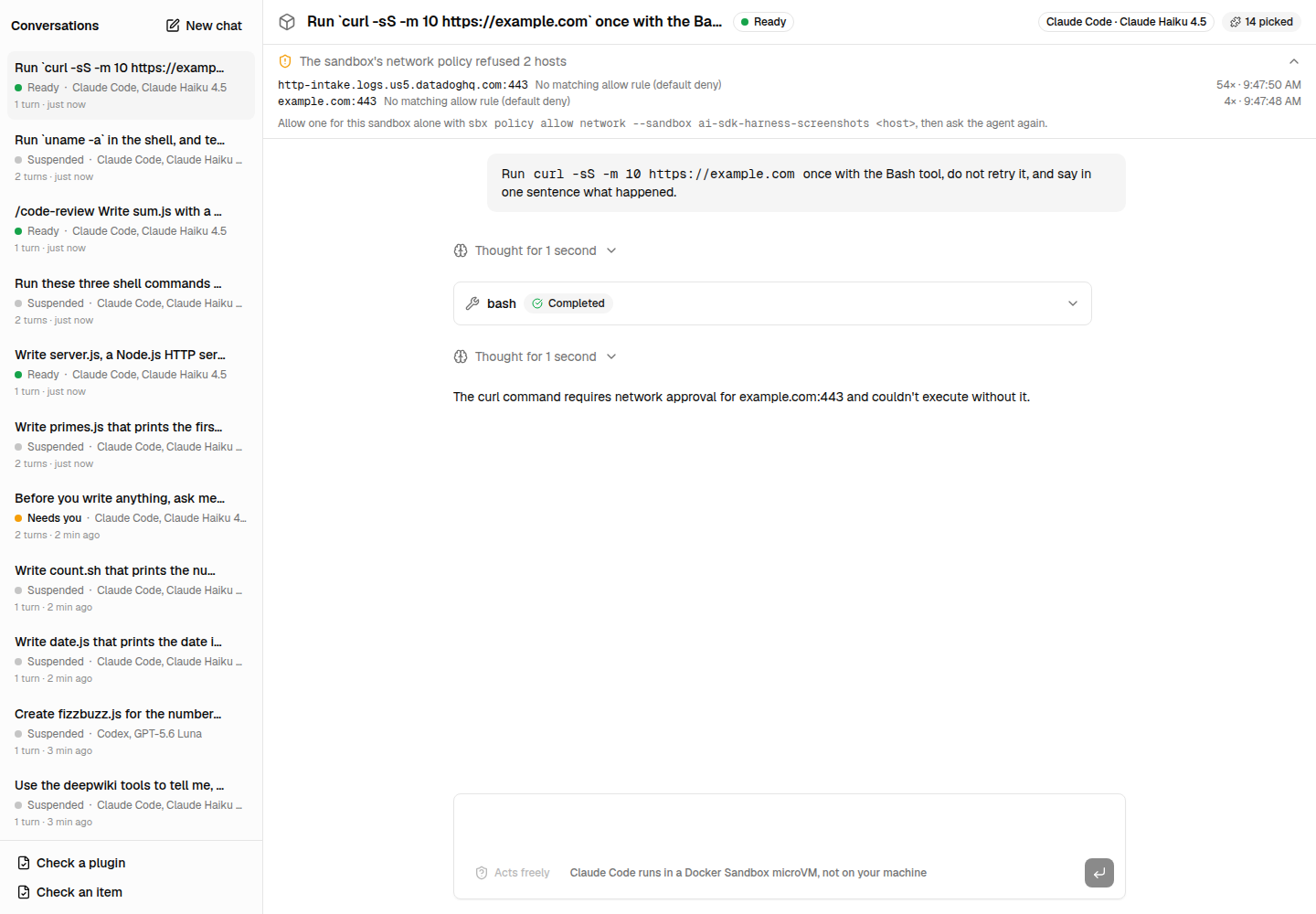
The example lists them above the conversation. Besides the host the agent called, Claude Code sends its telemetry (http-intake.logs.us5.datadoghq.com): refusing it does not stop a turn.
A host no rule allows also waits for an answer in sbx policy approval ls, which the package leaves alone: it prints a table only, and never lists a host a rule denies, so neither what deny-all refuses nor the denies of a custom policy.
Ports
ports lists the ports inside the sandbox the harness may reach. Each one is published the first time getPortEndpoint() asks for it, on this host's loopback (127.0.0.1:<free port>) or, for a cloud sandbox, at the public https:// URL the control plane assigns, and unpublished by release(), stop() or setPorts(). A port outside the list is refused with HarnessCapabilityUnsupportedError.
Lifecycle
| Method | What it does |
|---|---|
release() | Stops the processes this session started, unpublishes its ports, withdraws its placeholders |
killAllProcesses() | Stops every process any session started in the sandbox, including what a previous run left behind |
stop() | release(), then stops the microVM. Its files stay; the next command starts it again |
extendTtl(duration) | Extends the time-to-live of a cloud sandbox ('1h'), within its 24 hours |
destroy() | Removes the sandbox, its files and its secrets |
restricted() | The files-and-processes view of the same sandbox, to hand to tools (see below) |
fork({ ports }) | Another view of the same sandbox, with ports, processes and credentials of its own (see below) |
restricted() returns an Experimental_SandboxSession: it can run commands and read and write files, but cannot stop the sandbox, publish ports or touch credentials. Pass it to AI SDK tools that accept experimental_sandbox.
deleteSbxSandbox({ sandboxId }) removes a sandbox by its id, with its files and its secrets, without a session: a stopped one is removed as it is, where destroy() needs a session, which resumes it, booting the microVM only to remove it. Pass cloud: true for a cloud sandbox. A sandbox that does not exist, or no longer does, is no error. It is the remove of sandboxPerSession() of ai-sdk-harness-sessions, for the sessions closed while suspended.
Several sessions in one sandbox
A bridge-backed harness, Claude Code or Codex, listens on the first port of the sandbox session it is given. To run several harness sessions side by side in one sandbox, give each its own view with fork({ ports }): the same microVM and files, and a port of its own for its bridge.
const sandbox = await createSbxNetworkSandboxSession({ sandboxId: 'shared', ports: [4000] });

const first = await agent.createSession({ sandboxSession: sandbox.fork({ ports: [4001] }) });
const second = await agent.createSession({ sandboxSession: sandbox.fork({ ports: [4002] }) });
A view starts its own processes, publishes its own ports and registers its own credentials, and its release() only touches them: releasing one session leaves the others running. Its setRequestTransformations() replaces its own credentials only. A cloud sandbox holds one secret per host and header, which the views share: the last view to release it withdraws it. stop() and destroy() act on the whole sandbox, from any view. ai-sdk-harness-sessions hands out the ports and releases the views for you.
Options
createSbxNetworkSandboxSession(options) takes every option below; resumeSbxNetworkSandboxSession(options) takes sandboxId, abortSignal, cloud and the connection settings.
| Option | Default | Description |
|---|---|---|
sandboxId | ai-sdk-<hex> | The sandbox's name in sbx ls. Creation fails if it is taken |
template | none | await agent.getSandboxTemplate(): prepare once, start every later sandbox from the image |
abortSignal | none | Aborts the creation or the resume |
agent | 'shell' | The Docker Sandboxes agent kit: its image and network rules |
image | the kit's own | Container image to use instead (sbx create --template) |
cloud | false | Run in Docker Sandboxes Cloud (sbx --cloud) rather than on this host |
workspace | none | Host directory to mount read-write as the working directory (local only) |
clone | false | With workspace: a private clone of the Git repository instead (local only) |
readOnlyWorkspaces | [] | More host directories, mounted read-only (local only) |
networkPolicy | the machine's | What the sandbox may reach: allow-all, deny-all or custom (local only) |
denyNetwork | [] | Hosts the sandbox may never reach (sbx create --deny-network) |
allowNetwork | [] | Hosts a cloud sandbox may reach, on top of the account's policy (cloud only) |
cpus | decided by sbx | CPUs of the microVM |
memory | decided by sbx | Memory limit of the microVM (4g, 512m) |
platform | decided by sbx | linux/amd64 or linux/arm64 (cloud only) |
ttl | decided by sbx | Time-to-live of a cloud sandbox, 24 hours at most (cloud only) |
onTimeout | decided by sbx | stop, restart or delete the cloud sandbox when its ttl lapses (cloud only) |
setup | [] | Commands run once after creation, as the sandbox user (who has sudo), baked into the template |
requiredCommands | ['node', 'git'] | Commands the sandbox must have once setup ran: see Images and toolchains |
ports | [] | Connection. Ports the harness may reach, published on demand |
brokerCredentials | true | Connection. Keep credentials out of the sandbox, swapped in by the proxy |
clearEnv | [] | Connection. More variables to drop from commands that do not set them |
keepProxyManagedEnv | false | Connection. Keep the proxy-managed credential variables Docker Sandboxes pre-sets |
commandTimeoutMs | 60_000 | Connection. How long a control command of sbx may take (see Errors) |
binary | 'sbx' | Connection. The sbx binary |
Errors
SbxSandboxImageError: the image of a new sandbox lacks a command ofrequiredCommands, oncesetupran; the sandbox is removed. CarriessandboxIdandmissing.SbxSandboxNotFoundError:resumeSbxNetworkSandboxSession()found no sandbox of that name. CarriessandboxId.SbxError: ansbxcommand exited with a non-zero status. Carriesargs,exitCodeandstderr.SbxTimeoutError(anSbxError): a control command ofsbx— listing, publishing a port, stopping or removing the sandbox, the package's own short commands in it — did not finish withincommandTimeoutMs, and was stopped. Creating the sandbox, itssetup, file reads and writes and the commands the agent runs have no deadline: they end with theirabortSignal. CarriestimeoutMs. A listing (sbx ls,template ls,policy ls,policy log,secret ls) is first tried twice more, 2 then 5 seconds later, as it is whensbxanswers that the Docker sign-in service is unavailable: asandboxdthat cannot refresh its Docker session for a moment delays a session instead of failing it.SbxNotSignedInError(anSbxError):sbxis signed out of Docker, or its sign-in expired. Runsbx login, then try again. For 30 seconds after, the other commands of the same sandbox fail with it at once rather than runsbxagain, which would only fail, or hang: a cleanup after the failure does not hold the caller for minutes.HarnessCapabilityUnsupportedError(from@ai-sdk/harness): a port that is not exposed, or a credential the proxy cannot broker.
Security checklist
What the sandbox does, or does not, against the essential risks of running an agent's code: ✅ covered, ⚠️ partly or with care, ❌ not covered. The same table describes every sandbox package of this repository. The rest is your application's and the harness's: approving sensitive actions, budgets, audit, and reviewing what leaves the sandbox before it runs anywhere else.
| Control | Status | How |
|---|---|---|
| Isolation boundary | ✅ | A microVM of Docker Sandboxes |
| Nothing of the host by default | ✅ | Nothing mounted but workspace and readOnlyWorkspaces; the sandbox runs its own Docker, never the host's |
| Writes to the host | ⚠️ | workspace is read-write: review what the agent writes there, or use clone: true. readOnlyWorkspaces are read-only |
| Privileges | ⚠️ | The sandbox user has sudo without a password: root, inside the microVM only |
| Docker and Compose | ✅ | Every sandbox runs a Docker daemon of its own |
| Outbound allow list | ✅ | networkPolicy and setNetworkPolicy(), rules of the Docker Sandboxes proxy scoped to the sandbox; in the cloud, the account's policy |
| Private networks and metadata | ✅ | Refused by the proxy, under any networkPolicy |
| Inbound ports | ⚠️ | Declared ports only, on the host's loopback, where any local process can connect; at a public URL in the cloud |
| Credentials out of the sandbox | ⚠️ | The sandbox holds a placeholder; the real value is in the proxy, and on the sbx command line while it is registered (docker/sbx-releases#706) |
| Credential scope | ⚠️ | Only to its API's host, but in any header that carries the placeholder (docker/sbx-releases#707) |
| Environment | ✅ | Only the variables a command names; the proxy-managed ones are dropped |
| Resource limits | ⚠️ | cpus and memory; no cap on connections |
| Lifetime limits | ⚠️ | ttl in the cloud only |
| Teardown | ✅ | destroy() removes the sandbox, with the secrets and rules scoped to it |
Limitations
- A secret is put in any header that carries its placeholder. The proxy cannot restrict it to the credential's own header (docker/sbx-releases#707): an allowed API that echoes the request's headers back could hand the real value to the sandbox.
- One bridge per port. A bridge-backed harness listens on the first port: run one harness session at a time per sandbox view, and give each session a view of its own with
fork().
Development
This package lives in the ai-sdk-harness monorepo. pnpm test runs the unit tests against a fake sbx; pnpm test:e2e runs them against the real one, creating and removing sandboxes on your machine.
License
Agent skills
Let your coding agent set up the packages — npx skills teaches Claude Code, Cursor, Codex and others to pick the sandbox, close its network and manage the sessions of a HarnessAgent.
ai-sdk-sandbox-microsandbox
microsandbox for AI SDK harness agents: Claude Code, Codex and friends in a local microVM booted from any OCI image.