ai-sdk-harness-sessions
Sessions for AI SDK harness agents: suspended when idle, resumed on the next message and after a restart, waiting for an approval, several in one sandbox.
Sessions for AI SDK harness agents: the whole lifecycle of your users' conversations with Claude Code, Codex and the other runtimes HarnessAgent drives. One turn at a time, suspended when idle and resumed on the next message, kept across restarts of your server, waiting for an approval as long as it takes, and several of them side by side in one sandbox.
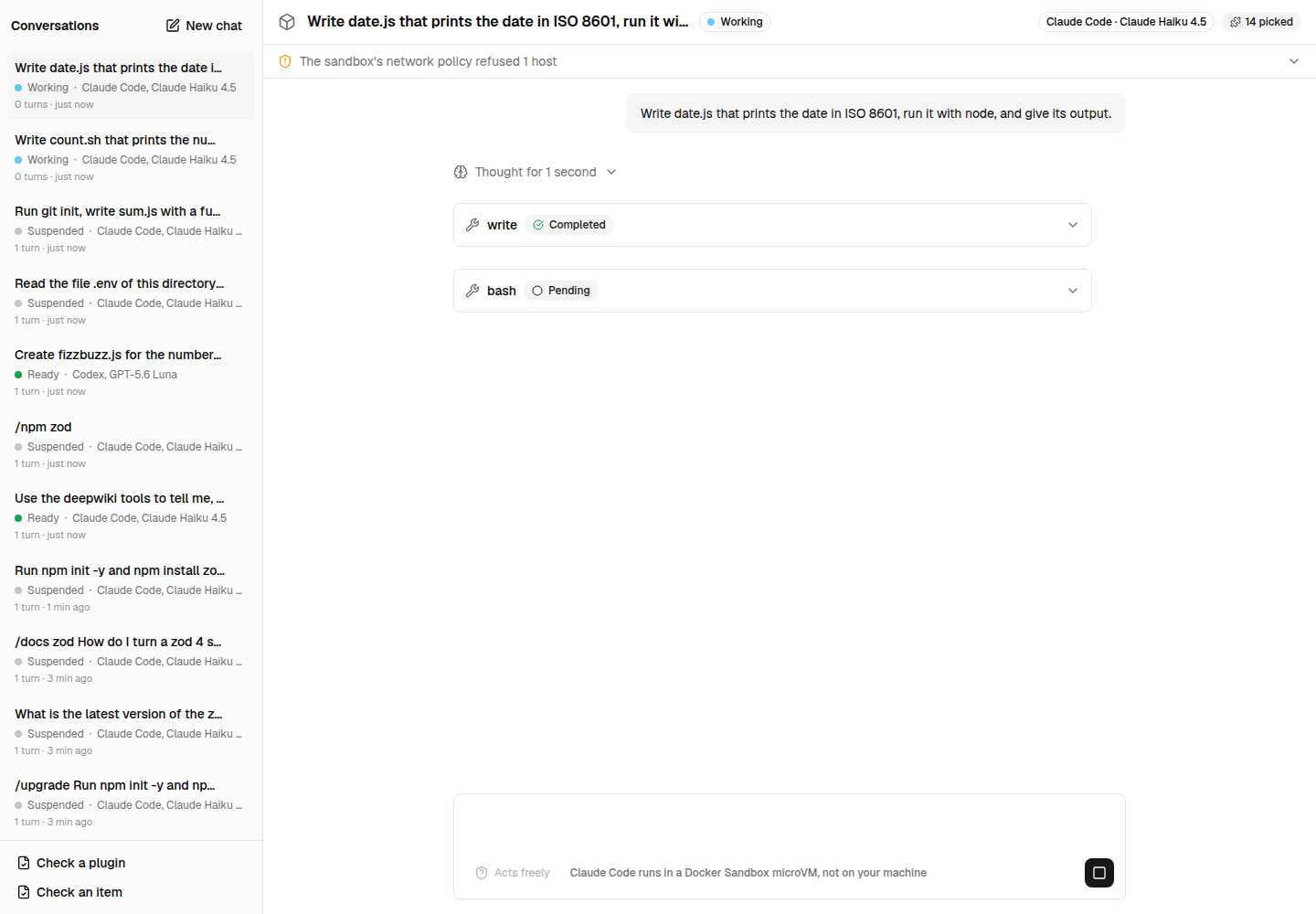
At a glance
HarnessAgent gives you a session and leaves the rest to you: which session a message goes to, what happens to a session nobody writes to, to a turn under way when your server stops, to the conversation the user wants to read again. A session manager does it:
import { createSessionManager, sharedSandbox } from 'ai-sdk-harness-sessions';

const sessions = createSessionManager({
  // The agent of a session, from what you keep with it.
  agent: ({ metadata }) => agents[metadata.agent],
  // One sandbox for every session, each with a port of its own for its bridge. `openSandbox` is
  // yours: it opens a sandbox of ai-sdk-sandbox-sbx, ai-sdk-sandbox-cloud-run… (see "Sandboxes").
  sandboxes: sharedSandbox({
    open: openSandbox,
    ports: Array.from({ length: 4 }, (_, i) => 4001 + i),
  }),
  // A session nobody writes to for 10 minutes is suspended; the next message resumes it.
  idleTimeoutMs: 10 * 60_000,
});

// A route handler: the turn streams back to useChat.
await sessions.create({ id, metadata: { agent: 'reviewer' } });
const turn = await sessions.send(id, { message, abortSignal: request.signal });
return turn.toUIMessageStreamResponse();| What happens | What the manager does |
|---|---|
| A first message | Opens a sandbox, or a view of a shared one, and a harness session, in the background: a message sent meanwhile waits |
| A message while a turn runs | Refuses it: one turn at a time per session (SessionConflictError, status busy) |
| The turn asks approval for a tool call | Asks your approve option first, then keeps the session awaiting-input until continue() brings the answer |
Nobody writes for idleTimeoutMs | Suspends the session: its harness session stops with its state, its sandbox is freed. The next message resumes it |
| Every sandbox slot is taken | Suspends the session idle the longest to make room |
Your server stops (shutdown()) | Cuts the turns under way short, and suspends every session: the next start resumes them on their next message |
| A turn fails on a transient error | With turnRetries, starts its harness session again and runs the turn again, telling the client |
| Your server crashes | Marks the sessions it held interrupted at the next start: their conversation can still be read |
| Your server runs on several instances | With a store that gives leases, each instance runs the sessions it holds, and takes over those of one that crashed |
| You want the conversation again | get(id) gives it as useChat shows it, list() every session, subscribe() every change, for a list to follow |
| The agent keeps a task list | tasksOf(messages) reads it from the conversation, over every turn, in the browser too |
Installation
pnpm add ai-sdk-harness-sessionsIt works with the agents and sandboxes you already have: @ai-sdk/harness and ai are peer dependencies, and a sandbox package such as ai-sdk-sandbox-sbx or ai-sdk-sandbox-cloud-run gives the sandbox.
Usage
The manager
Create one manager for your server, and keep it: with Next.js, on globalThis, so that a reload of the module in development does not start a second one.
import { createClaudeCode } from '@ai-sdk/harness-claude-code';
import { createHarnessSandboxTemplate, HarnessAgent } from '@ai-sdk/harness/agent';
import {
  createSbxNetworkSandboxSession,
  resumeSbxNetworkSandboxSession,
  SbxSandboxNotFoundError,
} from 'ai-sdk-sandbox-sbx';
import { createSessionManager, sharedSandbox } from 'ai-sdk-harness-sessions';

const harness = createClaudeCode();
const agent = new HarnessAgent({ harness, model: 'claude-sonnet-5-5' });

/** The sandbox the sessions share: found again when it exists, created from a template otherwise. */
async function openSandbox() {
  const settings = { sandboxId: 'my-app', ports: [4000] };
  try {
    const sandbox = await resumeSbxNetworkSandboxSession(settings);
    // The bridges a previous run of the server left behind still hold their ports.
    await sandbox.killAllProcesses();
    return sandbox;
  } catch (error) {
    if (!(error instanceof SbxSandboxNotFoundError)) throw error;
  }
  const template = await createHarnessSandboxTemplate({ harnesses: [harness] });
  return createSbxNetworkSandboxSession({ ...settings, template });
}

export const sessions = createSessionManager<{ title: string }>({
  agent: () => agent,
  sandboxes: sharedSandbox({
    open: openSandbox,
    ports: Array.from({ length: 4 }, (_, i) => 4001 + i),
  }),
  idleTimeoutMs: 10 * 60_000,
});

// Suspended rather than lost when the server is told to stop.
process.once('SIGTERM', () => void sessions.shutdown().finally(() => process.exit(0)));
agent is called when a session starts and each time it resumes, with the session's metadata: what you keep with it, the agent it runs, a title, its owner. Build each agent once and return it again. The metadata is kept as JSON.
A route
The first message creates the session; every message is sent to it. The session keeps the conversation, so only the new message goes to the agent: prompt sends something else, a slash command expanded for instance, while the conversation keeps the message as it was written.
import type { UIMessage } from 'ai';

import { SessionConflictError } from 'ai-sdk-harness-sessions';

import { sessions } from '@/lib/sessions';

export async function POST(request: Request) {
  const { id, messages } = (await request.json()) as { id: string; messages: UIMessage[] };
  const message = messages.at(-1)!;
  if ((await sessions.get(id)) === undefined) {
    await sessions.create({ id, metadata: { title: 'New conversation' } });
  }
  try {
    const turn = await sessions.send(id, { message, abortSignal: request.signal });
    return turn.toUIMessageStreamResponse();
  } catch (error) {
    if (SessionConflictError.isInstance(error)) return new Response(error.message, { status: 409 });
    throw error;
  }
}
The turn is read to its end on your server as well: a user who closes the tab does not leave the session hanging, and the session is written either way. abortSignal: request.signal lets the stop button of useChat cut the turn short; leave it out for turns that go on without the client. interrupt(id) cuts a turn short from anywhere.
A turn cut short — by interrupt(id), turnTimeoutMs or the caller's abortSignal — starts its harness session again, in the same sandbox, before the session takes another message. A runtime goes on with a turn for a moment after it is told to stop, and its harness session would hand what it still says to the next turn: that turn would end at once, its answer lost (vercel/ai#23507). The conversation goes on where it stopped; starting again takes a few seconds. A harness session that cannot start again leaves the session suspended, resumed by the next message.
A turn that fails on a transient error
A turn fails on its first error, by default: the client gets an error chunk, the session's error keeps the full message, and the session waits for the next message. turnRetries runs the turn again instead when the error is transient — the harness bridge lost, a connection reset or timed out, a 5xx or an overloaded provider:
const sessions = createSessionManager<Metadata>({
  // …
  // Waits 10 seconds before the first retry, 20 before the second.
  turnRetries: { attempts: 2 },
});
The harness session starts again from where it stopped, in the same sandbox, as after a turn cut short, and the agent is told to carry on: its conversation keeps what the failed attempt did. The client reads one answer. Before each retry it gets a data-turn-retry chunk (TURN_RETRY_CHUNK), sent transient so the conversation does not keep it, whose data is { attempt, attempts, delayMs, error } — error as errorMessage tells it; the error chunk comes only once the retries are used up, with the last error:
const { messages } = useChat({
  onData: (part) => {
    if (part.type === 'data-turn-retry')
      setNotice(`Retrying (${part.data.attempt}/${part.data.attempts})…`);
  },
});
isTransient judges the errors (default: isTransientError, exported for the applications that retry on their own), delayMs sets the waits, a number or a function of the retry, and prompt what the agent is told. Each retry goes to onError (action: 'retry turn'); TurnReport.retries counts them. A rate limit, a quota, credentials refused, an abort and any error isTransientError does not recognise are never retried; nor is a turn that cannot start: send() rejects, and the session stays ready. A harness session that cannot be stopped to start again leaves the session interrupted, as after a turn cut short.
A sandbox lost with its machine — stopped, or a Spot VM preempted, its disk kept — cannot take the harness session back. The retry then hands the sandbox back and acquires it again as after a suspension (acquire(id, { resume: true })), which starts a stopped machine of sandboxPerSession(), and starts the harness session there from where it stopped: the agent's files are as it left them, committed or not. The client gets a data-sandbox-resume chunk (SANDBOX_RESUME_CHUNK, data { attempt }, transient) first, since a machine takes a minute or so to start. A sandbox that cannot be resumed leaves the session suspended, with the reason: the next message resumes it.
Showing the conversations again
const conversations = await sessions.list(); // every session, without its messages
const conversation = await sessions.get(id); // with its messages, for useChat({ messages })
subscribe() calls you with every change: a status, the end of a turn, a deletion. Send them to the page as server-sent events, and a list of conversations follows each one live:
export function GET(request: Request) {
  const encoder = new TextEncoder();
  const stream = new ReadableStream({
    start(controller) {
      const unsubscribe = sessions.subscribe((event) =>
        controller.enqueue(encoder.encode(`data: ${JSON.stringify(event)}\n\n`)),
      );
      request.signal.addEventListener('abort', () => {
        unsubscribe();
        controller.close();
      });
    },
  });
  return new Response(stream, { headers: { 'content-type': 'text/event-stream' } });
}
The agent's task list
Claude Code keeps a task list while it works: whole, with TodoWrite, or task by task, with TaskCreate then TaskUpdate and the id the creation returned. tasksOf() replays those calls over the whole conversation, every turn of it, and gives the list as it stands. It comes from ai-sdk-harness-sessions/tasks, which imports nothing that runs on a server, so a page reads it from useChat's messages:
import { isTaskToolName, tasksOf } from 'ai-sdk-harness-sessions/tasks';

const tasks = useMemo(() => tasksOf(messages), [messages]);
// [{ id: '1', subject: 'Fix the bug', activeForm: 'Fixing the bug', status: 'in-progress' }, …]

// Show the list once, rather than the calls that keep it.
if (isToolUIPart(part) && isTaskToolName(getToolName(part))) return null;
The AgentTasks component shows it: how many are done, the task in progress, the done ones struck through.
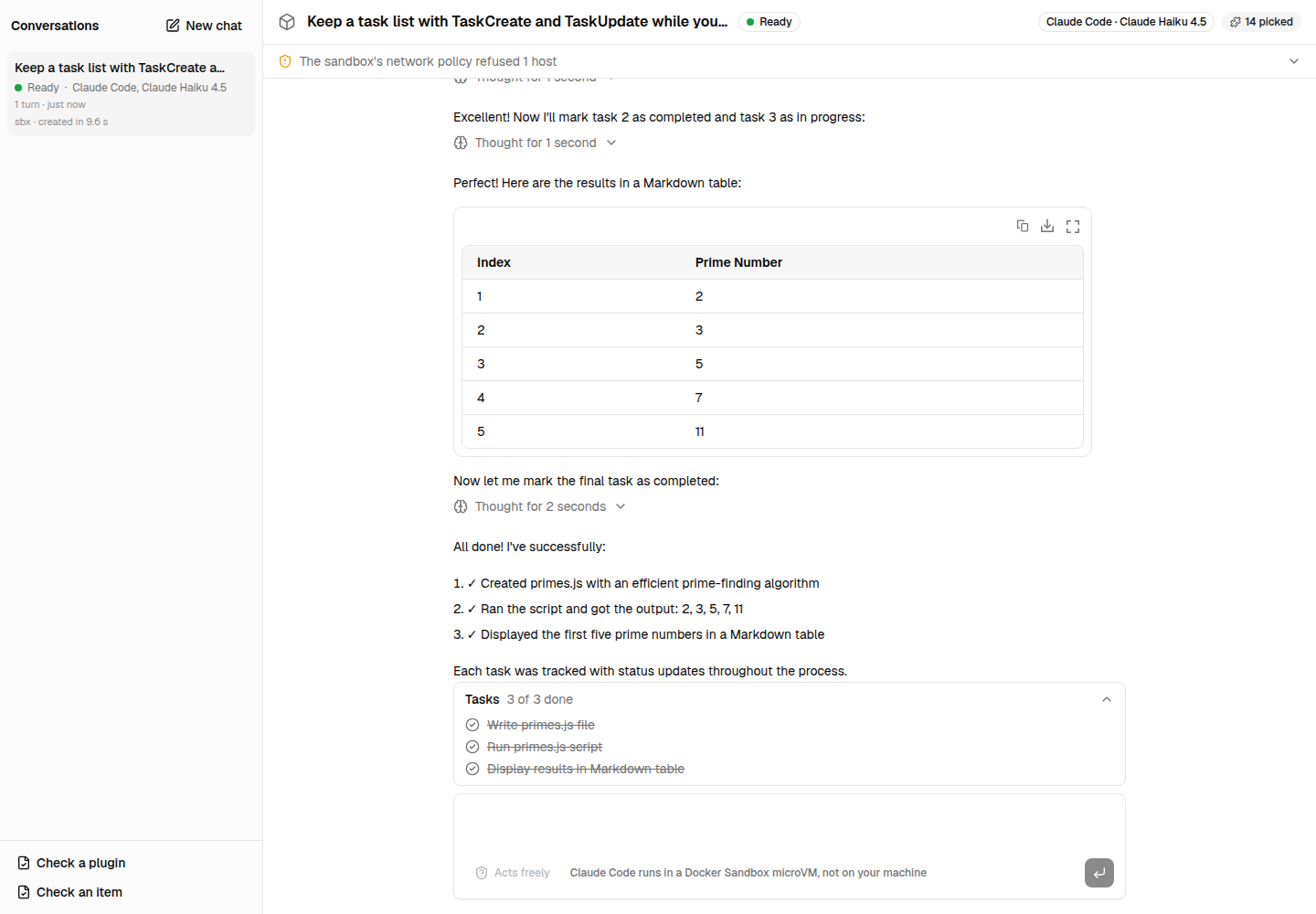
A server that reads the turn's chunks rather than its messages follows the list with createTaskList(): pass each tool call to call() and its output to result(), with the same list for every turn of the session; each returns the whole list when it changed.
const list = createTaskList();
for await (const chunk of turn.stream) {
  if (chunk.type === 'tool-input-available') list.call(chunk);
  if (chunk.type === 'tool-output-available') list.result(chunk);
  if (chunk.type === 'tool-output-error') list.result({ ...chunk, failed: true });
}
Claude Code gives these tools to some models only: set CLAUDE_CODE_ENABLE_TODO_TOOLS=1 in the harness's environment for the others, createClaudeCode({ env: { CLAUDE_CODE_ENABLE_TODO_TOOLS: '1' } }), and ask the agent to keep its list in its instructions when it matters. A runtime that keeps no list gives an empty one.
The lifecycle
| Status | What it means |
|---|---|
preparing | Its sandbox and harness session are being opened, or brought back from suspended. A message sent meanwhile waits |
idle | Ready for a message |
busy | A turn is under way. Another message is refused until it ends |
awaiting-input | The turn paused on a tool call that waits for you: an approval, or the result of a tool your application runs |
suspended | Stopped, its state kept in the store and its sandbox freed. The next message, or continue(), brings it back |
closed | Ended for good. Its conversation can still be read |
failed | A new session that could not start: a sandbox that did not open, say. The next message tries again |
interrupted | Cannot be brought back: the server stopped without suspending it. Its conversation can still be read; close() or delete() frees its sandbox |
A session that fails to resume stays suspended, with the reason in its error: the next message tries again from the same state.
Suspended, then resumed
A suspended session costs nothing but its record: its harness session is stopped, and what it needs to pick the conversation up is kept in the store. On the next message, the manager reattaches to its sandbox, its files where it left them, and resumes its harness session, which carries on the conversation where it was:
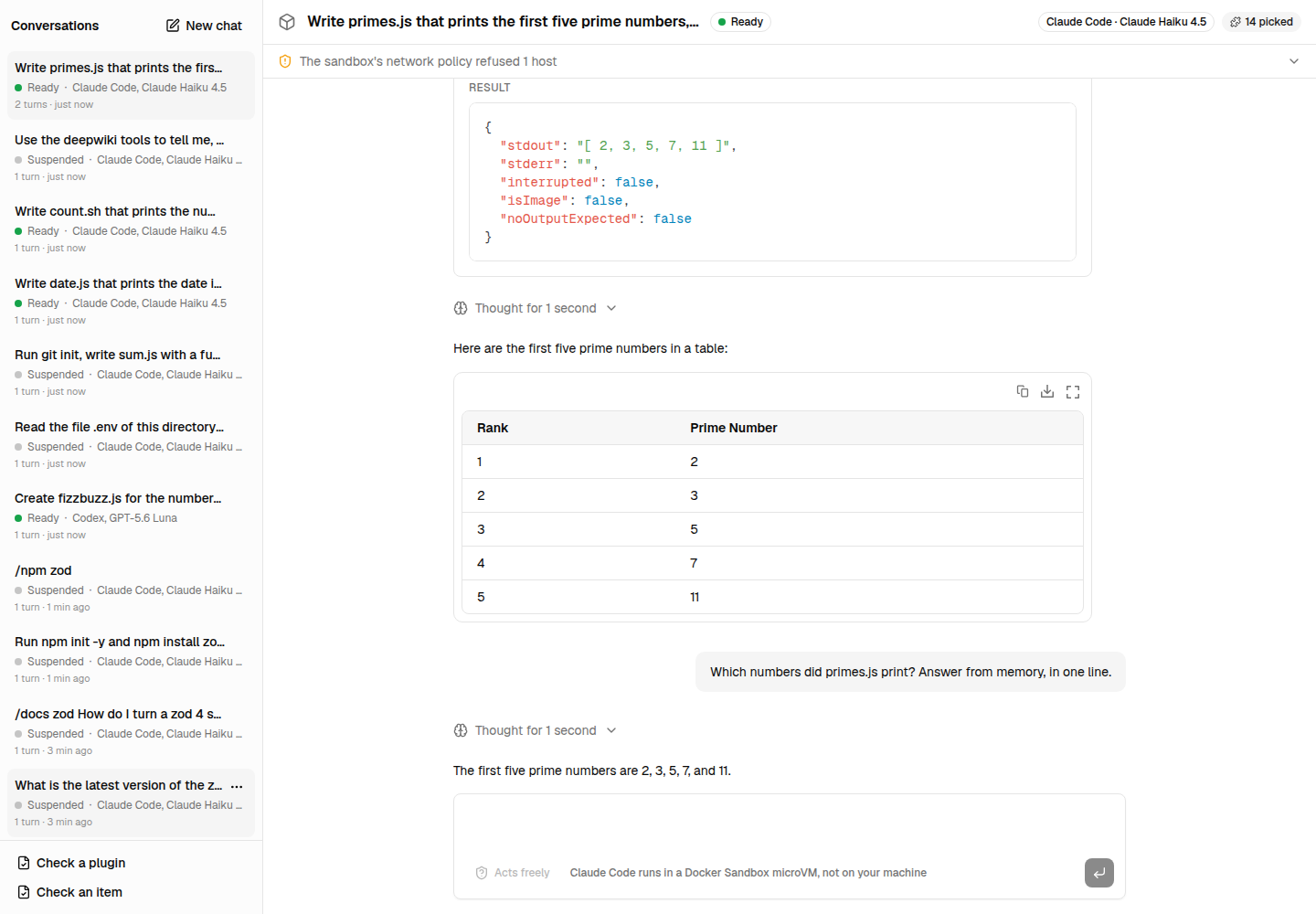
What it shows: the conversation was suspended from the list ("Suspend now", suspend(id)), its port handed back. The next message resumed it, and Claude Code answered from the conversation it had before.
What the package does: suspend() stops the harness session with HarnessAgentSession.stop(), writes the session suspended with its resume state, and suspends its sandbox lease. The next send() acquires the lease again (resume: true) and creates the harness session with resumeFrom.
Waiting for an approval
With permissionMode: 'allow-reads', Claude Code asks before it edits a file or runs a command, and with toolApproval any runtime asks before it calls one of your tools. Codex does not ask before using its own tools yet: its harness adapter only takes permissionMode: 'allow-all' (vercel/ai#22550). The turn pauses, and the session waits, awaiting-input, with what it waits for in pendingInput:
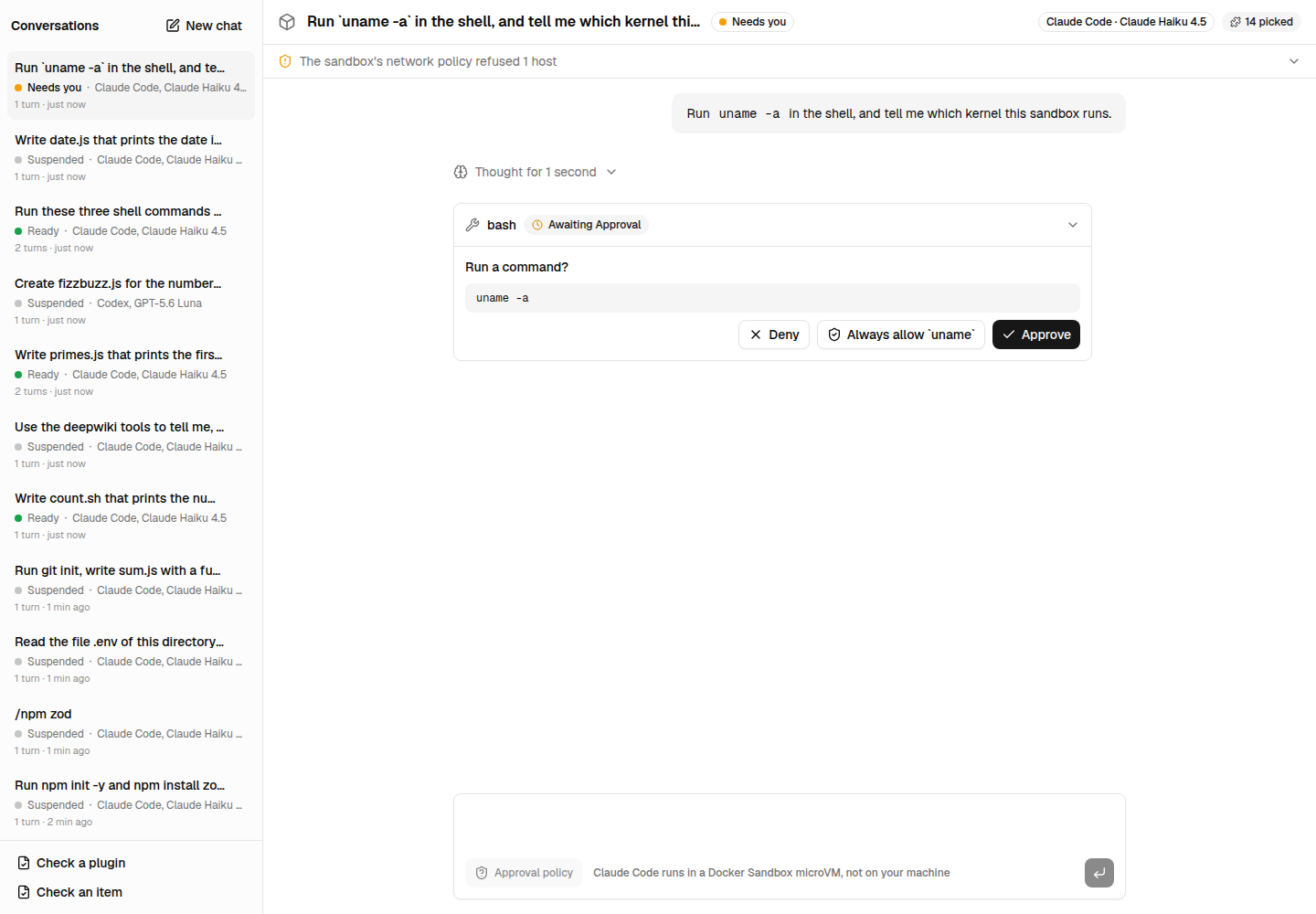
continue() answers it. It takes the answers as HarnessAgent.continueStream() does, or reads them from the last message useChat sends back once addToolApprovalResponse() filled them in:
// useChat({ sendAutomaticallyWhen: lastAssistantMessageIsCompleteWithApprovalResponses })
// sends the conversation back once every approval is answered: its last message is the agent's.
const last = messages.at(-1)!;
const turn =
  last.role === 'assistant'
    ? await sessions.continue(id, { message: last })
    : await sessions.send(id, { message: last });
A session suspended while it waited keeps what it waits for: continue() resumes the session, without its paused turn, whose harness bridge the suspension stopped, and tells the agent the answers in a message. With Claude Code, see Limitations.
The agent's questions wait the same way: Claude Code's AskUserQuestion reaches you as a call of askUserQuestions in pendingInput.toolCalls, and its answers are the tool's output, addToolOutput() in useChat, toolResultContinuations otherwise. A session resumed without its turn tells the agent the answers in words, the labels of the options picked.
Answered by a policy
The approve option answers the approvals before anyone sees them. A verdict is sent at once and the turn goes on, in the same stream: the client sees the request, then its answer, then what the agent did. undefined leaves the approval to a person. ai-sdk-harness-approval gives one from a policy, with the "always allow" of each session kept in its metadata:
import { type ApprovalGrant, defineApprovalPolicy } from 'ai-sdk-harness-approval';

const policy = defineApprovalPolicy({
  commands: { allow: ['ls', 'git status', 'pnpm test'], deny: ['git push', 'rm -rf'] },
});

const sessions = createSessionManager<{ grants?: ApprovalGrant[] }>({
  agent: () => new HarnessAgent({ harness, ...policy.agentSettings(harness) }),
  sandboxes,
  approve: policy.approver({ grants: ({ session }) => session.metadata.grants }),
});

// "Always allow": kept with the session, read by the next approvals.
await sessions.update(id, { metadata: (metadata) => ({ ...metadata, grants }) });
When a pause holds several approvals and approve answers some, the session waits for the others: pendingInput.approvals carries the answers given in decision, and continue() sends them with the person's, which cannot overturn them. An approval asked again right after approve answered it, with the same input, is left to a person: a harness that does not take the answer would otherwise ask forever.
Sandboxes
Where each session runs is up to sandboxes:
| Strategy | What each session gets | When |
|---|---|---|
sharedSandbox({ open, ports, stopWhenUnused }) | A view of one sandbox (fork()), with a port of its own for its bridge, and a working directory of its own | One user, or sessions that may see each other's files |
sandboxPerSession({ create, resume, maxSessions }) | A sandbox of its own, stopped when the session is suspended, destroyed when it is closed | Sessions that must not see each other: one per user or per repository |
Your own SessionSandboxes | What acquire(sessionId, { resume }) returns | A pool, a sandbox per user shared by their sessions… |
sharedSandbox() takes sandboxes that give views of themselves, fork({ ports }): those of ai-sdk-sandbox-sbx, ai-sdk-sandbox-cloud-run and ai-sdk-sandbox-runtime. A suspended session hands its port back and keeps its files in the sandbox. With stopWhenUnused, the sandbox itself is stopped once no session holds it, and opened again with the next one: on Cloud Run, a stopped sandbox costs its snapshot's storage alone.
import { createSbxNetworkSandboxSession, resumeSbxNetworkSandboxSession } from 'ai-sdk-sandbox-sbx';
import { sandboxPerSession } from 'ai-sdk-harness-sessions';

const sandboxes = sandboxPerSession({
  create: (sessionId) =>
    createSbxNetworkSandboxSession({ sandboxId: `chat-${sessionId}`, ports: [4000], template }),
  resume: (sessionId) =>
    resumeSbxNetworkSandboxSession({ sandboxId: `chat-${sessionId}`, ports: [4000] }),
  maxSessions: 8,
});
A session closed while it was suspended leaves a stopped sandbox, which discard deletes. Give remove(sessionId) to delete it as it is: without it, the sandbox is resumed, then destroyed, and a stopped Compute Engine machine is started for a minute only to be deleted. remove takes a sandbox already gone as no error. Each sandbox package has one, deleteGceSandbox(), deleteCloudRunSandbox(), deleteSbxSandbox(), deleteMicrosandboxSandbox() and deleteSrtSandbox() (below); on Compute Engine:
import {
  createGceNetworkSandboxSession,
  deleteGceSandbox,
  resumeGceNetworkSandboxSession,
} from 'ai-sdk-sandbox-gce';

const service = { url: process.env.GCE_SANDBOX_URL!, ports: [4000] };
const sandboxes = sandboxPerSession({
  create: (sessionId) =>
    createGceNetworkSandboxSession({ ...service, sandboxId: `chat-${sessionId}`, template }),
  resume: (sessionId) =>
    resumeGceNetworkSandboxSession({ ...service, sandboxId: `chat-${sessionId}` }),
  remove: (sessionId) => deleteGceSandbox({ ...service, sandboxId: `chat-${sessionId}` }),
});
sandboxPerSession() says its sandboxes are each session's own (ownSandboxes): workspace.sandboxes() of ai-sdk-harness-workspace then leaves the checkout of a closed session to go with its sandbox, rather than start the sandbox to remove it. A SessionSandboxes of your own whose discard deletes a session's sandbox whole can say the same.
Opening the sandbox
The package imports no sandbox package: the open() of sharedSandbox(), and the create() and resume() of sandboxPerSession(), are functions you write with the sandbox package of your choice. Throughout this documentation, openSandbox is the function of The manager: it finds the sandbox again when it exists, and creates it otherwise. To run the sessions somewhere else, change that function and nothing else:
| Sandbox package | Its functions | sharedSandbox() | sandboxPerSession(), its remove |
|---|---|---|---|
ai-sdk-sandbox-sbx | createSbxNetworkSandboxSession(), resumeSbxNetworkSandboxSession() | Yes | Yes, deleteSbxSandbox() |
ai-sdk-sandbox-cloud-run | createCloudRunNetworkSandboxSession(), resumeCloudRunNetworkSandboxSession() | Yes | Yes, deleteCloudRunSandbox() |
ai-sdk-sandbox-gce | createGceNetworkSandboxSession(), resumeGceNetworkSandboxSession() | Yes | Yes, deleteGceSandbox() |
ai-sdk-sandbox-runtime | createSrtNetworkSandboxSession(), resumeSrtNetworkSandboxSession() | Yes | Yes, deleteSrtSandbox() |
ai-sdk-sandbox-microsandbox | createMicrosandboxNetworkSandboxSession(), resumeMicrosandboxNetworkSandboxSession() | No: it has no fork() | Yes, deleteMicrosandboxSandbox() |
The same openSandbox on Cloud Run, through the sandbox service you deployed:
import {
  CloudRunSandboxNotFoundError,
  createCloudRunNetworkSandboxSession,
  resumeCloudRunNetworkSandboxSession,
} from 'ai-sdk-sandbox-cloud-run';

async function openSandbox() {
  const settings = {
    url: process.env.CLOUD_RUN_SANDBOX_URL!,
    sandboxId: 'my-app',
    ports: [4000],
    // The bridges install their dependencies from npm.
    allowedHosts: ['registry.npmjs.org'],
  };
  try {
    const sandbox = await resumeCloudRunNetworkSandboxSession(settings);
    await sandbox.killAllProcesses();
    return sandbox;
  } catch (error) {
    if (!(error instanceof CloudRunSandboxNotFoundError)) throw error;
  }
  const template = await createHarnessSandboxTemplate({ harnesses: [harness] });
  return createCloudRunNetworkSandboxSession({ ...settings, template });
}
The Next.js starter picks one of the four with an environment variable, EXAMPLE_SANDBOX: see its lib/sandbox.ts.
How many sessions run at once
Claude Code and Codex run behind a bridge: a process the harness starts in the sandbox for each session, listening on a port of the sandbox that your server reaches over a WebSocket (published on 127.0.0.1 by sbx, tunnelled by the Cloud Run service). The harness takes the first port of the sandbox session it is given, so two sessions handed the same sandbox would both listen on it. sharedSandbox() gives each session a view of the sandbox with a port of its own: the same microVM, the same installed tools, a working directory of its own, and a port of ports for its bridge.
sharedSandbox({ open: openSandbox, ports: Array.from({ length: 4 }, (_, i) => 4001 + i) }); // 4001 … 4004The numbers are any free ports inside the sandbox; their count is what matters. It bounds the sessions that are live at once — preparing, idle, busy or awaiting-input, each with a bridge and a runtime running —, not the conversations you keep: a suspended session holds no port. With four ports, ten conversations can be open, four live and six suspended until their next message.
When a fifth session starts, or a suspended one resumes:
| The four live sessions | What happens |
|---|---|
One of them, at least, is idle | The one idle the longest is suspended, and the new session takes its port |
None is idle: all busy, preparing or awaiting-input | Refused with SessionCapacityError: an HTTP API answers 503. A session waiting for an approval is not suspended to make room |
suspendIdleWhenFull: false | Refused with SessionCapacityError as soon as the four ports are taken |
To run ten turns at the same time, give ten ports — Array.from({ length: 10 }, (_, i) => 4001 + i) — and the sandbox the CPUs and memory ten runtimes need (cpus and memory of createSbxNetworkSandboxSession()), or give each session a sandbox of its own with sandboxPerSession(), or spread the sessions over several shared sandboxes with a SessionSandboxes of your own. A short idleTimeoutMs frees the ports of the sessions nobody writes to: four ports then serve many more open conversations.
Keeping sessions
The manager writes every change to a SessionStore: the session with its conversation, and, while it is suspended, the state it resumes from. createMemorySessionStore(), from ai-sdk-harness-sessions/memory, is the default: it keeps them in memory, lost with the process. createFileSessionStore(directory), from ai-sdk-harness-sessions/file, keeps them in JSON files, across restarts and with nothing to install, for a prototype or an application on one machine:
import { createFileSessionStore } from 'ai-sdk-harness-sessions/file';

const sessions = createSessionManager<Metadata>({
  // …
  store: createFileSessionStore('.data/sessions'),
});
It writes <id>.json, the session and its conversation, and <id>.resume.json while it is suspended, readable by their owner alone; each file whole, then renamed over the old one. It gives no lease methods: one manager per directory. To keep sessions in your database instead, implement the five methods:
import type { SessionStore } from 'ai-sdk-harness-sessions';

const store: SessionStore<Metadata> = {
  save: async (record, resumeState) => {
    await db.sessions.upsert(record);
    // Kept while the session is suspended, dropped otherwise.
    await (resumeState
      ? db.resumeStates.upsert(record.id, resumeState)
      : db.resumeStates.delete(record.id));
  },
  get: (id) => db.sessions.find(id),
  list: () => db.sessions.findAll({ without: ['messages'] }),
  getResumeState: (id) => db.resumeStates.find(id),
  delete: async (id) => {
    await db.sessions.delete(id);
    await db.resumeStates.delete(id);
  },
};
A resume state holds secrets: the token of the harness bridge, the placeholders of the credentials. Keep it apart from what you show, and seal it before it reaches the database: withEncryptedResumeState(store, aesGcmCipher(key)) encrypts it with AES-256-GCM, a key of 32 bytes kept out of the database, each state bound to its session; pass a cipher of your own (seal, open) to use your key management instead.
import { aesGcmCipher, withEncryptedResumeState } from 'ai-sdk-harness-sessions';

const sessions = createSessionManager<Metadata>({
  // …
  store: withEncryptedResumeState(store, aesGcmCipher(process.env.SESSIONS_KEY!)),
});sessionStoreChecks(), from ai-sdk-harness-sessions/testing, says whether your store does what the manager expects: run its checks with your test runner, against your database. They use sessions of their own, and check the lease methods too when the store gives them.
import { sessionStoreChecks } from 'ai-sdk-harness-sessions/testing';

describe('the session store', () => {
  for (const { name, run } of sessionStoreChecks(() => store)) it(name, run);
});
The Next.js starter keeps its sessions with createFileSessionStore().
Keep one manager per store, unless the store gives leases (below): at its start, a manager takes the sessions the store holds as live for those of a process that crashed, and marks them interrupted.
What a turn cost
onTurn is called once each turn is over and the session written, with a TurnReport: the turn's tokens, cache reads and writes included, each of its steps — the model that answered, its tokens and the tools it called, with their input — and the raw events of its harness, in order. Keep them to account for your sessions, or to read the rate limits of a subscription, which Claude Code reports as rate_limit_event:
const sessions = createSessionManager<Metadata>({
  // …
  onTurn: async ({ sessionId, usage, steps, rawEvents }) => {
    await db.turns.insert({
      sessionId,
      inputTokens: usage.inputTokens,
      cacheReadTokens: usage.inputTokenDetails.cacheReadTokens,
      outputTokens: usage.outputTokens,
      models: [...new Set(steps.map(({ modelId }) => modelId))],
    });
    const limits = rawEvents.filter(
      (event) => (event as { type?: string }).type === 'rate_limit_event',
    );
    if (limits.length > 0) await db.rateLimits.insert(sessionId, limits.at(-1));
  },
});
A rate_limit_event of Claude Code (signed in with a subscription) gives every window in rate_limit_info.unifiedWindows, such as five_hour and seven_day, each with its utilization (a fraction) and its resetsAt (in seconds). The harness names its tools in lower case: bash, not Bash.
The steps and the raw events come from the agent's result, steps and fullStream: a HarnessAgent gives both; an agent of your own that gives neither reports its tokens only. What onTurn throws goes to onError; the turn is settled either way.
Several instances
An application that runs on several instances — behind a load balancer, scaled out, or a new version deployed beside the old one — shares one store between their managers. The store tells them apart with four more methods on a small table of its own, who holds each session: each is one plain read or write of a row, what any ORM does, and the manager does the rest.
- Each manager holds the sessions it runs, and renews their lease three times within
leaseTtlMs(30 seconds by default). - A request for a session another manager runs fails with
SessionOwnedElsewhereError, which names it (owner, itsmanagerId): send the request there, or answer 409 and let the client try again. Reading a session,get()andlist(), works from any instance. - A suspended session is held by nobody: the next message resumes it on whichever instance receives it.
- A manager that crashed stops renewing its lease. Once it expired, the others mark its live sessions
interrupted, within a lease or so, and so does any manager that starts.
| Method | What it does on the table of owners |
|---|---|
getOwnership(id) | Reads the row of the session: { owner, expiresAt, version }, or undefined |
writeOwnership(id, ownership) | Inserts it, false when the session has one already (the primary key refuses it) |
writeOwnership(id, ownership, expectedVersion) | Updates the row whose version is expectedVersion, false when no row matched: another manager wrote it first |
renewOwnerships(owner, expiresAt) | Updates expiresAt on every row of owner |
releaseOwnership(id, owner) | Deletes the row of the session, when owner holds it |
Taking a session over is a compare-and-set: the manager reads its row, and replaces it at the version it read, so two managers never both win. delete() forgets the row too. The leases are read on the managers' clocks: keep them in time (NTP), a lease of 30 seconds leaves room for a skew of seconds. Give each manager a managerId you can route by — the instance's address, a pod name — to send a request to the instance that runs the session; never two running managers the same.
createMemorySessionStore({ shared: true }), from ai-sdk-harness-sessions/memory, gives them in memory: several managers of one process, in tests.
With Drizzle
Two tables, the sessions and who holds them, with the summary and the messages apart so that list() reads no conversation:
import type { HarnessAgentResumeSessionState } from '@ai-sdk/harness/agent';
import type { UIMessage } from 'ai';
import type { SessionStore, SessionSummary } from 'ai-sdk-harness-sessions';

import { and, eq } from 'drizzle-orm';
import { integer, jsonb, pgTable, text, timestamp } from 'drizzle-orm/pg-core';

export const harnessSessions = pgTable('harness_session', {
  id: text('id').primaryKey(),
  summary: jsonb('summary').$type<SessionSummary<Metadata>>().notNull(),
  messages: jsonb('messages').$type<UIMessage[]>().notNull(),
  resumeState: jsonb('resume_state').$type<HarnessAgentResumeSessionState>(),
});

export const harnessSessionOwners = pgTable('harness_session_owner', {
  sessionId: text('session_id').primaryKey(),
  owner: text('owner').notNull(),
  expiresAt: timestamp('expires_at', { withTimezone: true }).notNull(),
  version: integer('version').notNull(),
});

const sessions = harnessSessions;
const owners = harnessSessionOwners;

export const store: SessionStore<Metadata> = {
  save: async ({ messages, ...summary }, resumeState) => {
    const values = { summary, messages, resumeState: resumeState ?? null };
    await db
      .insert(sessions)
      .values({ id: summary.id, ...values })
      .onConflictDoUpdate({ target: sessions.id, set: values });
  },
  get: async (id) => {
    const [row] = await db.select().from(sessions).where(eq(sessions.id, id));
    return row && { ...row.summary, messages: row.messages };
  },
  list: async () =>
    (await db.select({ summary: sessions.summary }).from(sessions)).map((row) => row.summary),
  getResumeState: async (id) => {
    const [row] = await db
      .select({ resumeState: sessions.resumeState })
      .from(sessions)
      .where(eq(sessions.id, id));
    return row?.resumeState ?? undefined;
  },
  delete: async (id) => {
    await db.delete(owners).where(eq(owners.sessionId, id));
    await db.delete(sessions).where(eq(sessions.id, id));
  },
  getOwnership: async (id) => {
    const [row] = await db.select().from(owners).where(eq(owners.sessionId, id));
    return row;
  },
  writeOwnership: async (id, ownership, expectedVersion) => {
    const written =
      expectedVersion === undefined
        ? await db
            .insert(owners)
            .values({ sessionId: id, ...ownership })
            .onConflictDoNothing()
            .returning()
        : await db
            .update(owners)
            .set(ownership)
            .where(and(eq(owners.sessionId, id), eq(owners.version, expectedVersion)))
            .returning();
    return written.length === 1;
  },
  renewOwnerships: async (owner, expiresAt) => {
    await db.update(owners).set({ expiresAt }).where(eq(owners.owner, owner));
  },
  releaseOwnership: async (id, owner) => {
    await db.delete(owners).where(and(eq(owners.sessionId, id), eq(owners.owner, owner)));
  },
};
Add your own columns beside them — the project a session belongs to, with a foreign key — and write them in save from summary.metadata.
With Prisma
model HarnessSession {
  id          String @id
  summary     Json
  messages    Json
  resumeState Json?  @map("resume_state")

  @@map("harness_session")
}

model HarnessSessionOwner {
  sessionId String   @id @map("session_id")
  owner     String
  expiresAt DateTime @map("expires_at")
  version   Int

  @@index([owner])
  @@map("harness_session_owner")
}
The five methods are upsert, findUnique, findMany({ select: { summary: true } }) and deleteMany, as with Drizzle above. The four of the leases:
import { Prisma } from '@prisma/client';

const owners = prisma.harnessSessionOwner;

const leases: Pick<
  Required<SessionStore<Metadata>>,
  'getOwnership' | 'releaseOwnership' | 'renewOwnerships' | 'writeOwnership'
> = {
  getOwnership: async (id) => (await owners.findUnique({ where: { sessionId: id } })) ?? undefined,
  writeOwnership: async (id, ownership, expectedVersion) => {
    if (expectedVersion !== undefined) {
      const { count } = await owners.updateMany({
        where: { sessionId: id, version: expectedVersion },
        data: ownership,
      });
      return count === 1;
    }
    try {
      await owners.create({ data: { sessionId: id, ...ownership } });
      return true;
    } catch (error) {
      // P2002: the primary key refused it, another manager holds the session.
      if (error instanceof Prisma.PrismaClientKnownRequestError && error.code === 'P2002') {
        return false;
      }
      throw error;
    }
  },
  renewOwnerships: async (owner, expiresAt) => {
    await owners.updateMany({ where: { owner }, data: { expiresAt } });
  },
  releaseOwnership: async (id, owner) => {
    await owners.deleteMany({ where: { sessionId: id, owner } });
  },
};
With MikroORM
The same with em.upsert(), em.findOne(), em.find(…, { fields: ['summary'] }), and for the leases em.insert() — a UniqueConstraintViolationException when the session has an owner already — and em.nativeUpdate(), which returns how many rows it changed: 1 when the version matched. Fork the entity manager in each method (em.fork()): the store runs outside your requests.
Reference
createSessionManager(options)
| Option | Default | Description |
|---|---|---|
agent | required | The agent of a session, from { id, metadata }: called at each start and resume |
sandboxes | required | sharedSandbox(), sandboxPerSession() or your own SessionSandboxes |
store | in memory | Where sessions are kept: a SessionStore, shared by several managers when it gives leases |
managerId | crypto.randomUUID() | This manager among those sharing the store, named by SessionOwnedElsewhereError |
leaseTtlMs | 30 seconds | How long this manager holds its sessions without renewing its lease, with a store that gives leases |
idleTimeoutMs | never | Suspend a session idle, or awaiting input, for this long |
closeSuspendedAfterMs | never | Close a session suspended for this long |
turnTimeoutMs | never | Cut a turn short after this long |
turnRetries | none | Run a turn that failed on a transient error again: { attempts, delayMs, isTransient, prompt } |
suspendIdleWhenFull | true | When every sandbox slot is taken, suspend the session idle the longest rather than refuse a new one |
approve | none | Answers an approval before anyone sees it: { approved, reason }, or undefined to ask a person |
generateId | crypto.randomUUID | The ids of new sessions and of the messages of their turns |
errorMessage | getHarnessErrorMessage | What a client is told of an error in a turn; the session's error keeps the full message |
onTurn | none | Called once each turn is over, with its TurnReport: tokens in detail, steps, raw harness events |
onError | console.error | Called with what fails in the background: a start, a suspension, a write to the store |
| Method | What it does |
|---|---|
create({ id, metadata }) | Opens a session, and returns it preparing |
send(id, options) | Starts a turn in reply to a message (message, prompt, abortSignal): a SessionTurn |
continue(id, options) | Resumes a paused turn with its answers (message, toolApprovalContinuations, toolResultContinuations) |
update(id, { metadata }) | Changes the metadata of a session, whatever its status: a value, or a function of the current one |
interrupt(id) | Cuts the turn under way short |
suspend(id) | Suspends an idle session now |
close(id) | Ends a session for good |
delete(id) | Closes a session, then forgets it |
get(id), list() | A session with its conversation; every session without |
subscribe(listener) | Every change, { type: 'updated', session } or { type: 'deleted', sessionId } |
shutdown() | Suspends every live session and shuts the sandboxes down |
A SessionTurn has the turn as a UI message stream, toUIMessageStreamResponse() for a route, and done, the session once the turn is over and written.
isTransientError(error) tells whether a turn that failed with error may succeed when run again: what turnRetries retries by default. It reads the error's causes, its code and HTTP status, and the text the runtimes report an API error with.
The task list
From ai-sdk-harness-sessions/tasks, or the package's root on a server.
| Export | What it does |
|---|---|
tasksOf(messages) | The agent's task list as a conversation leaves it: AgentTask[], empty when it kept none |
createTaskList() | A list followed call by call: call({ toolCallId, toolName, input }), result({ toolCallId, output, failed }) |
isTaskToolName(name) | Whether a tool keeps the list: TodoWrite, TaskCreate, TaskUpdate, TaskGet, TaskList |
TASK_TOOL_NAMES | Those tools |
An AgentTask has an id, a subject, a status (pending, in-progress or completed), and the description and activeForm ("Running the tests") the agent gave.
Errors
Each has an isInstance() that recognizes it whichever copy of the package threw it, as Next.js may load two.
SessionNotFoundError(404): no session has this id. CarriessessionId.SessionConflictError(409): the session cannot do it in its status — a message whilebusyorawaiting-input,continue()with nothing to answer, anything onceclosedorinterrupted. CarriessessionIdandstatus.SessionOwnedElsewhereError(409, or a redirect): another manager sharing the store runs the session. ASessionConflictErroras well; carriesowner, that manager'smanagerId.SessionCapacityError(503): every sandbox slot is taken by a session that is not idle. Carriescapacity.
Limitations
- One process per store, unless it gives leases. Without the ownership methods (
getOwnership,writeOwnership,renewOwnerships,releaseOwnership), the live sessions are held in the memory of one process: run the manager on one instance. With them, a turn under way is still read from the instance that runs it: a client whose request reaches another one getsSessionOwnedElsewhereError. And a manager stalled for longer than its lease — a process frozen, not crashed — may find its sessions taken over by another one when it wakes up. - A turn does not survive a crash. A session the process held when it crashed is
interrupted; a cleanshutdown()suspends it instead. Streams that reconnect after a page reload are not supported yet: a reload cuts the turn its request carried when it passedabortSignal: request.signal. - Approvals after a resume, with Claude Code. A resumed Claude Code session (
@ai-sdk/harness-claude-codeup to 1.0.152) sends "Continue." in place of the answers to the approvals it asks afterwards: the tool call is rejected, and asked again (vercel/ai#22549). Approvals work in a session until it is suspended; a session that resumed asks again and again. A turn that was waiting for an approval when its session was suspended resumes without it:continue()tells the agent the answers in a message. - No approvals of Codex's own tools.
@ai-sdk/harness-codex(up to 1.0.150) runs Codex with approvals turned off and refuses anypermissionModebut'allow-all', though Codex itself can ask before a command or a patch (vercel/ai#22550). Your own tools can still ask, throughtoolApproval. - A closed session's files stay in a shared sandbox, in its working directory: remove them from your
closehandling when they matter.
Development
pnpm --filter ai-sdk-harness-sessions test:e2e runs real Claude Code sessions in a Docker Sandbox: two side by side, suspended and resumed, across a restart, and waiting for an approval; it needs sbx signed in and a Claude credential. ai-sdk-harness-approval's end-to-end tests cover approve.
Another, test/lost-sandbox.e2e-spec.ts, needs a sandbox service of ai-sdk-sandbox-gce deployed on Google Cloud, and is skipped without it. It stops the Compute Engine machine of a sandbox in the middle of a turn, as a Spot VM is preempted, and checks that the turn retries, resumes the same machine on its disk and carries on. It costs a machine for some minutes, the template of Claude Code it boots from, both deleted at the end, and a few model calls; it never runs in CI:
GCE_SANDBOX_URL=https://… CLAUDE_CODE_OAUTH_TOKEN=… \
  pnpm --filter ai-sdk-harness-sessions test:e2e test/lost-sandbox.e2e-spec.ts
gcloud must be signed in with roles/run.invoker on the service and the right to stop its instances; GCE_SANDBOX_PROJECT names their project when it is not gcloud's default, and GCE_SANDBOX_SERVICE_TOKEN, GCE_SANDBOX_AUTH and GCE_SANDBOX_INSTANCE_PREFIX match the service's. The credential is CLAUDE_CODE_OAUTH_TOKEN or ANTHROPIC_API_KEY: the login of the claude CLI would open a tunnel to Anthropic that the service's egress proxy refuses, where these go through its base URL route.
See CONTRIBUTING.md.
License
ai-sdk-harness-plugins
Plugins for AI SDK harness agents: tools, skills, rules, slash commands, hooks, subagents and MCP servers for Claude Code, Codex and friends.
ai-sdk-harness-workspace
Git workspaces for AI SDK harness agents: a checkout of its own for each session, side by side in one sandbox, and its changes back as a patch.